
What the Decimal to Hex Converter Does
This tool converts a whole number written in decimal (base 10) into its hexadecimal (base 16) representation. As a bonus, it also returns the binary (base 2) equivalent, so you get two conversions from a single entry. It is ideal for programmers, students, and anyone working with colour codes, memory addresses, or low-level data who needs a quick, accurate base conversion without doing the arithmetic by hand.
The Single Input You Provide
There is just one field:
- Decimal Number – the base 10 integer you want to convert. Enter a whole number (the tool reads it as a 64-bit integer, so values up to 9,223,372,036,854,775,807 are supported).
How the Conversion Works
Behind the scenes the calculator parses your text as a long integer, then applies standard base-conversion routines:
- Hex: the decimal value is converted to its base-16 string and shown in uppercase. Hexadecimal uses the digits 0–9 followed by the letters A–F to represent values 10 through 15.
- Binary: the same value is converted to its base-2 string of 0s and 1s.
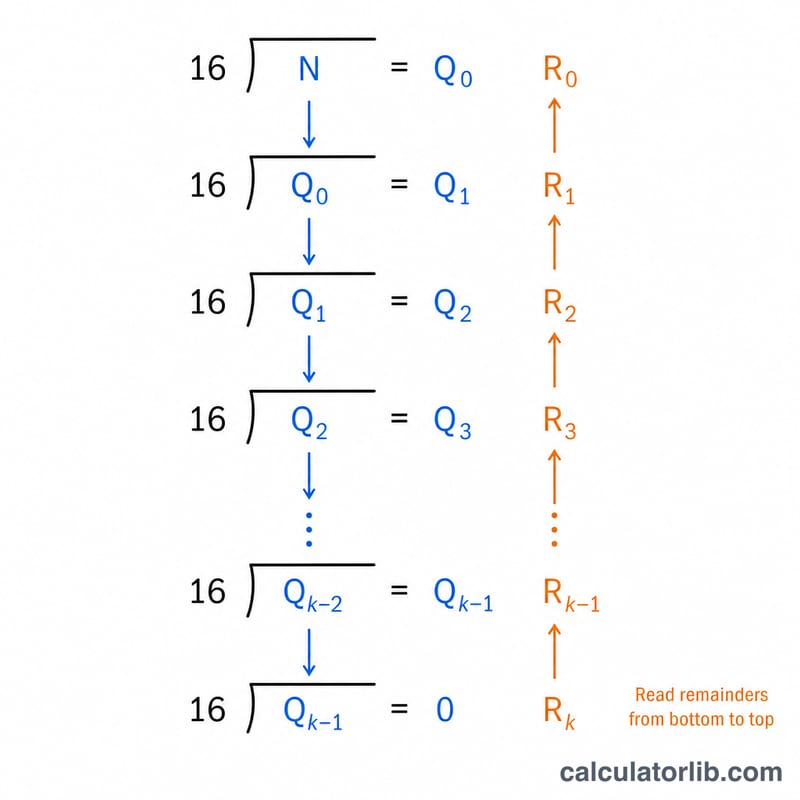
Mathematically, each conversion repeatedly divides the number by the base (16 or 2) and records the remainders, reading them from last to first.
Worked Example
Suppose you enter 255:
- 255 ÷ 16 = 15 remainder 15 (F)
- 15 ÷ 16 = 0 remainder 15 (F)
- Reading the remainders gives FF in hex.
- In binary, 255 becomes 11111111.
So an input of 255 returns hex FF and binary 11111111 — the classic full-intensity colour channel value used in web design.
Frequently Asked Questions
Why is the hex shown in uppercase? The tool standardises output to uppercase (e.g. 1A instead of 1a) for readability. Hexadecimal is case-insensitive, so 1A and 1a represent the same value.
Can I enter decimals with a fraction, like 12.5? No. This converter works with whole numbers only, because it parses the input as an integer. Remove any decimal point before converting.
What is the largest number I can convert? Because the value is read as a 64-bit signed integer, you can convert numbers up to 9,223,372,036,854,775,807. Larger values will not be accepted.