
What is a Binary to Text Converter?
A binary to text converter decodes sequences of binary digits (0s and 1s) back into the human-readable characters they represent. Computers store every letter, number, and symbol as a binary number using a character encoding such as ASCII. This tool reverses that process: it reads your binary, splits it into 8-bit bytes, and translates each byte into its corresponding character.
How to Use It
Paste your binary into the box. Separate each 8-bit group with a space or a new line — for example 01001000 01101001. The converter ignores any characters that are not 0 or 1, so stray punctuation won't break it. Press calculate to see the decoded text and the number of characters produced.
The Formula Explained
Each group of 8 binary digits is a byte. The byte is interpreted as a base-2 number: the rightmost bit is worth 1, the next 2, then 4, 8, 16, 32, 64, and 128. Summing the bits that are set gives a value from 0 to 255. That value is the character code, which is mapped through the ASCII/Unicode table to a printable character. The characters are then joined in order to rebuild the original message.
$$\text{Char} = \text{Chr}\!\left( \sum_{k=0}^{7} b_{7-k} \cdot 2^{\,k} \right), \qquad b_k \in \text{Binary (8-bit groups)}$$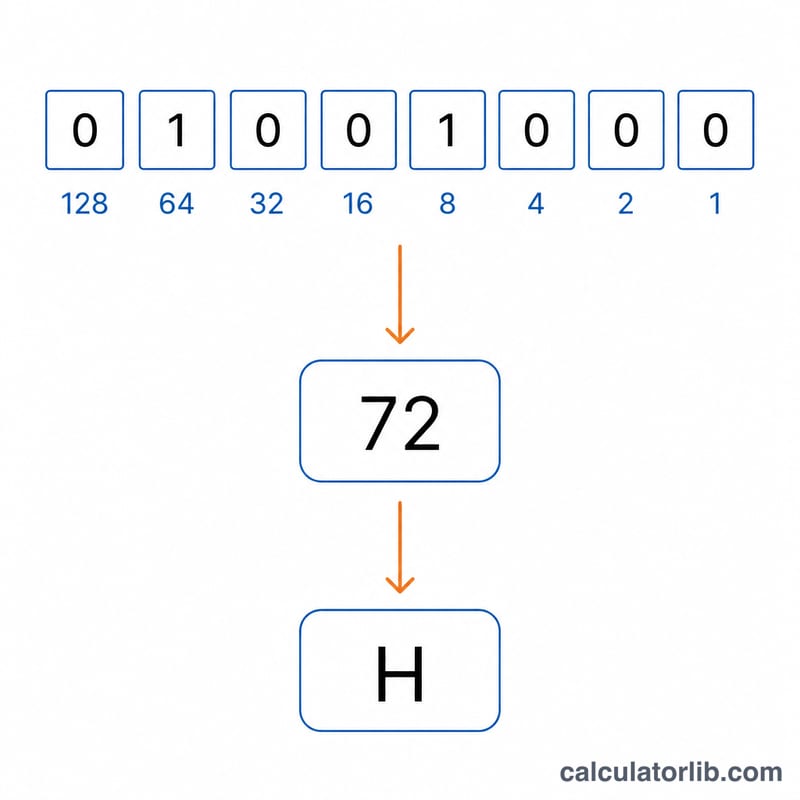
Worked Example
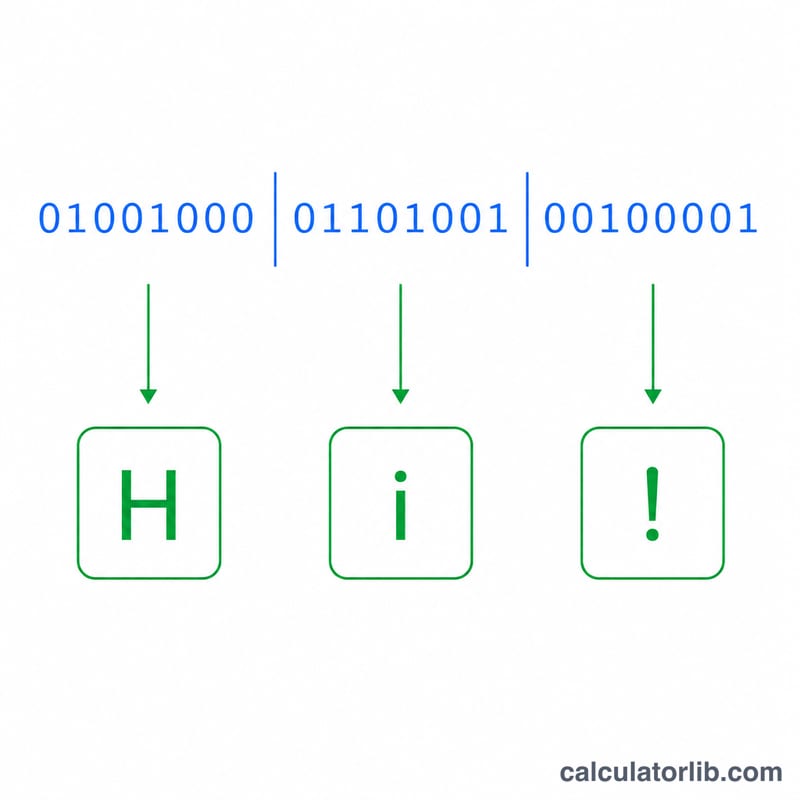
Take 01001000. Reading the set bits: \(64 + 8 = 72\). Character code 72 is the letter "H". The next group 01101001 gives \(64 + 32 + 8 + 1 = 105\), which is "i". Concatenated, the result is "Hi".
ASCII Binary Reference Table
Each printable character maps to a decimal code point in the ASCII standard, which is stored as an 8-bit binary group (one byte). To decode binary back to text, split the binary string into groups of 8 bits, convert each group to its decimal value, and look up the matching character. For example, the byte 01000001 equals decimal 65, which is the letter A.
Uppercase Letters (A–Z)
| Char | Decimal | Binary |
|---|---|---|
| A | 65 | 01000001 |
| B | 66 | 01000010 |
| C | 67 | 01000011 |
| D | 68 | 01000100 |
| E | 69 | 01000101 |
| F | 70 | 01000110 |
| G | 71 | 01000111 |
| H | 72 | 01001000 |
| I | 73 | 01001001 |
| J | 74 | 01001010 |
| K | 75 | 01001011 |
| L | 76 | 01001100 |
| M | 77 | 01001101 |
| N | 78 | 01001110 |
| O | 79 | 01001111 |
| P | 80 | 01010000 |
| Q | 81 | 01010001 |
| R | 82 | 01010010 |
| S | 83 | 01010011 |
| T | 84 | 01010100 |
| U | 85 | 01010101 |
| V | 86 | 01010110 |
| W | 87 | 01010111 |
| X | 88 | 01011000 |
| Y | 89 | 01011001 |
| Z | 90 | 01011010 |
Lowercase Letters (a–z)
| Char | Decimal | Binary |
|---|---|---|
| a | 97 | 01100001 |
| b | 98 | 01100010 |
| c | 99 | 01100011 |
| d | 100 | 01100100 |
| e | 101 | 01100101 |
| f | 102 | 01100110 |
| g | 103 | 01100111 |
| h | 104 | 01101000 |
| i | 105 | 01101001 |
| j | 106 | 01101010 |
| k | 107 | 01101011 |
| l | 108 | 01101100 |
| m | 109 | 01101101 |
| n | 110 | 01101110 |
| o | 111 | 01101111 |
| p | 112 | 01110000 |
| q | 113 | 01110001 |
| r | 114 | 01110010 |
| s | 115 | 01110011 |
| t | 116 | 01110100 |
| u | 117 | 01110101 |
| v | 118 | 01110110 |
| w | 119 | 01110111 |
| x | 120 | 01111000 |
| y | 121 | 01111001 |
| z | 122 | 01111010 |
Digits (0–9)
| Char | Decimal | Binary |
|---|---|---|
| 0 | 48 | 00110000 |
| 1 | 49 | 00110001 |
| 2 | 50 | 00110010 |
| 3 | 51 | 00110011 |
| 4 | 52 | 00110100 |
| 5 | 53 | 00110101 |
| 6 | 54 | 00110110 |
| 7 | 55 | 00110111 |
| 8 | 56 | 00111000 |
| 9 | 57 | 00111001 |
Space & Common Punctuation
| Char | Name | Decimal | Binary |
|---|---|---|---|
| (space) | Space | 32 | 00100000 |
| ! | Exclamation | 33 | 00100001 |
| " | Double quote | 34 | 00100010 |
| # | Hash | 35 | 00100011 |
| $ | Dollar | 36 | 00100100 |
| % | Percent | 37 | 00100101 |
| & | Ampersand | 38 | 00100110 |
| ' | Apostrophe | 39 | 00100111 |
| ( | Left paren | 40 | 00101000 |
| ) | Right paren | 41 | 00101001 |
| * | Asterisk | 42 | 00101010 |
| + | Plus | 43 | 00101011 |
| , | Comma | 44 | 00101100 |
| - | Hyphen | 45 | 00101101 |
| . | Period | 46 | 00101110 |
| / | Slash | 47 | 00101111 |
| : | Colon | 58 | 00111010 |
| ; | Semicolon | 59 | 00111011 |
| ? | Question | 63 | 00111111 |
| @ | At sign | 64 | 01000000 |
As a longer example, the binary 01001000 01101001 decodes to the decimal pair 72 and 105, giving the text Hi. To go the other direction, the Text to Binary converter turns Hi back into 01001000 01101001.
Key Terms Explained
- Bit
- The smallest unit of digital information, holding a single binary value of either 0 or 1. The word is a contraction of "binary digit."
- Byte
- A group of 8 bits processed as one unit. One byte can represent \(2^8 = 256\) distinct values (0–255), which is exactly enough to encode every character in the extended ASCII set. This is why binary text is grouped into 8-bit chunks.
- Binary / Base-2
-
A number system using only two symbols, 0 and 1. Each position represents a power of two; reading right to left the place values are \(1, 2, 4, 8, 16, 32, 64, 128\). For example,
01000001= 64 + 1 = 65. - ASCII
- The American Standard Code for Information Interchange, a character encoding that maps the integers 0–127 to letters, digits, punctuation, and control codes. Standard ASCII uses 7 bits; an eighth leading bit (usually 0) pads it to a full byte.
- Code Point
-
The numeric value assigned to a single character in an encoding scheme. In ASCII the letter
Ahas code point 65; the same character has Unicode code point U+0041 (also 65). - Character Encoding
- The set of rules that maps characters to numeric code points and then to bytes for storage or transmission. ASCII, Latin-1, and UTF-8 are all encodings; choosing the right one ensures bytes are decoded back into the intended text.
- Unicode
- A universal character standard that assigns a unique code point to every character across the world's writing systems, far beyond ASCII's 128 characters. Its first 128 code points are identical to ASCII, so basic English text decodes the same way under both.
- UTF-8
- The most common encoding for Unicode on the web. It represents ASCII characters in a single byte (matching ASCII exactly) and uses 2–4 bytes for higher code points, keeping plain English text fully backward-compatible.
FAQ
Why must binary be in 8-bit groups? Standard ASCII uses 8 bits (one byte) per character. The tool slices input into 8-bit chunks, so each byte maps cleanly to one character.
What if my groups aren't exactly 8 bits? The converter processes whatever digits it finds in 8-bit slices left to right. For correct results, keep each character's byte as a full 8 digits.
Does it support extended characters? Values 0–127 are standard ASCII; values 128–255 map to extended characters, and the byte value is used directly as a Unicode code point.