
What is the Text to Binary / ASCII Converter?
This tool turns any text you type into its binary representation. Computers store text as numbers using a character encoding — for basic English letters, digits, and punctuation that encoding is ASCII. Each character maps to a numeric code, and that code is written here as an 8-bit binary string (eight 0s and 1s). The converter also shows the decimal ASCII codes and the hexadecimal equivalents so you can cross-check the result in any base.
How to use it
Type or paste your text into the input box and submit. The main box shows the full binary string with one 8-bit group per character separated by spaces. The table below lists the matching decimal ASCII codes and hex values, plus a count of characters and total bits. Spaces and punctuation count as characters too — a space is ASCII 32.
The formula explained
For every character c, we take its character code (the same value JavaScript's charCodeAt returns), convert that integer to base 2, and left-pad it with zeros to a width of 8.
For example, the letter A has ASCII code 65, which is 1000001 in binary, padded to 01000001. Total bits = 8 × number of characters.
$$\text{bits} = 8 \times n_{chars}$$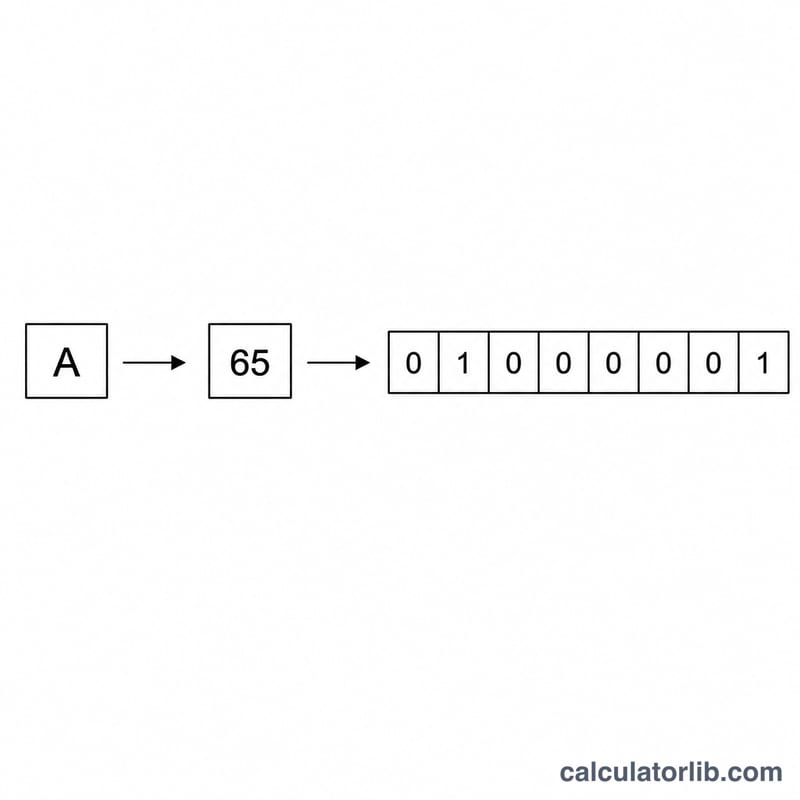
Worked example
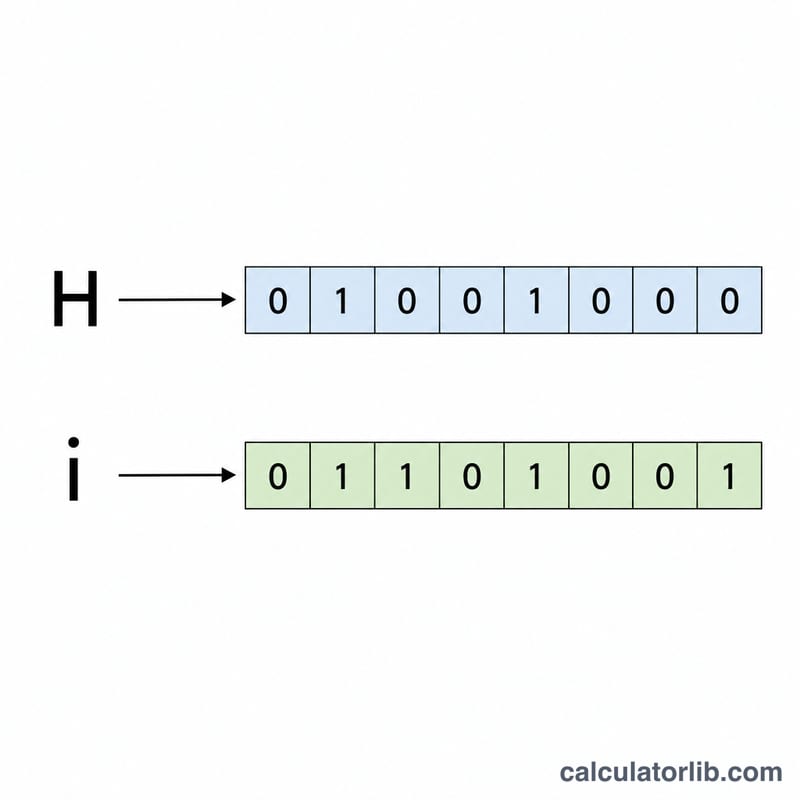
Convert the word Hi. "H" is ASCII 72 → binary 01001000 → hex 48. "i" is ASCII 105 → binary 01101001 → hex 69. So "Hi" becomes 01001000 01101001, decimal 72 105, hex 48 69, using 16 bits across 2 characters.
ASCII Character Reference Table
Standard ASCII assigns each character a number from 0 to 127. In this converter each character's decimal code is converted to an 8-bit binary value (left-padded with zeros to fill 8 bits) and to a two-digit hexadecimal value. The table below lists commonly used printable characters.
| Character | Decimal | 8-Bit Binary | Hex |
|---|---|---|---|
| (space) | 32 | 00100000 | 20 |
| ! | 33 | 00100001 | 21 |
| 0 | 48 | 00110000 | 30 |
| 1 | 49 | 00110001 | 31 |
| 5 | 53 | 00110101 | 35 |
| 9 | 57 | 00111001 | 39 |
| : | 58 | 00111010 | 3A |
| ? | 63 | 00111111 | 3F |
| @ | 64 | 01000000 | 40 |
| A | 65 | 01000001 | 41 |
| B | 66 | 01000010 | 42 |
| M | 77 | 01001101 | 4D |
| Z | 90 | 01011010 | 5A |
| a | 97 | 01100001 | 61 |
| b | 98 | 01100010 | 62 |
| m | 109 | 01101101 | 6D |
| z | 122 | 01111010 | 7A |
For example, the capital letter A has decimal code 65, which in binary is 1000001 and, padded to 8 bits, becomes 01000001. As a single character, the word "Hi" encodes to 01001000 01101001.
Key Terms Explained
- Bit
- The smallest unit of digital data, holding a single value of either 0 or 1 (a binary digit).
- Byte
- A group of 8 bits. A byte can represent 256 distinct values (\(2^8 = 256\)), which is exactly enough to store one extended-ASCII character.
- ASCII
- The American Standard Code for Information Interchange — a character-encoding standard that maps 128 characters (codes 0–127), including letters, digits, punctuation, and control codes, to numbers.
- Unicode
- A universal character standard that extends far beyond ASCII to cover virtually all writing systems, symbols, and emoji. The first 128 Unicode code points are identical to ASCII.
- Code point
- The numeric value assigned to a character within a character set. For the letter "A", the code point is 65 in both ASCII and Unicode.
- Binary
- The base-2 number system, using only the digits 0 and 1. Each position represents a power of two (1, 2, 4, 8, …).
- Decimal
- The base-10 number system used in everyday counting, with digits 0–9 and positions representing powers of ten.
- Hexadecimal
- The base-16 number system, using digits 0–9 and letters A–F. One hex digit represents exactly 4 bits, so two hex digits represent one byte.
- Padding / Left-pad
- Adding leading zeros to the front of a binary value so every character occupies a uniform width. ASCII bytes are left-padded to 8 bits — for example, the code 65 (binary 1000001) becomes 01000001.
Binary, Decimal & Hexadecimal Conversion Table
The table below shows how the same value appears in decimal (base 10), binary (base 2), and hexadecimal (base 16). Note how each power of two adds one more binary digit, and how every 4 binary bits map cleanly onto a single hex digit.
| Decimal | Binary (8-bit) | Hex |
|---|---|---|
| 0 | 00000000 | 00 |
| 1 | 00000001 | 01 |
| 2 | 00000010 | 02 |
| 3 | 00000011 | 03 |
| 4 | 00000100 | 04 |
| 5 | 00000101 | 05 |
| 6 | 00000110 | 06 |
| 7 | 00000111 | 07 |
| 8 | 00001000 | 08 |
| 9 | 00001001 | 09 |
| 10 | 00001010 | 0A |
| 11 | 00001011 | 0B |
| 12 | 00001100 | 0C |
| 13 | 00001101 | 0D |
| 14 | 00001110 | 0E |
| 15 | 00001111 | 0F |
| 16 | 00010000 | 10 |
| 32 | 00100000 | 20 |
| 64 | 01000000 | 40 |
| 128 | 10000000 | 80 |
| 255 | 11111111 | FF |
As a check, decimal 255 is the largest value a single byte can hold; its hex form is FF and its binary form is all eight bits set to 1. Likewise, decimal 64 converts to binary 1000000, which pads to 01000000.
FAQ
Does it handle non-English characters? Standard ASCII covers code points 0–127. Characters above 127 (accents, emoji) will use their Unicode code point, which may exceed 8 bits and not fit standard ASCII.
Why 8 bits per character? A byte is 8 bits, and ASCII traditionally fits in one byte, so 8-bit grouping is the conventional representation.
Can I convert binary back to text? This tool converts text to binary. To reverse it, split the binary into 8-bit groups and map each value back to its ASCII character.