
What is a Binary to Hex Converter?
This tool converts a binary number (base-2, using only 0s and 1s) into its hexadecimal (base-16) equivalent. Hexadecimal is widely used in computing because each hex digit represents exactly four binary digits, making long binary strings far shorter and easier to read.
How to Use It
Type a binary number such as 11010110 into the input box and submit. The converter strips any stray characters, keeps only the 0s and 1s, and returns the hexadecimal result along with the decimal value for reference.
The Formula Explained
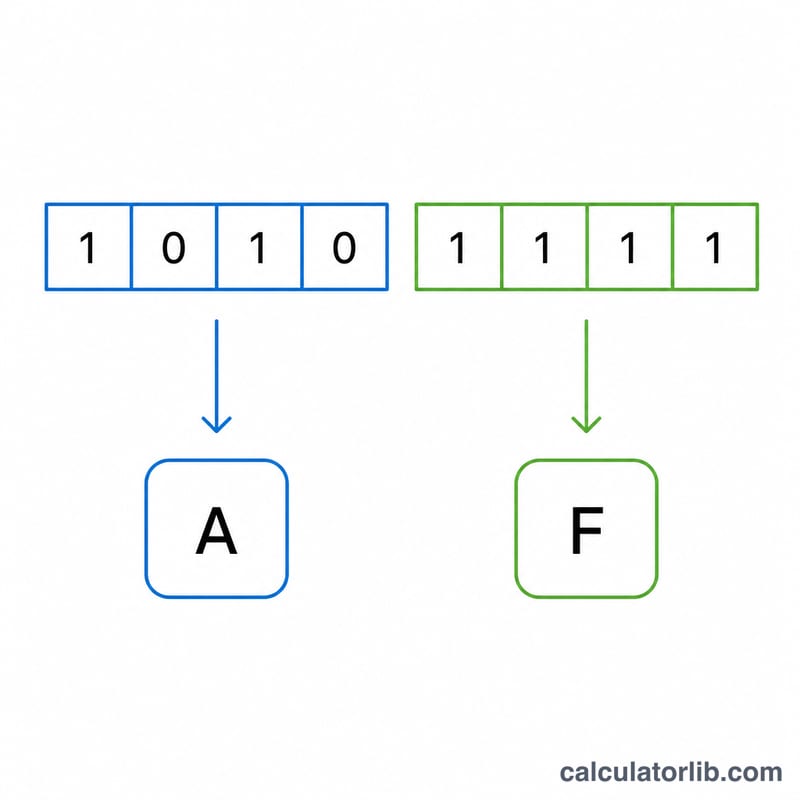
The conversion relies on the fact that \(16 = 2^4\). The binary string is first padded on the left with zeros so its length is a multiple of four. It is then split into 4-bit groups called nibbles, starting from the right. Each nibble has a value from 0 to 15, which maps directly to a single hex digit: 0–9 for values 0–9, and A–F for values 10–15.
$$\text{Hex} = \sum_{i=0}^{n-1} b_i \cdot 2^{\,n-1-i} \;\longrightarrow\; \text{base-16}$$
Worked Example
Take 11010110. Split into nibbles: 1101 and 0110. The first nibble equals \(8+4+0+1 = 13 \to\) D. The second equals \(0+4+2+0 = 6 \to\) 6. So the hexadecimal result is D6, which equals 214 in decimal.
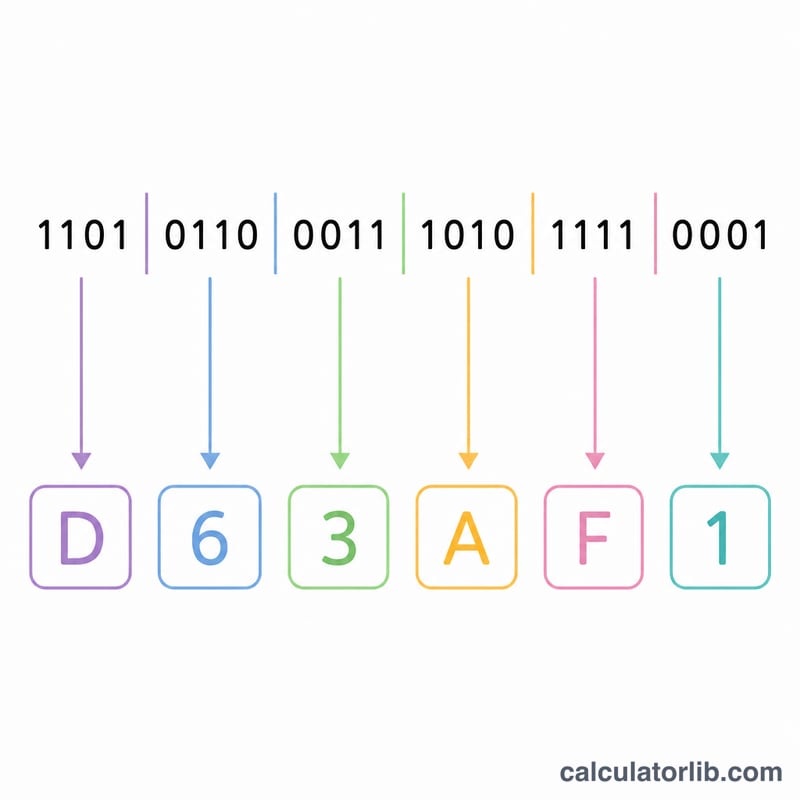
Binary Nibble to Hex Digit Lookup Table
Hexadecimal conversion works because exactly four binary bits (one nibble) map to exactly one hex digit. A nibble can represent \(2^4 = 16\) distinct values, and hexadecimal has 16 digits (0–9 and A–F), so the correspondence is one-to-one. To convert a binary number, split it into 4-bit groups from the right, pad the leftmost group with leading zeros if needed, then replace each nibble with its hex digit using the table below.
| 4-bit Binary | Decimal | Hex Digit |
|---|---|---|
| 0000 | 0 | 0 |
| 0001 | 1 | 1 |
| 0010 | 2 | 2 |
| 0011 | 3 | 3 |
| 0100 | 4 | 4 |
| 0101 | 5 | 5 |
| 0110 | 6 | 6 |
| 0111 | 7 | 7 |
| 1000 | 8 | 8 |
| 1001 | 9 | 9 |
| 1010 | 10 | A |
| 1011 | 11 | B |
| 1100 | 12 | C |
| 1101 | 13 | D |
| 1110 | 14 | E |
| 1111 | 15 | F |
For example, the binary number 1011 0110 splits into the nibbles 1011 and 0110, which map to B and 6, giving the hex value B6. The same bits equal 182 in decimal.
Key Terms Explained
- Bit
- The smallest unit of digital information, holding a single binary value of 0 or 1. The word is a contraction of "binary digit."
- Nibble
- A group of 4 bits. Because a nibble has \(2^4 = 16\) possible values, it corresponds exactly to one hexadecimal digit, which is why binary-to-hex conversion is done four bits at a time. Two nibbles make one byte (8 bits).
- Binary (base-2)
- A number system using only two symbols, 0 and 1. Each position represents a power of 2, so a value is \(\sum b_i \cdot 2^{n-1-i}\). It is the native language of digital electronics.
- Hexadecimal (base-16)
- A number system using sixteen symbols: 0–9 for values zero to nine and A–F for values ten to fifteen. Each position represents a power of 16. Hex is a compact way to write binary, since one hex digit replaces four bits.
- Decimal (base-10)
- The everyday number system using ten symbols (0–9), where each position represents a power of 10. Conversion tools often show the decimal value as a familiar reference point.
- Least Significant Bit (LSB)
- The rightmost bit of a binary number, carrying the smallest place value (\(2^0 = 1\)). Changing it alters the number by the smallest amount.
- Most Significant Bit (MSB)
- The leftmost bit of a binary number, carrying the largest place value. Changing it has the greatest effect on the number's magnitude.
- Leading-zero padding
- Adding zeros to the left of a binary number so its total length is a multiple of 4, allowing it to be split into whole nibbles. For example, 110110 is padded to 0011 0110 before mapping to hex (3 and 6, i.e. 36). Leading zeros do not change the numeric value.
FAQ
Why pad with leading zeros? Grouping into nibbles requires the total bit count to be a multiple of four. Padding the left side does not change the value but ensures clean 4-bit groups.
Does the case of hex letters matter? No. Hex digits A–F are the same value whether upper or lowercase; this tool outputs uppercase.
What if I enter spaces or other characters? Any character that is not 0 or 1 is ignored, so 1101 0110 converts the same as 11010110.