
What this Binary Calculator does
This Binary Calculator lets you perform arithmetic on two binary numbers (numbers written in base 2 using only the digits 0 and 1). You enter two binary values, pick one of four operations — add, subtract, multiply, or divide — and the tool returns the answer in binary as well as its decimal equivalent, along with a clear breakdown of the calculation.
The input fields
- First Binary Number – the left-hand operand, e.g.
1010. - Operation – choose Add, Subtract, Multiply, or Divide.
- Second Binary Number – the right-hand operand, e.g.
11.
Each entry must contain only 0s and 1s. If either field has any other character, the calculator reports "Invalid binary input" instead of a result.
How the calculation works
Internally the tool does not do bit-by-bit arithmetic. Instead it follows three simple steps:
$$\text{Result}_2 = \left( \text{Binary}_1 \right)_2 + \left( \text{Binary}_2 \right)_2$$
$$\text{Result}_2 = \left( \text{Binary}_1 \right)_2 - \left( \text{Binary}_2 \right)_2$$
$$\text{Result}_2 = \left( \text{Binary}_1 \right)_2 \times \left( \text{Binary}_2 \right)_2$$
$$\text{Result}_2 = \left\lfloor \frac{\left( \text{Binary}_1 \right)_2}{\left( \text{Binary}_2 \right)_2} \right\rfloor$$
- Convert to decimal: each binary string is parsed as a base-2 integer.
- Apply the operation: add, subtract, multiply, or integer-divide the two decimal values. Division uses whole-number (truncated) division, so any remainder is dropped, and dividing by zero returns "Division by zero".
- Convert back to binary: the result is converted from decimal to a base-2 string for display, while the decimal result is also shown.
Worked example
Suppose First Binary Number = 1010, Operation = Multiply, Second Binary Number = 11.
1010in decimal is 10.11in decimal is 3.- \(10 \times 3 = 30\).
- 30 converted back to binary is
11110.
So the calculator shows the result as 11110 (binary) and 30 (decimal).
Binary–Decimal Conversion Table
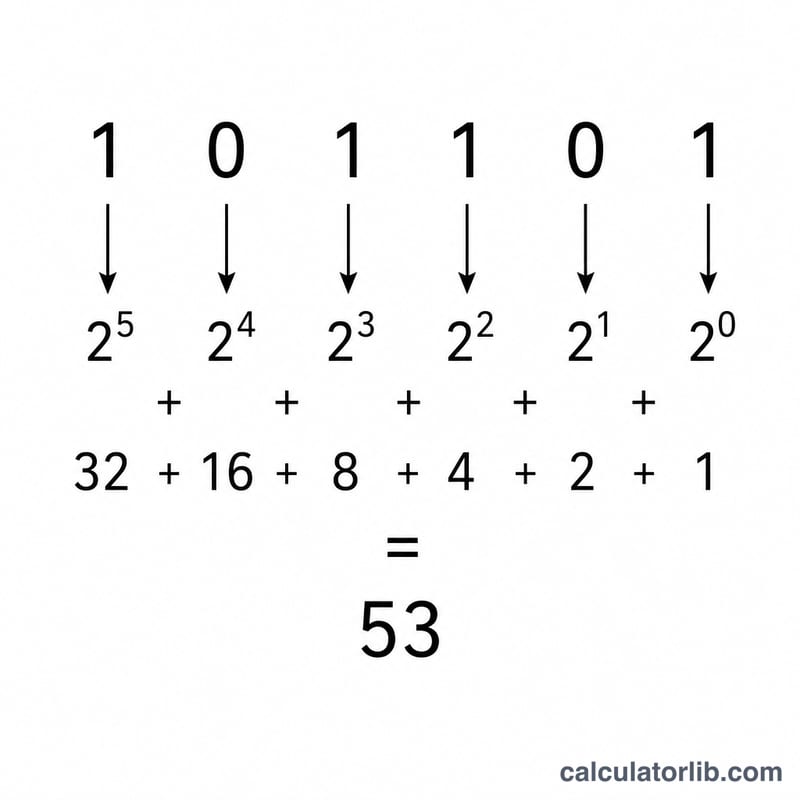
In base-2, every digit (bit) represents a power of two. Reading a binary number from right to left, the place values are \(2^0=1,\ 2^1=2,\ 2^2=4,\ 2^3=8,\ 2^4=16,\ \dots\). To find the decimal equivalent, add the place values wherever a 1 appears.
Common values
| Binary | Decimal |
|---|---|
| 0 | 0 |
| 1 | 1 |
| 10 | 2 |
| 11 | 3 |
| 100 | 4 |
| 101 | 5 |
| 110 | 6 |
| 111 | 7 |
| 1000 | 8 |
| 1001 | 9 |
| 1010 | 10 |
| 1011 | 11 |
| 1100 | 12 |
| 1101 | 13 |
| 1110 | 14 |
| 1111 | 15 |
Place values (powers of two)
| Binary | Power | Decimal weight |
|---|---|---|
| 1 | \(2^0\) | 1 |
| 10 | \(2^1\) | 2 |
| 100 | \(2^2\) | 4 |
| 1000 | \(2^3\) | 8 |
| 10000 | \(2^4\) | 16 |
| 100000 | \(2^5\) | 32 |
| 1000000 | \(2^6\) | 64 |
| 10000000 | \(2^7\) | 128 |
| 100000000 | \(2^8\) | 256 |
More Worked Examples
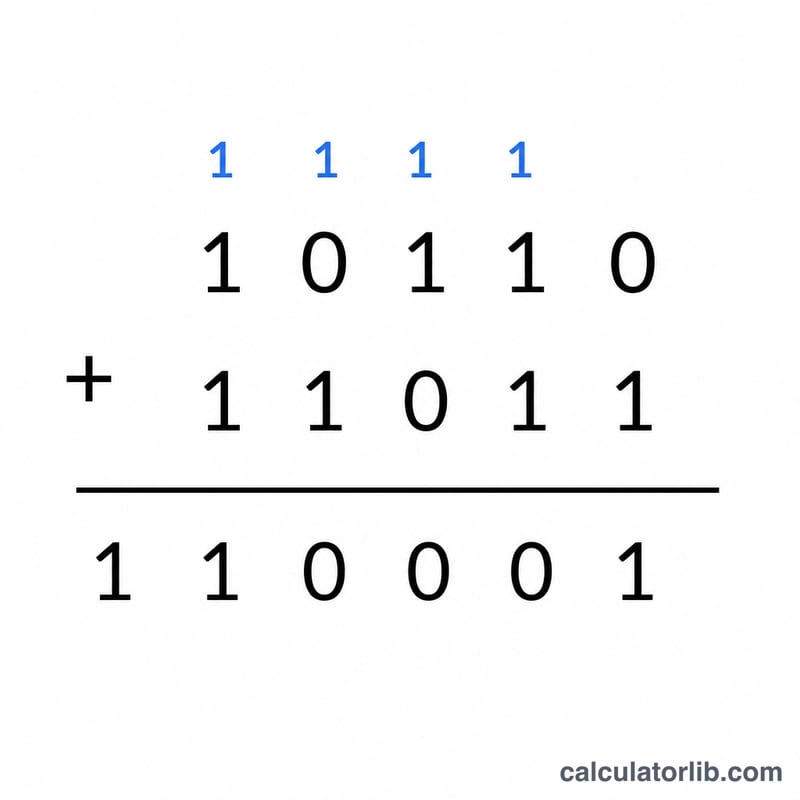
Addition: 1011 + 110
Convert each operand to decimal, add, then convert back to binary.
- \(1011_2 = 8+2+1 = 11_{10}\)
- \(110_2 = 4+2 = 6_{10}\)
- Add: \(11 + 6 = 17_{10}\)
- Convert back: \(17_{10} = 16+1 = 10001_2\)
Column addition confirms this — adding \(1011 + 0110\) produces carries into the higher bits, giving 10001 (decimal 17).
Subtraction giving a negative: 10 − 111
When the second number is larger, the result is negative.
- \(10_2 = 2_{10}\)
- \(111_2 = 7_{10}\)
- Subtract: \(2 - 7 = -5_{10}\)
- Convert magnitude back: \(5_{10} = 101_2\), so the answer is \(-101_2\)
The result of \(10 - 111\) is -101 in binary (decimal \(-5\)).
Integer division with dropped remainder: 111 ÷ 10
Binary integer division keeps only the whole quotient and discards the remainder.
- \(111_2 = 7_{10}\)
- \(10_2 = 2_{10}\)
- Divide: \(7 \div 2 = 3\) remainder \(1\); the remainder \(1\) is dropped
- Convert quotient back: \(3_{10} = 11_2\)
So \(111 \div 10 = \)11 in binary (decimal 3, remainder 1 discarded).
Key Terms Explained
- Binary (base-2)
- A number system using only the digits 0 and 1. Each position represents a power of two, in contrast to the decimal (base-10) system that uses digits 0–9.
- Bit
- A single binary digit — either 0 or 1. It is the smallest unit of data in computing.
- Most significant bit (MSB)
- The leftmost bit of a binary number; it carries the largest place value and has the greatest effect on the number's magnitude.
- Least significant bit (LSB)
- The rightmost bit, with place value \(2^0=1\); it has the smallest effect and determines whether the number is odd or even.
- Carry
- When two bits in a column sum to 2 or more, the excess is carried into the next higher column. In binary, \(1+1=10\), so the column shows 0 and 1 is carried left.
- Place value
- The weight assigned to each digit position, equal to a power of two: \(1, 2, 4, 8, 16, \dots\) reading right to left.
- Integer (truncated) division
- Division that returns only the whole-number quotient and discards any remainder. For example \(7 \div 2 = 3\), dropping the remainder of 1.
- Decimal equivalent
- The base-10 value of a binary number, found by summing the place values where a 1 appears — e.g. \(1011_2 = 8+2+1 = 11_{10}\).
Frequently asked questions
What happens with division remainders? Division is integer-based, so the fractional part is discarded. For example 111 (7) ÷ 10 (2) gives 11 (3), not 3.5.
Can I get a negative result? Yes. Subtracting a larger number from a smaller one produces a negative decimal value, which is reflected in the displayed binary representation.
Why does it say "Invalid binary input"? The fields accept only the digits 0 and 1. Spaces, decimal points, or digits like 2–9 will trigger this message, so double-check your entry.