
What is a Base64 Decoder?
Base64 is an encoding scheme that represents binary data using 64 printable ASCII characters (A–Z, a–z, 0–9, + and /). It is widely used to embed images in HTML, transmit data in JSON or URLs, and encode email attachments. This decoder reverses the process, turning a Base64 string back into the original plain text it represented.
How to Use It
Paste or type your Base64 string into the input box and submit. The tool removes any whitespace, decodes the characters, and shows the resulting text along with the number of decoded bytes, the input character count, and how many padding characters ('=') were present. If the input contains characters outside the Base64 alphabet, you will see an "invalid" message.
The Formula Explained
Each Base64 character encodes 6 bits of data. Four Base64 characters therefore carry \(4 \times 6 = 24\) bits, which regroup neatly into three 8-bit bytes. When the original data length isn't a multiple of 3, one or two '=' padding characters are appended so the encoded string length is always a multiple of 4. During decoding, the padding is stripped and the leftover bits are discarded.
$$\text{Bytes} = \left\lfloor \frac{6 \times \text{Base64 chars (no padding)}}{8} \right\rfloor$$$$\begin{gathered} \text{Bytes} = \left\lfloor \frac{6N}{8} \right\rfloor \\[1.5em] \text{where}\quad \left\{ \begin{aligned} N &= \text{valid chars of } \text{Base64 Input} \\ &\quad \text{(whitespace and } = \text{ removed)} \\ \text{char} &\to 6\text{ bits},\; 8\text{ bits} \to 1\text{ byte} \end{aligned} \right. \end{gathered}$$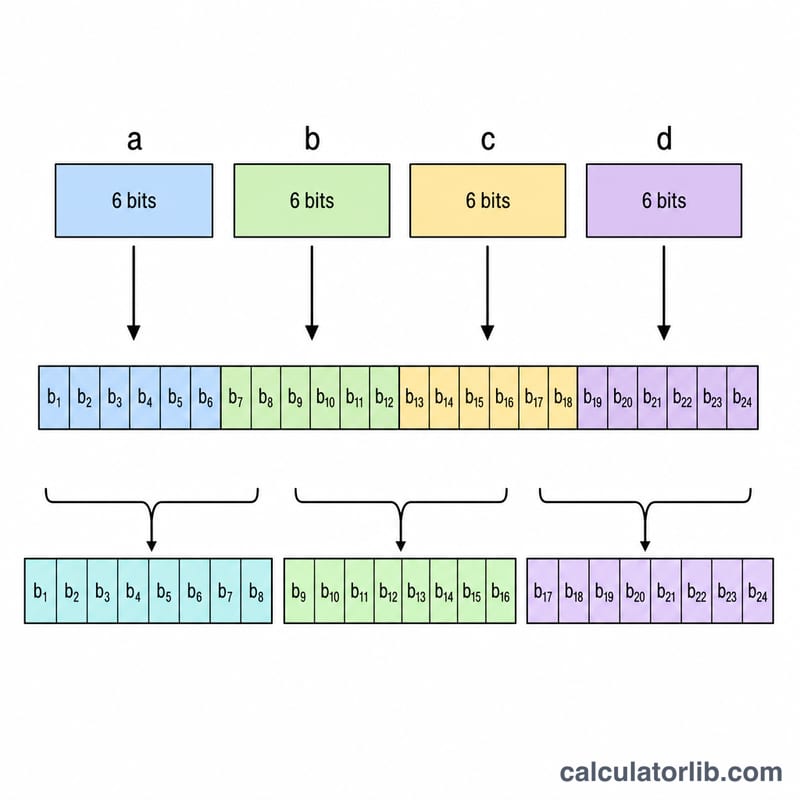
Worked Example
Take the Base64 string SGk=. The characters map to values S=18, G=6, k=36, and '=' is padding. In binary: \(010010\ 000110\ 100100\) → 24 bits, but the trailing padding means only 2 bytes are valid: \(01001000\) (72 = 'H') and \(01101001\) (105 = 'i'). The result is Hi.
Base64 Alphabet Reference
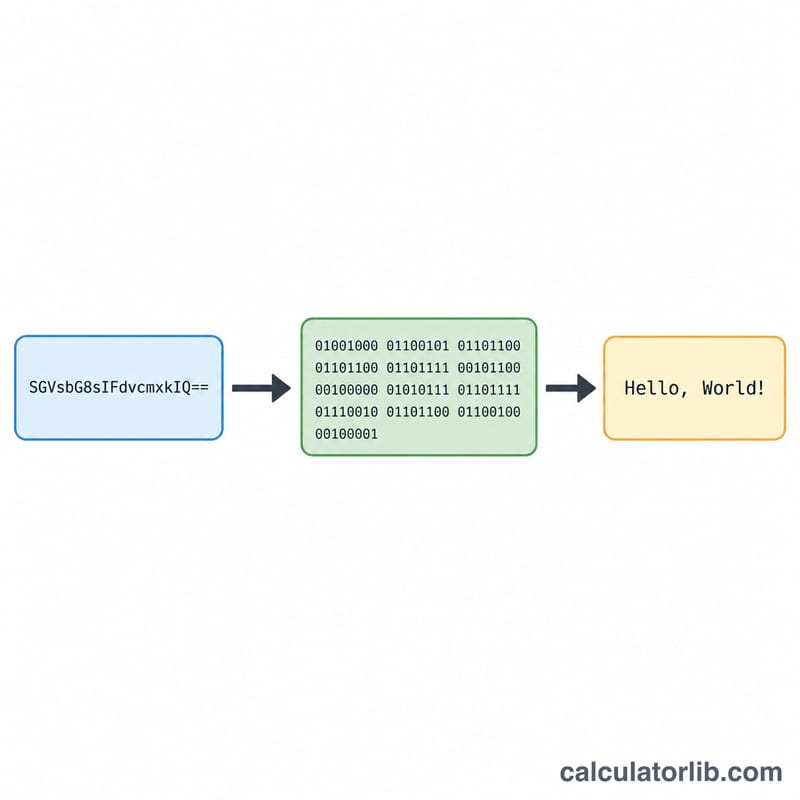
Standard Base64 (RFC 4648) maps every 6-bit value (0–63) to one of 64 printable ASCII characters. A decoder reads each character, looks up its 6-bit index in this table, concatenates the bits, and regroups them into 8-bit bytes. The table below lists the full alphabet and the index assigned to each character.
| Index | Char | Index | Char | Index | Char | Index | Char |
|---|---|---|---|---|---|---|---|
| 0 | A | 16 | Q | 32 | g | 48 | w |
| 1 | B | 17 | R | 33 | h | 49 | x |
| 2 | C | 18 | S | 34 | i | 50 | y |
| 3 | D | 19 | T | 35 | j | 51 | z |
| 4 | E | 20 | U | 36 | k | 52 | 0 |
| 5 | F | 21 | V | 37 | l | 53 | 1 |
| 6 | G | 22 | W | 38 | m | 54 | 2 |
| 7 | H | 23 | X | 39 | n | 55 | 3 |
| 8 | I | 24 | Y | 40 | o | 56 | 4 |
| 9 | J | 25 | Z | 41 | p | 57 | 5 |
| 10 | K | 26 | a | 42 | q | 58 | 6 |
| 11 | L | 27 | b | 43 | r | 59 | 7 |
| 12 | M | 28 | c | 44 | s | 60 | 8 |
| 13 | N | 29 | d | 45 | t | 61 | 9 |
| 14 | O | 30 | e | 46 | u | 62 | + |
| 15 | P | 31 | f | 47 | v | 63 | / |
The 65th symbol, = (equals), is not a data character. It is the padding marker used at the end of an encoded string so the total length is always a multiple of 4 characters. One = means the final 4-character group encodes 2 bytes; two == means it encodes 1 byte. A decoder discards padding and the extra zero bits it implies.
More Decoding Examples
Each Base64 character contributes 6 bits. Four characters (24 bits) decode to exactly 3 bytes; partial groups use padding so the decoder knows how many bytes to keep. The byte count follows \(\text{Bytes} = \left\lfloor \frac{6 \times n}{8} \right\rfloor\), where \(n\) is the number of real (non-padding) characters.
Example 1 — No padding: "TWFu" → "Man"
- Indices: T=19, W=22, F=5, u=46.
- 6-bit groups:
010011 010110 000101 101110. - Regroup into bytes:
01001101 01100001 01101110= 77, 97, 110. - ASCII 77, 97, 110 = M, a, n. With \(n=4\): \(\lfloor 24/8 \rfloor = 3\) bytes — Man.
Example 2 — One '=' pad: "SGVsbG8=" → "Hello"
- Drop padding: 7 real characters S,G,V,s,b,G,8.
- Indices: S=18, G=6, V=21, s=44, b=27, G=6, 8=60.
- Bits:
010010 000110 010101 101100 011011 000110 111100(the trailing 2 bits from the pad group are zero filler and discarded). - Bytes:
01001000 01100101 01101100 01101100 01101111= 72, 101, 108, 108, 111 = H, e, l, l, o. - With \(n=7\): \(\lfloor 42/8 \rfloor = 5\) bytes — Hello.
Example 3 — Two '==' pad: "aGk="... and "TQ==" → "M"
- Drop padding: 2 real characters T, Q.
- Indices: T=19, Q=16.
- Bits:
010011 010000; keep only the first 8 bits, the remaining 4 are zero filler. - Byte:
01001101= 77 = M. - With \(n=2\): \(\lfloor 12/8 \rfloor = 1\) byte — M.
To go the other direction and produce these strings from text, use the Base64 Encoder.
Key Terms
- Base64 alphabet
- The fixed set of 64 printable characters (A–Z, a–z, 0–9, + and /) used to represent binary data as text. Each character stands for a 6-bit value from 0 to 63.
- Padding ('=')
- The equals sign appended at the end of an encoded string so its length is a multiple of 4 characters. It carries no data; one '=' marks a 2-byte final group and '==' marks a 1-byte final group.
- Sextet (6 bits)
- A group of 6 bits — the unit a single Base64 character encodes. Four sextets (24 bits) align exactly with three octets.
- Octet / byte (8 bits)
- An 8-bit unit, the standard size of one byte of decoded data. Base64 decoding regroups sextets back into octets, which the Binary to Text converter can also illustrate bit by bit.
- Whitespace stripping
- Removing spaces, tabs, and line breaks before decoding. Many systems insert newlines into long Base64 (e.g. PEM certificates, email MIME); a robust decoder ignores this whitespace rather than treating it as data.
- URL-safe Base64
- A variant (RFC 4648 §5) that replaces + with - and / with _ so the string is safe in URLs and filenames. Padding is often omitted as well. Convert such characters back to + and / before using a standard decoder; for the surrounding URL itself see the URL Encode / Decode Calculator.
FAQ
Is my data sent anywhere? The decoding logic runs server-side to render the result, but no input is stored. Avoid pasting secrets.
Why is the byte count not divisible by 4? The byte count refers to decoded output bytes, not input characters. Every 4 input characters become up to 3 output bytes.
What does padding mean? One '=' means the last group produced 2 bytes; two '=' means it produced 1 byte. No padding means the data length was already a multiple of 3.