
What is the Word and Character Counter?
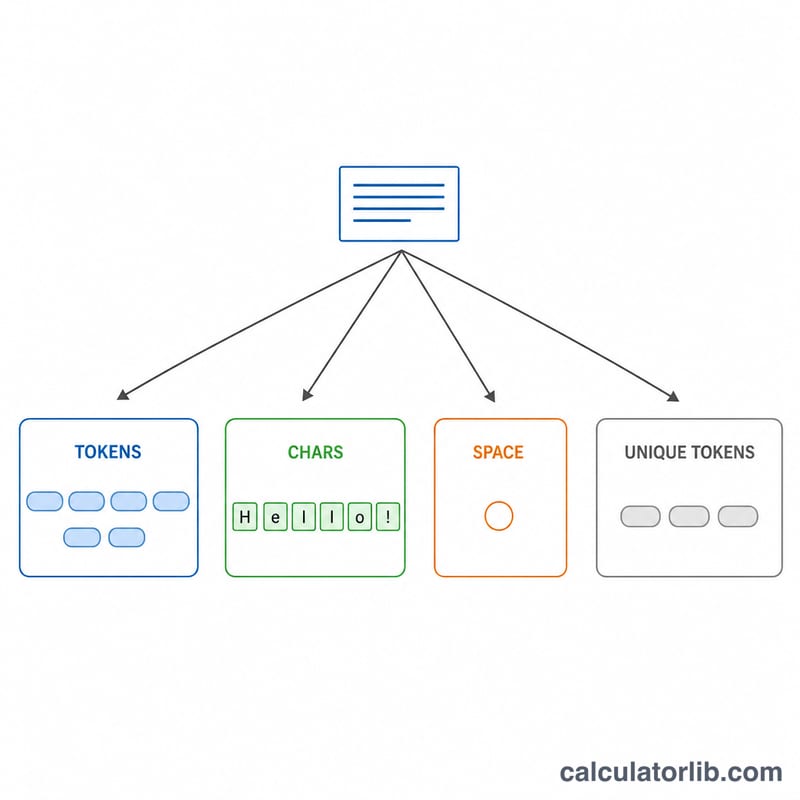
This tool analyzes any block of text and reports the number of words, the number of distinct (unique) words, the total character count with spaces, the number of visible characters (excluding whitespace), and the number of literal space characters. It also builds a word-density table showing how often each word appears and what percentage of the text it represents — useful for SEO writing, essays, social media limits, and readability checks. It is a pure text-processing tool and works identically anywhere in the world.
How to use it
Paste or type your text into the box and submit. Leave "Omit Stop Words for Density Chart" checked to hide common filler words (the, a, is, and...) from the density table while still counting them toward your total word count. Uncheck it to see every word in the density list.
The counting rules
A word is a maximal run of letters or digits that may contain internal hyphens or apostrophes, so "up-to-date", "don't" and "sister-in-law" each count as one word. All Characters counts every character including spaces, tabs and line breaks. Visible Characters counts only non-whitespace characters: $$\text{visibleCharacters} = \text{allCharacters} - \text{whitespace}$$ Spaces counts the literal space character (U+0020) only.
Density for a word is its occurrence count divided by the total word count, times 100, shown with two decimals: $$\text{density}(w) = \frac{\text{count}(w)}{\text{allWords}} \times 100$$ If there are no words, every density is \(0.00\%\).
Worked example
For "The quick brown fox. The fox is up-to-date." there are 8 words, 6 unique words, 44 characters, 7 spaces and 37 visible characters. With stop words omitted the density table shows fox 2 (\(\frac{2}{8} \times 100 = 25.00\%\)), quick 1 (\(\frac{1}{8} \times 100 = 12.50\%\)), brown 1 (\(12.50\%\)) and up-to-date 1 (\(12.50\%\)), with a Total of 8 words and \(100.00\%\).
FAQ
Do spaces count as characters? Yes — All Characters includes spaces; Visible Characters excludes them.
Are stop words removed from the word count? No. Omitting stop words only hides them from the density table; they still count toward All Words.
Does it support accented or non-Latin text? Yes, the word matcher uses Unicode letter and digit classes.