What is the GB to TB Converter?
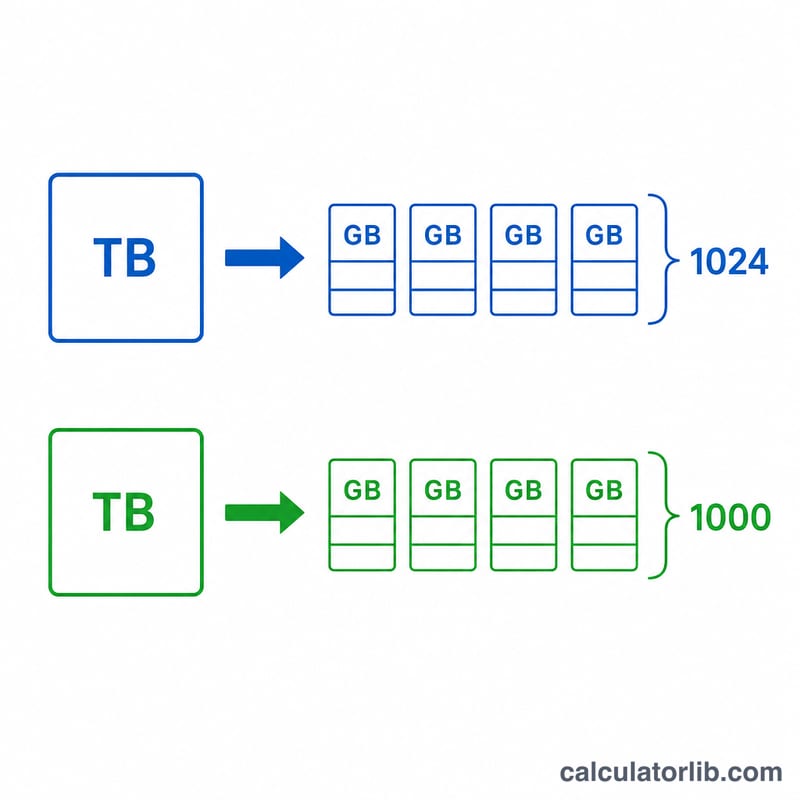
This tool converts a storage size in gigabytes (GB) to terabytes (TB). Because the computing industry uses two different definitions of a "terabyte," the calculator lets you pick between the binary standard (1 TB = 1024 GB) and the decimal standard (1 TB = 1000 GB). This applies universally — it is pure unit conversion with no country or jurisdiction restrictions.
How to use it
Enter the number of gigabytes you want to convert, choose whether you want the binary or decimal interpretation, and read the equivalent terabytes. Use binary when matching values reported by Windows, macOS, or Linux file managers, and decimal when matching the capacity printed on a hard drive or SSD box.
The formula explained
The conversion simply divides gigabytes by the number of gigabytes in one terabyte. Under the binary convention a terabyte is \(2^{10} = 1024\) gigabytes, so
$$\text{TB} = \frac{\text{Gigabytes (GB)}}{1024}$$Under the decimal (SI) convention a terabyte is 1000 gigabytes, so
$$\text{TB} = \frac{\text{Gigabytes (GB)}}{1000}$$The decimal answer is always slightly larger than the binary answer for the same GB value.
Worked example
Suppose you have 2048 GB. Using the binary standard:
$$2048 \div 1024 = 2 \text{ TB}$$Using the decimal standard:
$$2048 \div 1000 = 2.048 \text{ TB}$$This difference is exactly why a "2 TB" drive often shows up as roughly 1.82 TB in your operating system.
GB to TB Quick Conversion Table
Storage makers and some software use the decimal (SI) standard, where 1 TB = 1000 GB. Many operating systems and memory tools use the binary standard, where 1 TB (strictly 1 TiB) = 1024 GB (strictly GiB). The formulas are \(\text{TB} = \frac{\text{GB}}{1000}\) (decimal) and \(\text{TB} = \frac{\text{GB}}{1024}\) (binary).
| Gigabytes (GB) | Decimal TB (÷ 1000) | Binary TB (÷ 1024) |
|---|---|---|
| 128 | 0.1280 | 0.1250 |
| 256 | 0.2560 | 0.2500 |
| 500 | 0.5000 | 0.4883 |
| 512 | 0.5120 | 0.5000 |
| 1000 | 1.0000 | 0.9766 |
| 1024 | 1.0240 | 1.0000 |
| 2048 | 2.0480 | 2.0000 |
| 4096 | 4.0960 | 4.0000 |
| 8192 | 8.1920 | 8.0000 |
Worked example: 500 GB in binary is \(\frac{500}{1024} = 0.48828\ldots \approx 0.4883\) TB; in decimal it is \(\frac{500}{1000} = 0.5\) TB.
Advertised vs. Reported Drive Capacity
Drive makers advertise capacity in decimal units (1 GB = 1,000,000,000 bytes; 1 TB = 1,000,000,000,000 bytes). Some operating systems report the same bytes using binary units (1 GiB = 1,073,741,824 bytes; 1 TiB = 1,099,511,627,776 bytes), though they often still label them "GB" or "TB". Nothing is missing from the drive; the unit is simply larger.
| Advertised size | Bytes (decimal) | Shown in GiB | Shown in TiB |
|---|---|---|---|
| 256 GB | 256,000,000,000 | ≈ 238.42 GiB | ≈ 0.2328 TiB |
| 512 GB | 512,000,000,000 | ≈ 476.84 GiB | ≈ 0.4657 TiB |
| 1 TB | 1,000,000,000,000 | ≈ 931.32 GiB | ≈ 0.9095 TiB |
| 2 TB | 2,000,000,000,000 | ≈ 1862.65 GiB | ≈ 1.8190 TiB |
| 4 TB | 4,000,000,000,000 | ≈ 3725.29 GiB | ≈ 3.6380 TiB |
Where the percentages come from
- GB level: 1 GiB is about 7.37% (roughly 7.4%) larger than 1 GB, since \(\frac{1073741824}{10^9} = 1.0737\). A decimal figure therefore appears about \(1 - \frac{1}{1.0737} \approx 6.87\%\) smaller when shown in GiB (for example, 1000 GB becomes 931.32 GiB).
- TB level: 1 TiB is about 9.95% larger than 1 TB, since \(\frac{1099511627776}{10^{12}} = 1.0995\). A decimal figure appears about \(1 - \frac{1}{1.0995} \approx 9.05\%\) smaller when shown in TiB (for example, 1 TB becomes 0.9095 TiB).
The gap grows with each prefix step (KB, MB, GB, TB) because the binary and decimal units diverge by a factor of 1.024 each time. Actual usable space can be a little lower still because of file system overhead, formatting and reserved partitions.
FAQ
Which standard should I use? Use binary (1024) to match what your computer reports, and decimal (1000) to match marketing/storage labels.
Why does my drive show less space than advertised? Manufacturers measure in decimal terabytes, but operating systems measure in binary, so a 1 TB (1,000,000,000,000 byte) drive shows about 0.909 binary TB.
Is GiB the same as binary GB? Yes — the precise IEC term for binary gigabytes is gibibytes (GiB) and for terabytes is tebibytes (TiB).