
What the NAND Calculator Does
The NAND Calculator performs a logical NAND (NOT-AND) operation on two binary inputs. NAND is one of the fundamental gates in digital electronics and is famously known as a "universal gate" — any other logic gate (AND, OR, NOT, XOR) can be built using only NAND gates. This tool takes two single-bit values and instantly returns the NAND result, making it ideal for students, electronics hobbyists, and engineers verifying truth tables.
How to Use It
The calculator has just two fields:
- Input A — a binary value, either 0 or 1.
- Input B — a binary value, either 0 or 1.
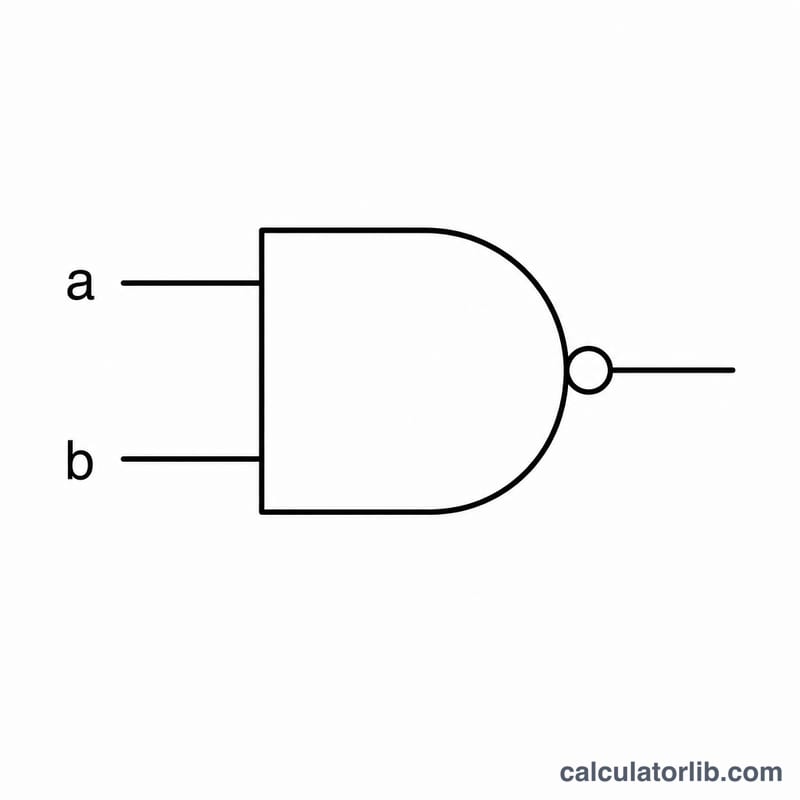
Enter both values and the calculator returns a single result (0 or 1) along with a visual representation of the NAND gate.
The Formula Explained
NAND is simply AND followed by a NOT (inversion). The tool applies this exact logic:
$$Q = \overline{\text{A} \cdot \text{B}}$$Result = NOT (A AND B)
In practice, the calculator checks whether both inputs equal 1. If and only if both A and B are 1, the AND condition is true, so the inverted (NAND) result is 0. In every other case the result is 1. Expressed in the calculator's own logic: result = !(A == 1 AND B == 1) ? 1 : 0.
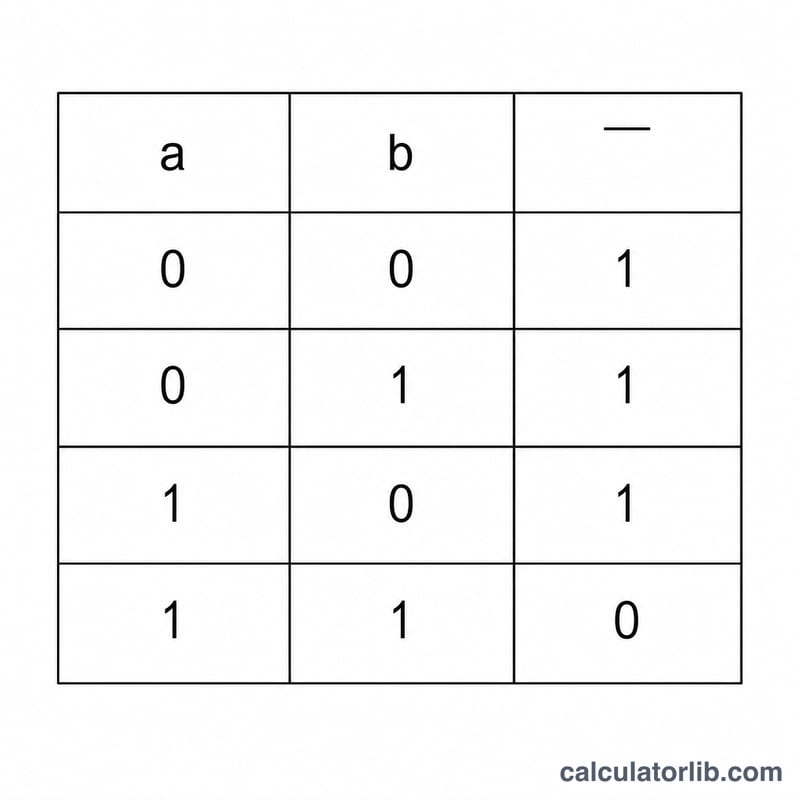
The full truth table is:
- A = 0, B = 0 → 1
- A = 0, B = 1 → 1
- A = 1, B = 0 → 1
- A = 1, B = 1 → 0
Worked Example
Suppose you enter Input A = 1 and Input B = 1. The calculator evaluates the AND condition: both inputs are 1, so A == 1 AND B == 1 is true. NAND inverts that, giving a result of 0. Now change Input B to 0. The AND condition is no longer satisfied (one input is 0), so the NAND result flips to 1. This confirms that the only way to get a 0 from a NAND gate is to feed it two 1s.
Frequently Asked Questions
What inputs are valid? The calculator expects binary digits — 0 or 1 — for both Input A and Input B. Any non-numeric text is treated as 0, so always enter clean binary values.
Why is NAND called a universal gate? Because you can construct every other logic function from NAND gates alone. For example, connecting both inputs of a NAND together produces a NOT gate, which is why NAND is so heavily used in real integrated circuits.
How is NAND different from AND? AND outputs 1 only when both inputs are 1; NAND is its exact opposite, outputting 0 only when both inputs are 1 and 1 in all other cases.