
What Is the Date of Birth Calculator?
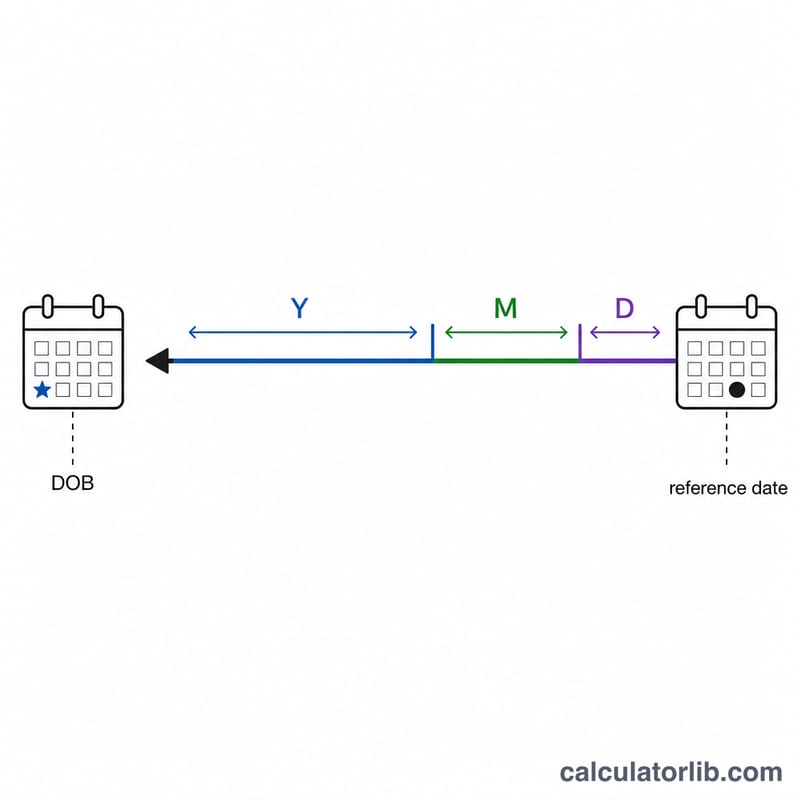
This tool works backward from an age to find a date of birth. Given a reference date (often today) and a person's age expressed in years, months, and days, it subtracts that age from the reference date to recover the original birth date — along with the day of the week that date fell on. It is handy for filling forms, verifying records, demographic research, and genealogy where only the age "as of" a certain date is known.
How to Use It
Enter the reference date (the date on which the age is measured) using the year, month, and day fields. Then enter the age in three parts: full years, additional months (0–11), and additional days. The calculator subtracts days first, then months, then years, so the calendar correctly accounts for varying month lengths and leap years.
The Formula Explained
The core relationship is simply DOB = Reference Date − Age. Because months and years have different lengths, the subtraction is done calendar-aware rather than by a fixed day count. For example, subtracting "1 year" from 1 March 2024 lands on 1 March 2023, regardless of the 2024 leap day in between.
$$\text{DOB} = \text{Date}\Big(\text{Year},\ \text{Month},\ \text{Day}\Big) - \text{Days} - \text{Months} - \text{Years}$$
$$\begin{gathered} \text{DOB} = \text{Ref} - \text{Days} - \text{Months} - \text{Years} \\[1.5em] \text{where}\quad \left\{ \begin{aligned} \text{Ref} &= \text{Date}\Big(\text{Year},\ \text{Month},\ \text{Day}\Big) \\ \text{Days} &= \text{Age Days} \\ \text{Months} &= \text{Age Months} \\ \text{Years} &= \text{Age Years} \end{aligned} \right. \end{gathered}$$
Worked Example
Suppose the reference date is 15 June 2024 and the age is 30 years, 2 months, 10 days. Subtract 10 days → 5 June 2024. Subtract 2 months → 5 April 2024. Subtract 30 years → 5 April 1994. That is the estimated date of birth.

More Worked Examples
The calculator always works backwards in the same order: days first, then months, then years. Following that order by hand reproduces the tool exactly, and it matters whenever subtracting the days forces a "borrow" into the previous month. Each example below shows every intermediate date.
Example 1 — a borrow across the month boundary
Reference date 5 March 2025, age 10 years 0 months 20 days.
- Subtract 20 days. From 5 March 2025, nine days takes you to 24 February and the remaining eleven to 13 February — February 2025 has 28 days (2025 is not a leap year), so the borrow uses 28, not 29: $$5\text{ Mar }2025 - 20\ \text{days} = 13\text{ Feb }2025$$
- Subtract 0 months. The date is unchanged: 13 February 2025.
- Subtract 10 years. \(2025 - 10 = 2015\), and 13 February exists in 2015, so no clamping is needed.
Date of birth: 13 February 2015, which was a Friday.
Example 2 — leap years and 29 February
Reference date 28 February 2025, age exactly 1 year 0 months 0 days.
- Subtract 0 days and 0 months. Still 28 February 2025.
- Subtract 1 year. \(2025 - 1 = 2024\). 28 February exists in 2024, so the result is 28 February 2024 — a Wednesday.
Notice what this does not produce: 29 February 2024. Because the reference year 2025 is a common year, no whole-year subtraction from a February date in 2025 can ever land on 29 February. To reach a leap day you need a days component and a leap-year intermediate date — for instance reference 10 March 2024 with age 0 years 0 months 10 days gives \(10\text{ Mar }2024 - 10\ \text{days} = 29\text{ Feb }2024\), a Thursday, because 2024 is a leap year.
Also be aware that whether a person born on 29 February "turns one" on 28 February or on 1 March of a common year is a legal convention that differs from country to country (and some jurisdictions have no written rule at all). The calculator applies plain arithmetic in the order above; if you are reconstructing a date of birth for a legal, insurance or medical record, check the age-reckoning rule that applies in the relevant country before relying on a leap-day result.
Example 3 — whole years only (the common case)
Reference date 1 October 2026, age 45 years (months and days left at 0).
- Subtract 0 days, 0 months. Still 1 October 2026.
- Subtract 45 years. \(2026 - 45 = 1981\).
Date of birth: 1 October 1981, a Thursday.
Read this result carefully. The day (1) and the month (October) were simply inherited from the reference date — the age input contained no information about them. All you really learned from "45 years old on 1 October 2026" is that the true birth date lies somewhere in a 365-day window: it cannot be later than 1 October 1981 (or the person would not yet be 45) and cannot be earlier than 2 October 1980 (or they would already be 46). The calculator returns the latest date consistent with that age, which is the right answer when "45" means age at last birthday. Treat the weekday as exact only when you supplied all three of years, months and days.
Scenario Comparison: How Precision Changes the Result
The same person can produce four different "dates of birth" depending on how precisely their age was recorded. The table below fixes the reference date at 5 October 2026 and varies only the age inputs, so every difference you see comes from precision alone. The last row changes the reference date instead.
| Age input | Reference date | Resulting DOB | Weekday | Uncertainty window |
|---|---|---|---|---|
| 30 years (months and days 0) | 5 Oct 2026 | 5 October 1996 | Saturday | ±365 days — any date from 6 Oct 1995 to 5 Oct 1996 fits "age 30" |
| 30 years 6 months | 5 Oct 2026 | 5 April 1996 | Friday | About ±30 days — the day-of-month is still inherited from the reference date |
| 30 years 6 months 14 days | 5 Oct 2026 | 21 March 1996 | Thursday | Exact — all three components supplied |
| "Age 30" from an age-last-birthday record (census, form, ID check) | 5 Oct 2026 | 5 October 1996 (latest possible DOB) | Saturday | ±365 days — the record only guarantees the 31st birthday had not yet occurred |
| 30 years 6 months 14 days (same age, later reference) | 5 Jan 2027 | 22 June 1996 | Saturday | Exact, but anchored to a different date — shifts the DOB by three months |
What the table shows
- Whole years alone pin down only the year. The month and day of the answer are copied from the reference date, so the result is the latest date of birth compatible with that age, with up to a year of slack behind it.
- Adding months narrows the window to roughly a month, and adding days makes the answer exact. Only in the third and fifth rows is the returned weekday genuinely the person's birth weekday.
- The reference date anchors everything, not today's date. Rows three and five use an identical age and return dates three months apart. If an age was recorded on a form in January, enter that January date — not the day you happen to be doing the lookup — or the whole result shifts.
- The step order is days → months → years, matching the calculator. Reversing it (years first, then months, then days) can land one day away in borrow cases near month ends, so stick to one order and state which one you used when the date goes into a record.
A practical habit: whenever you only have whole years, record the answer as a range ("born between 6 Oct 1995 and 5 Oct 1996") rather than a single date, and reserve single-date answers for cases where years, months and days were all captured. Age-recording and age-reckoning conventions themselves vary by country and by document type, so confirm which convention a source used before treating its number as years completed.
FAQ
Why subtract days before years? Doing days, then months, then years keeps the arithmetic stable across month boundaries and leap years, mirroring how calendars naturally roll over.
Is the result exact? If you know the exact age in years, months, and days as of the reference date, the result is exact. If you only know whole years, the day and month will reflect the reference date's day and month.
Does it handle leap years? Yes — the calculation uses a real calendar, so February 29 and leap-year lengths are respected automatically.