
What is a Hex to Decimal Converter?
A hex to decimal converter turns a number written in base 16 (hexadecimal) into the everyday base 10 (decimal) system. Hexadecimal uses sixteen symbols — 0-9 followed by A, B, C, D, E and F — where A equals 10, B equals 11, and so on up to F equals 15. Programmers, web designers, and electronics engineers use hex constantly for memory addresses, color codes, and byte values, so quickly reading them as decimals is a common need.
How to use it
Type a hexadecimal value into the box — for example 1A3F, FF, or 0x2B (a leading 0x is accepted and ignored). The tool is case-insensitive, so ff and FF give the same answer. Press calculate and the decimal equivalent appears instantly, along with a check confirming the input was valid hex.
The formula explained
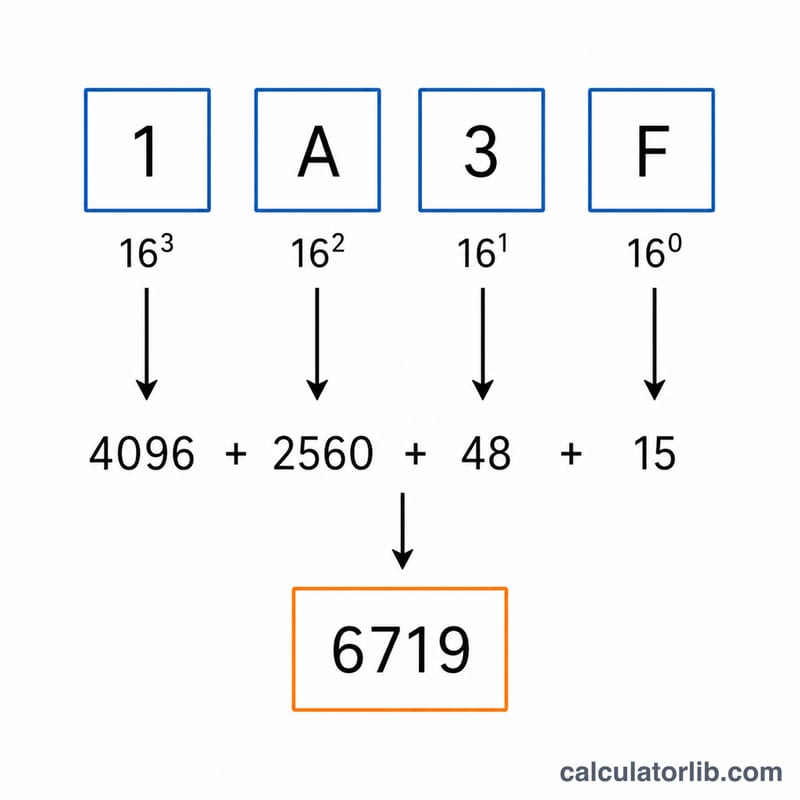
Each digit contributes its face value multiplied by a power of 16 determined by its position, counting from 0 at the rightmost digit:
$$\text{Decimal} = \sum_{i=0}^{n-1} d_i \times 16^{\,i}, \qquad d_i \in \text{Hexadecimal value}$$
Working example for 1A3F: F=15 at position 0 gives \(15 \times 1 = 15\); 3 at position 1 gives \(3 \times 16 = 48\); A=10 at position 2 gives \(10 \times 256 = 2560\); 1 at position 3 gives \(1 \times 4096 = 4096\). Summing: $$15 + 48 + 2560 + 4096 = \mathbf{6719}.$$
FAQ
Does case matter? No. The converter accepts both uppercase and lowercase letters A-F.
Can I include the 0x prefix? Yes. A leading 0x or 0X is automatically stripped before conversion.
What happens with invalid characters? If the input contains anything other than 0-9 and A-F (after an optional 0x), the result is flagged as invalid and shown as 0.