
What is the Game Download Time Calculator?
This tool estimates how long it will take to download a game (or any large file) given its size in gigabytes and your internet connection's download speed in megabits per second. It's perfect for planning whether you can start playing tonight or whether the download will run overnight.
How to use it
Enter the game size in GB — usually shown on the store page or in your library. Then enter your download speed in Mbps. Note that internet plans are sold in megabits (Mbps), while files are measured in gigabytes (GB), so a unit conversion is needed. The calculator returns the time as hours, minutes, and seconds.
The formula explained
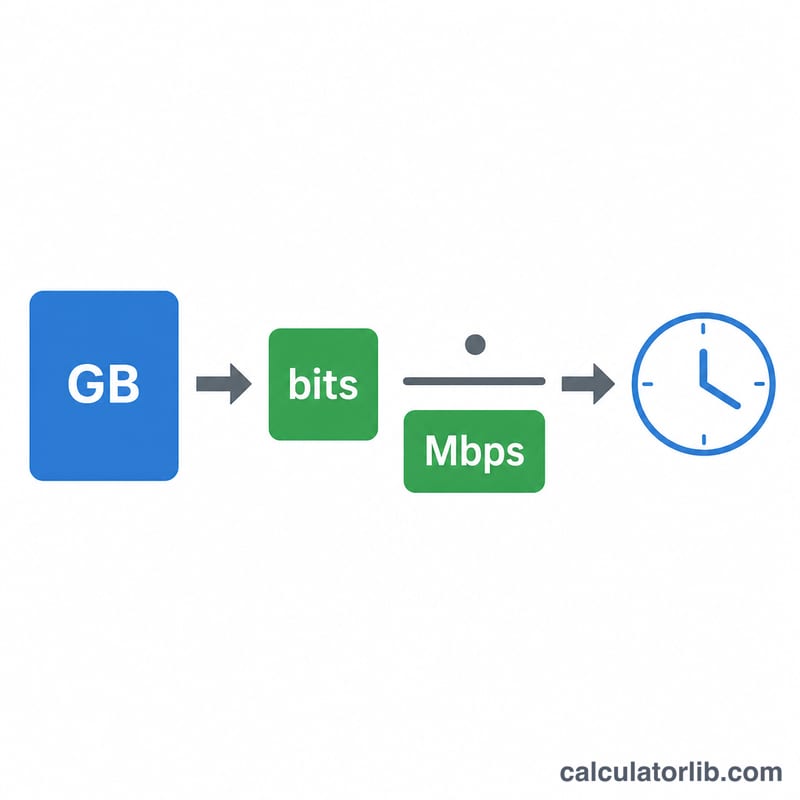
One byte equals 8 bits, and one gigabyte equals 1024 megabytes. So a game of size GB contains Size \(\times\) 1024 \(\times\) 8 megabits. Dividing that total by your speed in Mbps gives the time in seconds:
$$t = \frac{\text{GB} \times 1024 \times 8}{\text{Mbps}}$$
We then break the seconds into hours, minutes, and remaining seconds.
Worked example
A 50 GB game on a 100 Mbps connection:
$$50 \times 1024 \times 8 = 409{,}600 \text{ megabits}$$$$409{,}600 \div 100 = 4096 \text{ seconds}$$
which is 1 hour, 8 minutes, and 16 seconds.
FAQ
Why is my real download slower? Server limits, Wi-Fi overhead, network congestion, and disk write speed all reduce real-world throughput, so treat this as a best-case estimate.
Should I use my plan's advertised speed? Use your actual measured speed from a speed test for a more accurate result, since advertised speeds are maximums.
What about MB/s vs Mbps? If your download manager shows MB/s, multiply it by 8 to get Mbps before entering it here.