
What Is the Mbps Download Time Calculator?
This tool estimates how long it takes to download a file given its size in megabytes (MB) and your connection speed in megabits per second (Mbps). It bridges the common mismatch between how files are sized (bytes) and how internet speeds are advertised (bits), giving you a realistic time estimate in seconds, minutes, and hours.
How to Use It
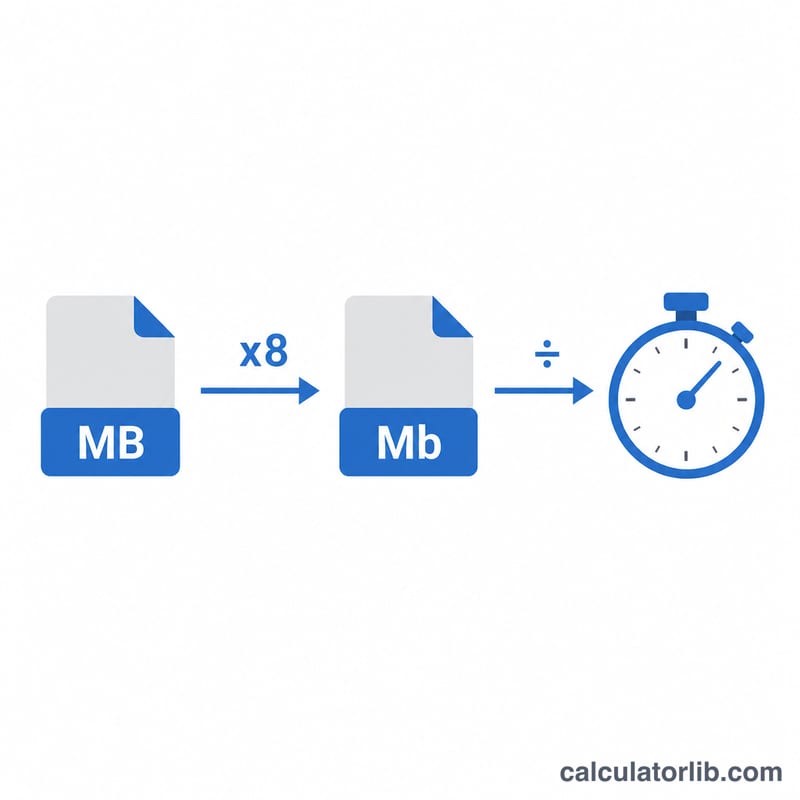
Enter the file size in MB (for example, a 700 MB video) and your download speed in Mbps (for example, 100 Mbps from a speed test). The calculator instantly returns the theoretical download time. Because there are 8 bits in a byte, a file's size in megabytes must be multiplied by 8 before dividing by the speed in megabits per second.
The Formula Explained
The core equation is:
$$\text{time (s)} = \frac{\text{file size in MB} \times 8}{\text{speed in Mbps}}$$
Multiplying by 8 converts megabytes to megabits so both quantities share the same unit (bits). Dividing by the Mbps speed then yields the time in seconds.
Worked Example
Suppose you want to download a 700 MB file at 100 Mbps. First convert: \(700 \times 8 = 5{,}600\) megabits. Then divide: \(5{,}600 \div 100 = 56\) seconds. So the download should take about 56 seconds under ideal conditions.
FAQ
Why is my real download slower? Advertised speeds are maximums. Network congestion, Wi-Fi signal, server limits, and overhead (TCP/IP headers) typically reduce real-world throughput by 10–30%.
What's the difference between MB and Mb? MB (megabyte) measures file size; Mb (megabit) measures speed. \(1 \text{ byte} = 8 \text{ bits}\), which is why we multiply file size by 8.
Does this work for GB files? Yes — convert gigabytes to megabytes first (\(1 \text{ GB} = 1{,}000 \text{ MB}\)) and enter the MB value.