
What is the MB to GB Converter?
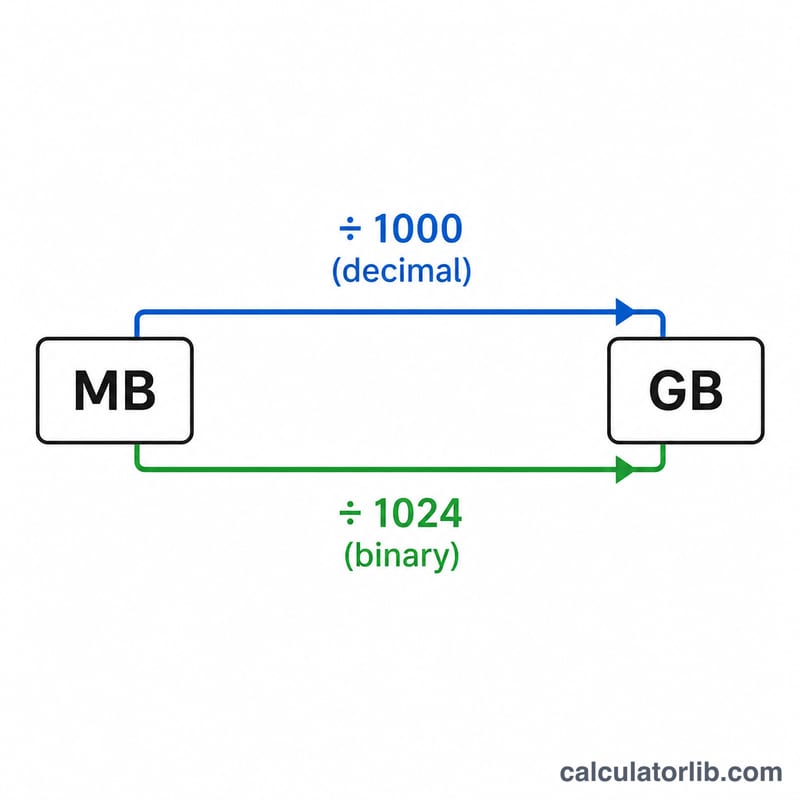
This tool converts a value in megabytes (MB) into gigabytes (GB). Because the computing world uses two different conventions for digital storage, the converter lets you choose between the decimal (SI) standard, where 1 GB equals 1000 MB, and the binary standard, where 1 GB (technically a gibibyte) equals 1024 MB.
How to use it
Enter the number of megabytes you want to convert, then select your preferred standard. The calculator instantly displays the equivalent in gigabytes. If you are working with hard drive, SSD, or download sizes advertised by manufacturers, use the decimal option. If you are matching numbers reported by some older software or operating systems, choose binary.
The formula explained
The conversion is a simple division. In decimal terms, $$\text{GB} = \frac{\text{Megabytes (MB)}}{1000}$$ In binary terms, $$\text{GB} = \frac{\text{Megabytes (MB)}}{1024}$$ The difference grows with larger values, which is why a drive sold as "500 GB" often shows as roughly 465 GB inside an operating system that reports in binary.
Worked example
Suppose you have a file of 2048 MB. Using the decimal standard: $$2048 \div 1000 = 2.048 \text{ GB}$$ Using the binary standard: $$2048 \div 1024 = 2 \text{ GB}$$ exactly. Both answers are valid — they simply use different definitions of a gigabyte.
FAQ
Which standard should I use? For storage devices and internet data plans, decimal (1000) is the modern norm. For RAM and certain file managers, binary (1024) may match what you see.
Is 1 GB always 1024 MB? No. Officially, \(1 \text{ GB} = 1000 \text{ MB}\) and \(1 \text{ GiB} = 1024 \text{ MiB}\), but the terms are often used interchangeably, which causes confusion.
How do I convert GB back to MB? Multiply by 1000 (decimal) or 1024 (binary).