What is a Hex to ASCII Converter?
A Hex to ASCII converter turns hexadecimal numbers back into the readable text characters they represent. Computers store every character as a number, and hexadecimal (base 16) is a compact way to write those byte values. This tool reads your hex input, splits it into pairs of digits, converts each pair to its numeric value, and maps that value to a character — giving you the original text.
How to Use It
Paste or type your hexadecimal string into the box. You can separate bytes with spaces, commas, or write them as one continuous string — the tool also ignores any 0x prefixes. Press calculate and the decoded text appears instantly, along with a count of how many bytes were decoded.
The Formula Explained
Hex is base 16, so two hex digits represent one byte with a value from 0 to 255. For each pair p, we compute int(p, 16) to get the decimal code, then chr(code) to get the character.
$$\text{ASCII} = \bigsqcup_{k=0}^{n-1} \text{char}\Big(\,\text{hex}_{16}\big(\,\text{Hex Input}[2k\,..\,2k{+}1]\big)\Big)$$
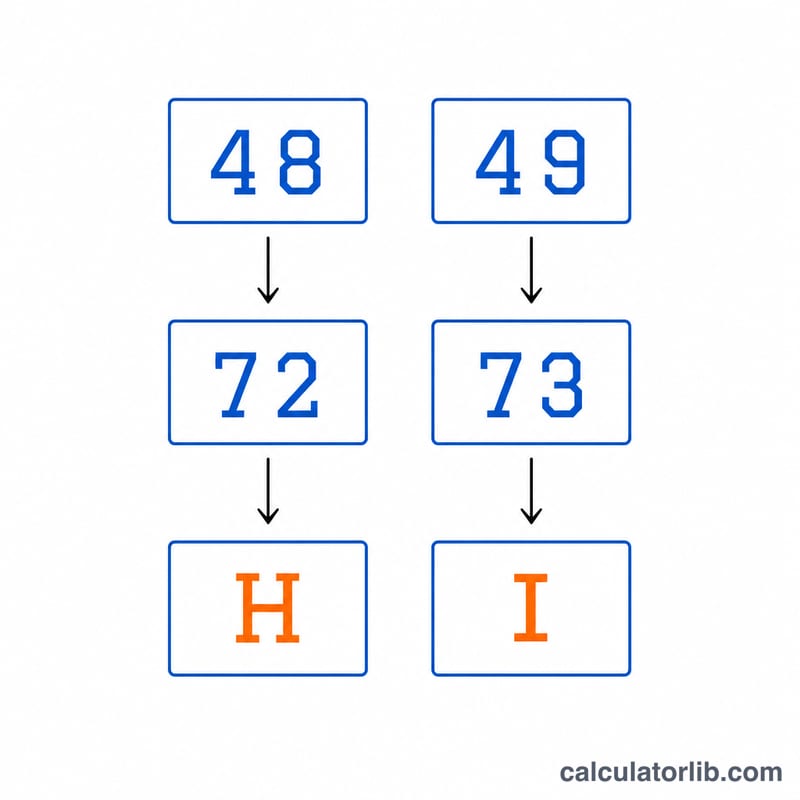
For example, the pair 48 equals \(4\times16 + 8 = 72\), and character 72 is the capital letter H.
Worked Example
Take the hex string 48 65 6C 6C 6F. Converting each pair: \(48\to72\to\text{"H"}\), \(65\to101\to\text{"e"}\), \(6C\to108\to\text{"l"}\), \(6C\to108\to\text{"l"}\), \(6F\to111\to\text{"o"}\). Joining them gives Hello.
ASCII Hex Reference Table
Standard ASCII is a 7-bit character set (codes 0–127, hex 00–7F). Each character is stored in one byte, so it is written as two hex digits. The table below lists the key control characters and the printable range 0x20–0x7E.
| Hex | Decimal | Character |
|---|---|---|
| 00 | 0 | NUL (null) |
| 09 | 9 | TAB (horizontal tab) |
| 0A | 10 | LF (line feed, newline) |
| 0D | 13 | CR (carriage return) |
| 1B | 27 | ESC (escape) |
| 20 | 32 | Space |
| 21 | 33 | ! |
| 22 | 34 | " |
| 23 | 35 | # |
| 24 | 36 | $ |
| 25 | 37 | % |
| 26 | 38 | & |
| 27 | 39 | ' (apostrophe) |
| 28 | 40 | ( |
| 29 | 41 | ) |
| 2A | 42 | * |
| 2B | 43 | + |
| 2C | 44 | , (comma) |
| 2D | 45 | - (hyphen) |
| 2E | 46 | . (period) |
| 2F | 47 | / |
| 30–39 | 48–57 | Digits 0–9 |
| 3A | 58 | : |
| 3B | 59 | ; |
| 3C | 60 | < |
| 3D | 61 | = |
| 3E | 62 | > |
| 3F | 63 | ? |
| 40 | 64 | @ |
| 41–5A | 65–90 | Uppercase A–Z |
| 5B | 91 | [ |
| 5C | 92 | (backslash) |
| 5D | 93 | ] |
| 5E | 94 | ^ |
| 5F | 95 | _ (underscore) |
| 60 | 96 | ` (backtick) |
| 61–7A | 97–122 | Lowercase a–z |
| 7B | 123 | { (left brace) |
| 7C | 124 | | (vertical bar) |
| 7D | 125 | } (right brace) |
| 7E | 126 | ~ (tilde) |
| 7F | 127 | DEL (delete) |
Quick patterns: an uppercase letter and its lowercase form differ by 0x20 (for example 41 = A, 61 = a), and the digit characters 30–39 are the digit value plus 0x30.
Interpreting the Decoded Output
The converter reads the hex input as byte pairs (spaces, commas and 0x prefixes are ignored) and turns each byte into a character. For example, 48 65 6C 6C 6F decodes to "Hello".
- Control characters (00–1F and 7F): these are not visible letters. They may show as blank space, a line break (0A, 0D), a tab (09), or an odd placeholder symbol. A result that looks shorter than expected may still contain them.
- Bytes 80–FF: these are outside 7-bit ASCII, so their meaning depends on the encoding. In Latin-1 (ISO-8859-1), the single byte E9 is é. In UTF-8, é is the two-byte sequence C3 A9. If C3 A9 is read as Latin-1, it appears as the two characters "é".
- Garbled output: strange symbols, question marks or accented clutter usually mean the wrong encoding was assumed, or that the data is not text at all (for example compressed data, an image, a number or encrypted bytes). Such data has no meaningful ASCII reading.
- Odd number of hex digits: each character needs exactly two hex digits. If the input has an odd digit count, the final unpaired digit is dropped. For example, 48656C6C6 decodes as "Hell" because the last 6 has no partner. Check for a missing or extra digit if the result looks cut off.
- Invalid characters: anything other than 0–9 and A–F (in either case) is not valid hex and may lead to errors or missing output.
For plain English text, expect nearly all bytes to fall in 20–7E, with occasional 0A or 0D line endings.
FAQ
Do I need spaces between bytes? No. Spaces, commas and 0x prefixes are all optional and stripped automatically before decoding.
What if I enter an odd number of digits? The final unpaired digit is ignored, since a valid byte needs two hex digits.
Is uppercase or lowercase required? Either works — 6c and 6C decode identically.