What is the TB to GB Converter?
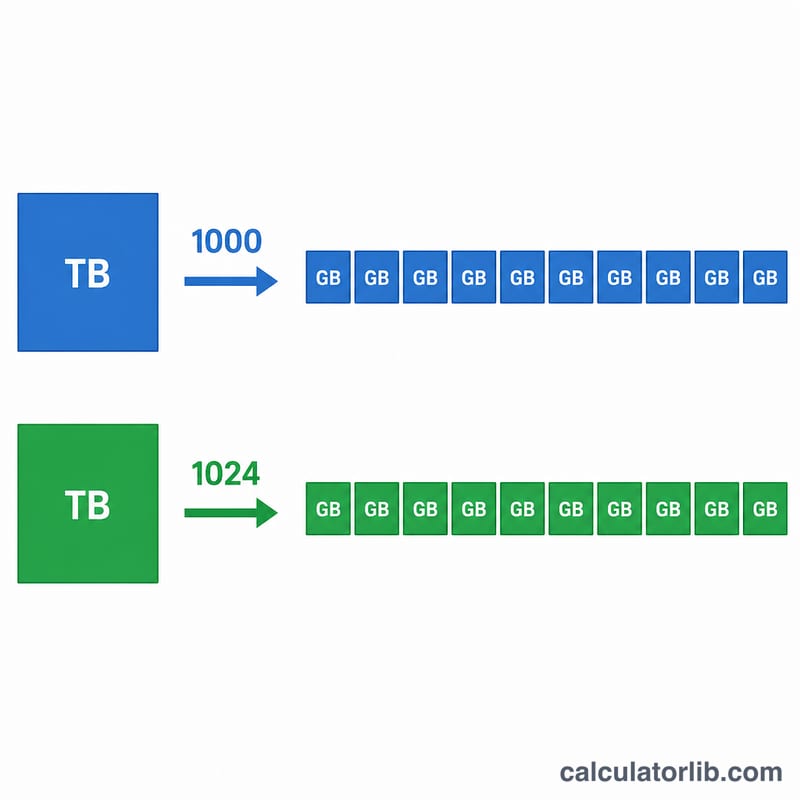
This tool converts a storage size given in terabytes (TB) into gigabytes (GB). Both units measure digital data, but there are two common conventions for how they relate. The decimal (SI) standard — used by hard drive and SSD manufacturers — treats 1 TB as exactly 1000 GB. The binary standard — used historically by many operating systems — treats 1 TB as 1024 GB. This calculator supports both so your numbers always match the context you are working in.
How to use it
Enter the number of terabytes you want to convert, then choose the standard. Select Decimal if you are comparing advertised drive capacities, or Binary if you want a value that lines up with what some software reports. Click calculate to see the equivalent number of gigabytes along with the conversion factor used.
The formula explained
The conversion is a simple multiplication. In decimal form, $$\text{GB} = \text{TB} \times 1000$$ In binary form, $$\text{GB} = \text{TB} \times 1024$$ The difference grows with larger numbers: a 10 TB drive equals 10,000 GB decimal but 10,240 GB binary — a gap of 240 GB.
Worked example
Suppose you have a 2.5 TB drive and want the decimal equivalent: $$2.5 \times 1000 = 2{,}500 \text{ GB}$$ Using the binary standard instead: $$2.5 \times 1024 = 2{,}560 \text{ GB}$$
TB to GB Quick Conversion Table
The decimal (SI) standard uses 1 TB = 1,000 GB. The binary convention uses 1 TB = 1,024 GB. Storage makers and most operating systems' marketing material use decimal, while some software reports binary values. The binary column below is the 1,024 multiplier, which is strictly the TiB-to-GiB relationship.
| TB | GB (decimal, ×1000) | GB (binary, ×1024) | Difference (GB) |
|---|---|---|---|
| 0.25 | 250 | 256 | 6 |
| 0.5 | 500 | 512 | 12 |
| 1 | 1,000 | 1,024 | 24 |
| 2 | 2,000 | 2,048 | 48 |
| 4 | 4,000 | 4,096 | 96 |
| 8 | 8,000 | 8,192 | 192 |
| 10 | 10,000 | 10,240 | 240 |
| 16 | 16,000 | 16,384 | 384 |
| 20 | 20,000 | 20,480 | 480 |
Formula: decimal GB = TB × 1000; binary GB = TB × 1024. Example: \(4 \times 1000 = 4000\) and \(4 \times 1024 = 4096\), a difference of 96 GB.
Storage Unit Glossary: TB, GB, TiB and GiB
- Bit: the smallest unit of digital data, a single 0 or 1.
- Byte: a group of 8 bits, the basic unit for measuring storage capacity.
- GB (gigabyte): an SI unit equal to \(10^9\) bytes = 1,000,000,000 bytes.
- GiB (gibibyte): an IEC unit equal to \(2^{30}\) bytes = 1,073,741,824 bytes.
- TB (terabyte): an SI unit equal to \(10^{12}\) bytes = 1,000 GB.
- TiB (tebibyte): an IEC unit equal to \(2^{40}\) bytes = 1,099,511,627,776 bytes = 1,024 GiB.
- SI prefixes: kilo, mega, giga and tera are powers of 1,000 (decimal). They are used for drive capacities and network speeds.
- IEC prefixes: kibi, mebi, gibi and tebi are powers of 1,024 (binary). They were introduced to remove the ambiguity of using "GB" for both meanings.
Key relationship: 1 TB = 1,000 GB, while 1 TiB = 1,024 GiB. Because the units differ, a 1 TB (decimal) drive holds \(10^{12}\) bytes, which is about 931 GiB (\(10^{12} / 2^{30} \approx 931.32\)). Some operating systems label GiB as "GB", which is why a new drive can appear smaller than advertised. The drive is not missing space; the two sides are using different units.
FAQ
Which standard should I use? Use decimal (1000) for storage marketing and most modern reporting. Use binary (1024) if your software or older system reports capacity that way.
Why does my computer show less than the advertised size? Manufacturers use decimal TB, but some systems display capacity in binary GB, so a "1 TB" drive may appear closer to 931 GB (GiB) in those tools.
Is GB the same as GiB? Strictly, GiB is the binary unit (1024 MiB). Here "GB" in binary mode is effectively GiB; in decimal mode it is the true SI gigabyte.