
What Is the Bits to Bytes Converter?
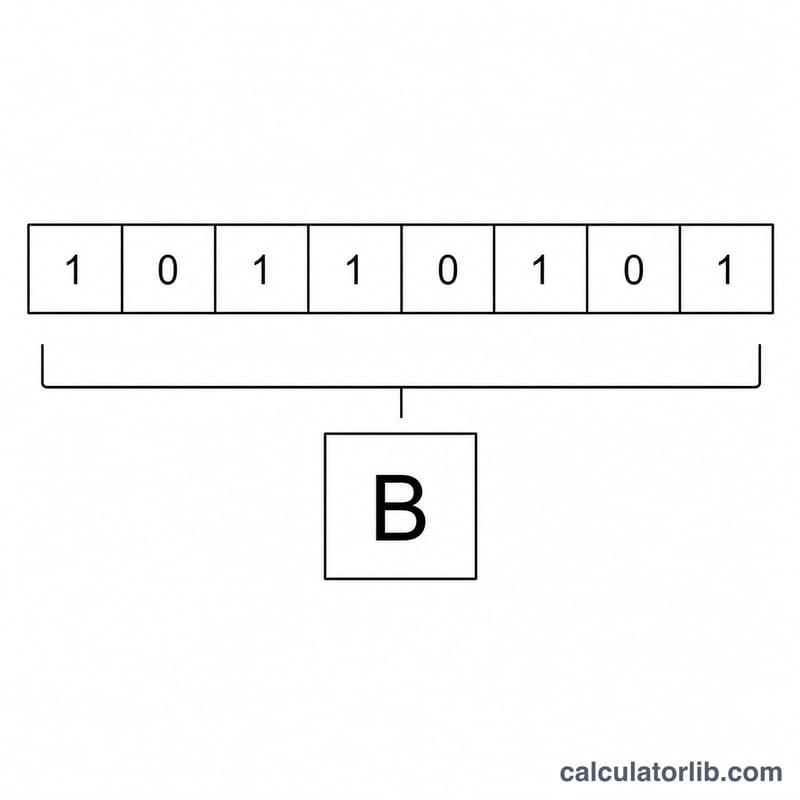
This tool converts a quantity of bits (bit) into bytes (B). In digital systems, a byte is the standard unit used to measure file sizes and storage, and one byte is composed of exactly 8 bits. Bits, on the other hand, are most often used to describe data transfer rates such as network bandwidth. Being able to switch between the two makes it easy to compare speeds and storage figures.
How to Use It
Enter the number of bits you want to convert in the input box and the calculator instantly returns the equivalent value in bytes. You can enter whole numbers or decimals — for example, partial results from a bandwidth measurement.
The Formula Explained
The conversion relies on a single, exact relationship:
$$\text{Bytes} = \frac{\text{bits}}{8}$$
Because 8 bits make up 1 byte, dividing the bit count by 8 yields the byte count. This is an exact mathematical conversion with no rounding inherent to the definition.
Worked Example
Suppose you have 2,048 bits. Dividing by 8 gives $$2048 \div 8 = 256 \text{ bytes}$$ Likewise, 8 bits equals exactly 1 byte, and 1,000,000 bits equals 125,000 bytes.
Key Terms Explained
Digital storage and data-rate units are easy to mix up because they share similar names and abbreviations. The definitions below clarify the building blocks behind the bits-to-bytes conversion.
- Bit (b)
- The smallest unit of digital information, holding a single binary value of either 0 or 1. The name is a contraction of binary digit. Bits are the fundamental units used to measure data transmission and the raw capacity of digital systems.
- Byte (B)
- A group of 8 bits treated as a single unit. One byte can represent 256 distinct values (\(2^8 = 256\)), enough to encode a single character of text in common encodings such as ASCII. Storage capacity is almost always quoted in bytes. To convert, divide bits by 8 — for example, 64 bits equals 8 bytes.
- Kilobit (kb) and Kilobyte (kB)
- A kilobit is 1,000 bits and a kilobyte is 1,000 bytes under the SI (decimal) convention, so a kilobyte equals 8 kilobits. Note that in some legacy contexts "kilobyte" has meant 1,024 bytes (binary); the standards-compliant binary unit for 1,024 bytes is the kibibyte (KiB).
- Megabit (Mb) and Megabyte (MB)
- A megabit is 1,000,000 bits and a megabyte is 1,000,000 bytes (decimal SI). One megabyte equals 8 megabits. Internet speeds are typically advertised in megabits per second (Mbps), while file sizes are listed in megabytes (MB), which is why an 8 Mbps connection downloads roughly 1 MB per second.
- Lowercase b vs Uppercase B
- By convention, a lowercase b denotes bits and an uppercase B denotes bytes. Therefore Mb means megabit and MB means megabyte — a factor-of-8 difference. Misreading this convention is the most common source of confusion when comparing connection speeds to download sizes.
- Bandwidth vs Storage
- Bandwidth (data rate) measures how fast data moves and is expressed in bits per second (bps, Mbps, Gbps) — a flow measured in bits. Storage measures how much data is held and is expressed in bytes (KB, MB, GB) — a quantity measured in bytes. Because the two use different base units, you divide a bit-based rate by 8 to estimate the byte-based amount transferred per second.
FAQ
Is a byte always 8 bits? In modern computing the byte is universally defined as 8 bits, so this calculator uses that standard.
What is the difference between Mb and MB? A lowercase "b" means bits and an uppercase "B" means bytes. So 1 MB (megabyte) equals 8 Mb (megabits). Internet speeds are usually quoted in megabits per second (Mbps), while file sizes are in megabytes (MB).
Can I convert bytes back to bits? Yes — just multiply the number of bytes by 8 to reverse the conversion.