What is a megapixel?
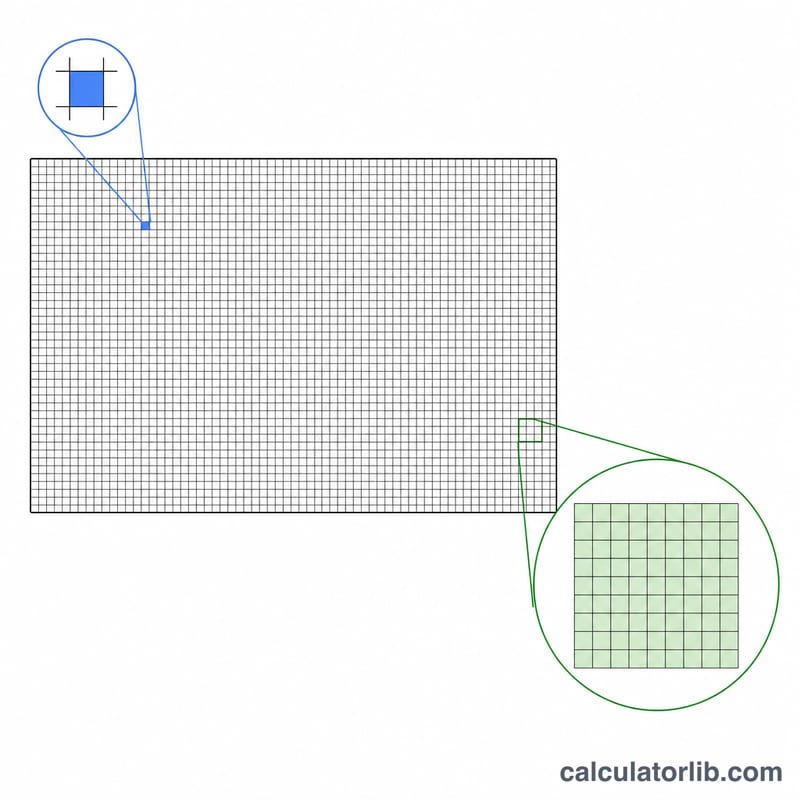
A megapixel (MP) is exactly one million pixels. Camera and screen resolutions are usually quoted in megapixels because the raw pixel count gets large quickly — a modern phone photo can be 50,000,000 pixels, which is much easier to say as "50 MP". This calculator converts any width × height resolution into megapixels, and also reports the total pixel count and the image aspect ratio.
How to use it
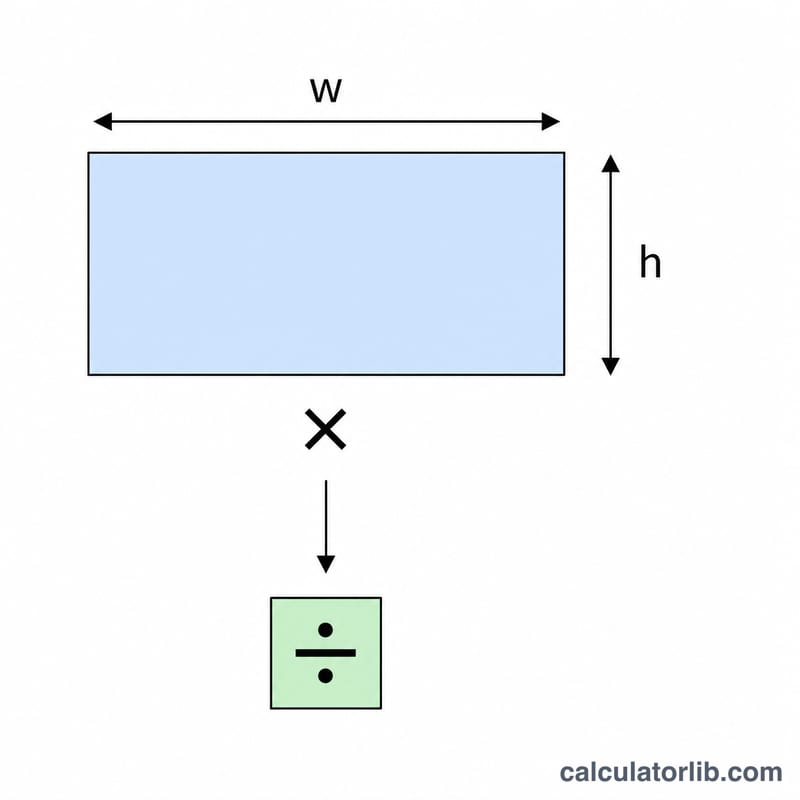
Enter the image or sensor width in pixels and the height in pixels, then read the result. For example, a 4K display is 3840 × 2160. The tool multiplies the two dimensions, divides by one million, and shows the megapixels rounded for easy reading. It also divides width by height to give the aspect ratio (so 16:9 widescreen shows as roughly 1.778 : 1).
The formula explained
The math is simple: $$\text{MP} = \frac{\text{width} \times \text{height}}{1{,}000{,}000}$$ First multiply the two pixel dimensions to get the total number of pixels, then divide by 1,000,000 because "mega" means million. Note that camera marketing sometimes rounds up — a "12 MP" sensor at 4032 × 3024 is actually 12,192,768 pixels, i.e. about 12.19 MP.
Worked example
Suppose you have a 6000 × 4000 photo from a DSLR. Total pixels = \(6000 \times 4000 = 24{,}000{,}000\). Megapixels = \(24{,}000{,}000 \div 1{,}000{,}000 = 24\) MP. Aspect ratio = \(6000 \div 4000 = 1.5\), i.e. a classic 3:2 frame.
Common Resolutions and Their Megapixels
Megapixels (MP) are width × height in pixels divided by 1,000,000. The table lists standard display resolutions and typical camera sensor sizes. MP values are rounded to two decimals.
| Name | Width × Height (px) | Total pixels | Megapixels | Aspect ratio |
|---|---|---|---|---|
| HD (720p) | 1280 × 720 | 921,600 | 0.92 MP | 16:9 |
| Full HD (1080p) | 1920 × 1080 | 2,073,600 | 2.07 MP | 16:9 |
| QHD (1440p) | 2560 × 1440 | 3,686,400 | 3.69 MP | 16:9 |
| 4K UHD | 3840 × 2160 | 8,294,400 | 8.29 MP | 16:9 |
| DCI 4K | 4096 × 2160 | 8,847,360 | 8.85 MP | 256:135 (about 1.90:1) |
| 5K | 5120 × 2880 | 14,745,600 | 14.75 MP | 16:9 |
| 8K UHD | 7680 × 4320 | 33,177,600 | 33.18 MP | 16:9 |
| Typical camera (12 MP) | 4000 × 3000 | 12,000,000 | 12.00 MP | 4:3 |
| Typical camera (24 MP) | 6000 × 4000 | 24,000,000 | 24.00 MP | 3:2 |
| High-resolution camera | 8192 × 5464 | 44,761,088 | about 44.8 MP | about 3:2 |
Note that camera manufacturers often quote a rounded MP figure, so the exact pixel count of a sensor or image file may differ slightly from the marketing number.
Print Size vs. Required Megapixels
The pixel dimensions needed for a print equal the print size in inches multiplied by the print resolution in DPI (dots per inch, here treated as pixels per inch). 300 DPI is a common target for high-quality prints viewed up close. Sizes below are in inches (portrait orientation, width × height).
| Print size (in) | Pixels at 300 DPI | MP at 300 DPI | MP at 150 DPI |
|---|---|---|---|
| 4 × 6 | 1200 × 1800 | 2.16 MP | 0.54 MP |
| 5 × 7 | 1500 × 2100 | 3.15 MP | about 0.79 MP |
| 8 × 10 | 2400 × 3000 | 7.2 MP | 1.80 MP |
| 11 × 14 | 3300 × 4200 | 13.86 MP | about 3.47 MP |
| 16 × 20 | 4800 × 6000 | 28.8 MP | 7.2 MP |
| 20 × 30 | 6000 × 9000 | 54.0 MP | 13.5 MP |
Halving the DPI cuts both pixel dimensions in half, so the total pixel count drops to one quarter. For large prints such as posters that are viewed from a distance, 150 DPI (or even lower) is often acceptable, which is why a 24 MP camera can still produce a good 20 × 30 in print. Note that the required aspect ratio of your image may differ from the print size, so some cropping can be needed.
FAQ
Does more megapixels mean a better photo? Not always — sensor size, lens quality, and pixel size matter just as much. More megapixels mean more detail and larger prints, but also bigger files.
How many megapixels for printing? A good 8×10 inch print at 300 DPI needs about 7.2 MP; an 11×14 needs roughly 13.9 MP.
Is 1 MP = 1,000,000 pixels? Yes, exactly one million pixels per megapixel.