What Is a Reverse Subnet Mask?
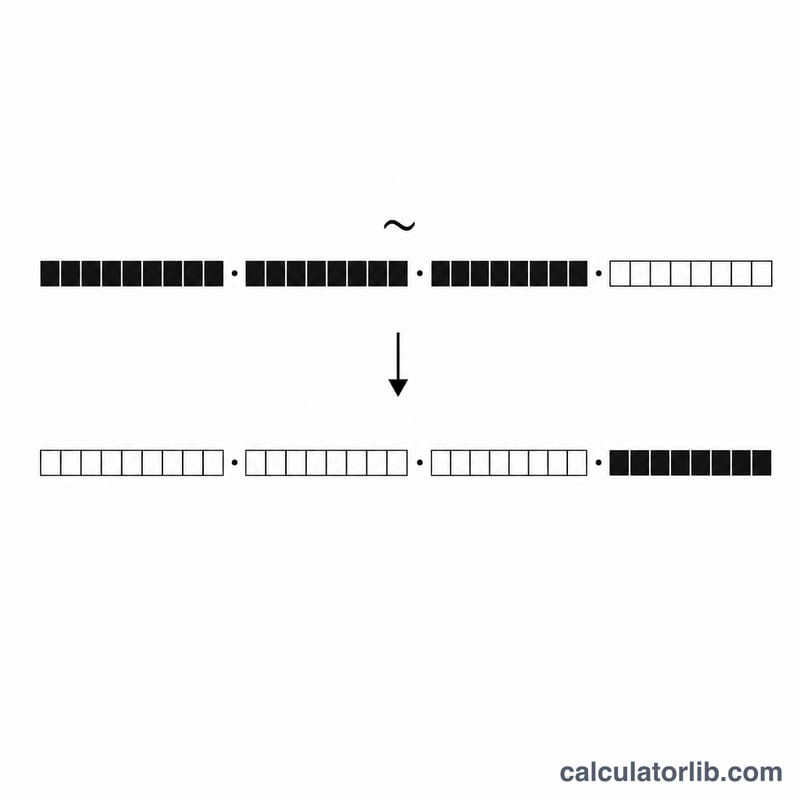
A reverse subnet mask — also called a wildcard mask — is the bitwise inverse of a standard subnet mask. Where a subnet mask uses 1s to identify the network portion of an IP address, a wildcard mask uses 0s for the bits that must match and 1s for the bits that can vary. Wildcard masks are used heavily in networking, especially in Cisco access control lists (ACLs) and OSPF configuration, where the device expects a wildcard rather than a normal mask.
This calculator takes one input — your Subnet Mask (for example, 255.255.255.0) — and instantly returns the reverse mask along with several useful related values: the CIDR prefix length, the total number of hosts, and the number of usable hosts.
How to Use the Calculator
- Subnet Mask: Enter the dotted-decimal mask you want to convert, such as
255.255.255.192. - Submit to receive the reverse (wildcard) mask, the CIDR notation, total hosts, and usable hosts.
The Formula Behind It
The tool performs four simple calculations:
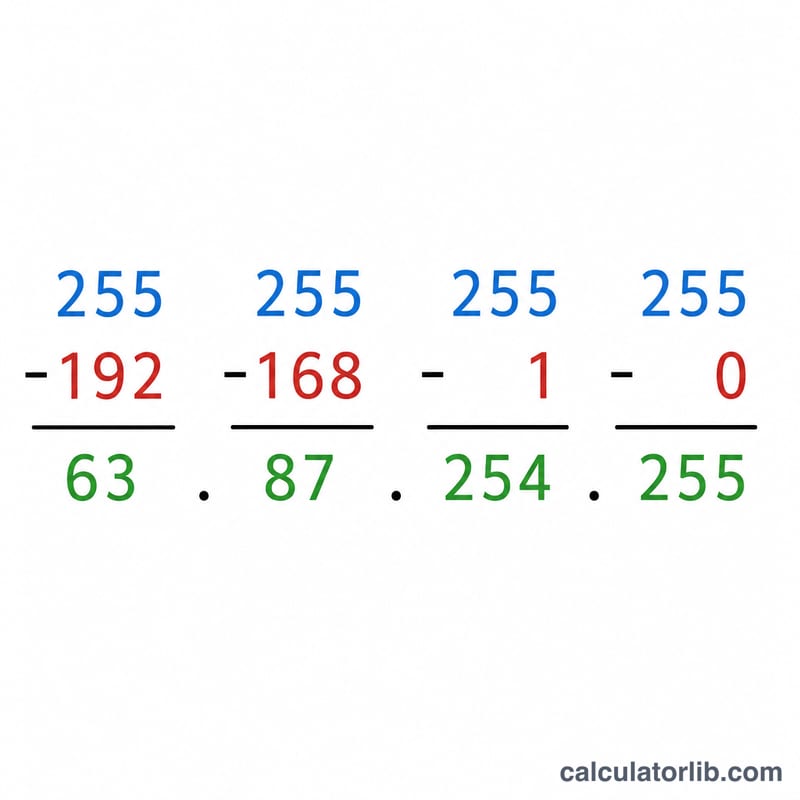
$$\text{Wildcard Mask} = 255.255.255.255 - \text{Subnet Mask}$$- Wildcard mask: each octet is subtracted from 255 (\(255 - \text{octet}\)).
- CIDR prefix: the mask is converted to binary and the number of 1 bits is counted.
- Total hosts: \(2^{(32 - \text{CIDR})}\).
- Usable hosts: total hosts minus 2 (one for the network address, one for the broadcast address), with a floor of 0.
Worked Example
Suppose you enter 255.255.255.0:
- Wildcard mask: \(255-255,\ 255-255,\ 255-255,\ 255-0\) =
0.0.0.255 - CIDR: the binary form has 24 ones, so the prefix is /24
- Total hosts: $$2^{(32 - 24)} = 2^{8} = 256$$
- Usable hosts: \(256 - 2 = 254\)
Common Subnet Masks and Wildcard Masks (CIDR /8 to /32)
The wildcard mask is the bitwise inverse of the subnet mask: each octet is 255 minus the subnet mask octet. The table covers common IPv4 prefixes.
| CIDR prefix | Subnet mask | Wildcard mask | Total addresses | Usable hosts |
|---|---|---|---|---|
| /8 | 255.0.0.0 | 0.255.255.255 | 16,777,216 | 16,777,214 |
| /16 | 255.255.0.0 | 0.0.255.255 | 65,536 | 65,534 |
| /20 | 255.255.240.0 | 0.0.15.255 | 4,096 | 4,094 |
| /22 | 255.255.252.0 | 0.0.3.255 | 1,024 | 1,022 |
| /24 | 255.255.255.0 | 0.0.0.255 | 256 | 254 |
| /25 | 255.255.255.128 | 0.0.0.127 | 128 | 126 |
| /26 | 255.255.255.192 | 0.0.0.63 | 64 | 62 |
| /27 | 255.255.255.224 | 0.0.0.31 | 32 | 30 |
| /28 | 255.255.255.240 | 0.0.0.15 | 16 | 14 |
| /29 | 255.255.255.248 | 0.0.0.7 | 8 | 6 |
| /30 | 255.255.255.252 | 0.0.0.3 | 4 | 2 |
| /31 | 255.255.255.254 | 0.0.0.1 | 2 | 2 (point-to-point, RFC 3021) |
| /32 | 255.255.255.255 | 0.0.0.0 | 1 | 1 (single host) |
For prefixes from /8 to /30, usable hosts = total addresses − 2, because the network and broadcast addresses are reserved. This rule does not apply to /31 and /32. A /31 has no network or broadcast address under RFC 3021, so both of its addresses can be used on a point-to-point link. A /32 identifies one host (for example a loopback address or a host route).
Interpreting Your Wildcard Mask
A wildcard mask tells a device which bits of an address to compare. A 0 bit means the corresponding address bit must match exactly. A 1 bit means the bit is ignored, so any value is accepted. This is the opposite of a subnet mask, where 1 bits mark the network portion.
Example: for the subnet mask 255.255.255.0, the wildcard is 255.255.255.255 − 255.255.255.0 = 0.0.0.255.
Usage examples (Cisco IOS syntax)
access-list 10 permit 192.168.1.0 0.0.0.255permits any source address from 192.168.1.0 to 192.168.1.255. The first three octets must match and the last octet can be anything.network 10.0.0.0 0.255.255.255 area 0(OSPF) enables OSPF on every interface whose address begins with 10, and places it in area 0.
Special wildcard masks
- 0.0.0.0: every bit must match, so it matches exactly one host. It is equivalent to the keyword
hostin a Cisco ACL. - 255.255.255.255: no bits need to match, so it matches any address. It is equivalent to the keyword
any(with address 0.0.0.0).
Valid subnet masks
A valid subnet mask is a run of contiguous 1s followed by contiguous 0s (for example 255.255.255.192, but not 255.0.255.0). The inverse of a valid subnet mask is therefore a run of 0s followed by 1s. Wildcard masks used in ACLs on some platforms can be non-contiguous (for example 0.0.0.254 to match odd or even addresses). Such a pattern is not the inverse of any valid subnet mask, so enter a valid subnet mask in the calculator. Syntax and wildcard support vary by vendor, so check your device documentation.
Frequently Asked Questions
Why does the wildcard for /24 come out as 0.0.0.255? Because the wildcard is the exact inverse of the mask — the bits the mask locks (the network) become 0, and the host bits become 1, here covering the final 256-address octet.
Where do I actually use a wildcard mask? Most commonly in Cisco IOS access lists and OSPF network statements, which require wildcard masks instead of standard subnet masks.
Why subtract 2 for usable hosts? The first address in a subnet is reserved as the network identifier and the last as the broadcast address, neither of which can be assigned to a device.