What this calculator does
The Video Streaming Buffer Time Calculator estimates how long it takes to download or pre-buffer a streaming video over a given internet connection. Streaming players often load a portion of the video into a buffer before playback starts so the picture does not stall. Knowing the buffer time helps you judge whether a connection (for example a modest 400 kbps link) is fast enough for smooth playback.
The formula explained
Video size is measured in megabytes (MB) while connection speed is measured in kilobits per second (kbps). Because one megabyte equals 8000 kilobits, the full download time in seconds is:
$$t = \frac{S \times 8000}{R}$$Here \(S\) = video size in MB, \(R\) = connection speed in kbps, and \(t\) = time in seconds. If you only pre-buffer a portion \(p\) (a percentage) of the video before hitting play, the buffer time is:
$$t_b = t \times \frac{p}{100}$$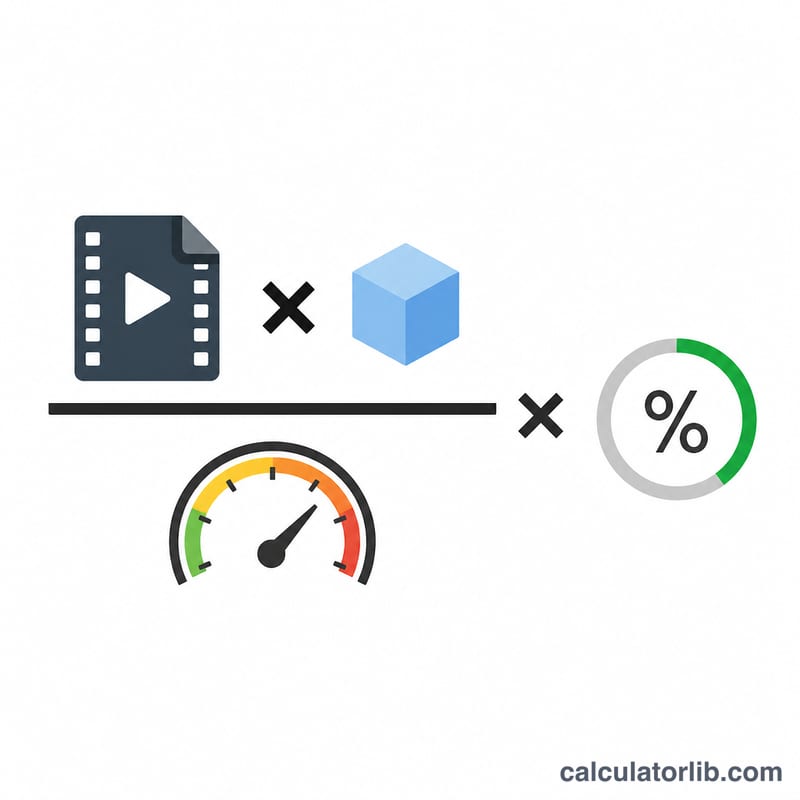
How to use it
Enter the size of the video file in MB, your connection speed in kbps, and the percentage of the video you want buffered before playback. The calculator returns the buffer time and the full download time in both seconds and minutes.
Worked example
Suppose a video is \(100\) MB and your connection runs at \(400\) kbps, and you want the entire clip buffered (\(p = 100\%\)). The download time is:
$$t = \frac{100 \times 8000}{400} = 2000\,\text{s}$$That is about \(33.3\) minutes to fully buffer the video at 400 kbps.
Recommended Speeds for Streaming Quality
Streaming playback is smooth only when your download speed is at least equal to the video's bitrate. The values below are widely-published industry guidelines used by major streaming services; actual requirements vary by codec (H.264, HEVC, AV1), frame rate, and provider. They are general recommendations rather than a single national or legal standard.
| Resolution | Common label | Recommended speed |
|---|---|---|
| 480p | SD | ~1.5–3 Mbps |
| 720p | HD | ~3–5 Mbps |
| 1080p | Full HD | ~5–8 Mbps |
| 2160p | 4K UHD | ~15–25 Mbps |
Rule of thumb: for uninterrupted playback your connection speed should be greater than or equal to the video's bitrate. When several devices share one connection, add each stream's requirement together. Speeds well above the bitrate let the player build a buffer ahead of time, reducing stalls when the network fluctuates.
Data and Speed Unit Conversions
Buffer-time math mixes storage units (megabytes) with speed units (kilobits or megabits per second). The key step is converting bytes to bits: since 1 byte = 8 bits, a file's size in bits is 8 times its size in bytes. Internet service providers use the decimal (base-1000) convention for network units, so this article uses 1 MB = 8000 kilobits = 8 megabits.
| From | Equals |
|---|---|
| 1 byte | 8 bits |
| 1 MB | 8000 kilobits = 8 megabits |
| 1 Mbps | 1000 kbps |
| 1 GB | 8000 megabits = 8,000,000 kilobits |
Example speed conversions:
| Speed | In kbps |
|---|---|
| 400 kbps | 400 kbps |
| 5 Mbps | 5000 kbps |
| 25 Mbps | 25000 kbps |
Example size conversions:
| Video size | In megabits | In kilobits |
|---|---|---|
| 100 MB | 800 megabits | 800,000 kilobits |
| 1 GB (1000 MB) | 8000 megabits | 8,000,000 kilobits |
These conversions are why the buffer-time formula multiplies the size in MB by 8000 before dividing by the speed in kbps: \( \text{bits} = \text{MB} \times 8000 \text{ (kilobits per MB)} \).
Buffer Time Across Common Speeds
Applying the full-download formula \( t = \dfrac{S \times 8000}{R} \) — where \(S\) is the video size in MB and \(R\) is the speed in kbps — gives the time to download the whole file (100% buffer). For a fixed 100 MB video (\(100 \times 8000 = 800{,}000\) kilobits):
| Speed | Speed (kbps) | Download time (s) | Download time (min) |
|---|---|---|---|
| 400 kbps | 400 | 2000 | ~33.3 |
| 1 Mbps | 1000 | 800 | ~13.3 |
| 5 Mbps | 5000 | 160 | ~2.7 |
| 25 Mbps | 25000 | 32 | ~0.5 |
Worked example — 100 MB at 400 kbps, downloading the full file (buffer = 100%):
$$ t = \frac{100 \times 8000}{400} \times \frac{100}{100} = \frac{800{,}000}{400} \times 1 = 2000 \text{ s} \approx 33.3 \text{ min} $$
Because time is inversely proportional to speed, a 100 MB file that needs about 33 minutes at 400 kbps finishes in roughly 32 seconds at 25 Mbps — a 62.5× faster connection. To estimate only a partial pre-load rather than the whole file, set the buffer percentage below 100; for example, buffering 10% of the same file at 400 kbps takes \( 2000 \times \tfrac{10}{100} = 200 \) seconds. Larger files scale linearly: a 1 GB (1000 MB) video takes ten times as long as the 100 MB rows above at any given speed.
FAQ
Why 8000 and not 8192? This tool uses the decimal convention where 1 MB = 8000 kilobits (1 MB = 8 megabits, 1 megabit = 1000 kilobits), which matches how ISPs advertise speeds.
Does this account for streaming overhead? No. It gives a clean theoretical estimate. Real playback includes protocol overhead and variable throughput, so allow extra margin.
What speed do I need for no buffering? Playback is smooth when your connection speed is at least the video bitrate. If buffer time keeps growing, your speed is below the video bitrate.