
What this calculator does
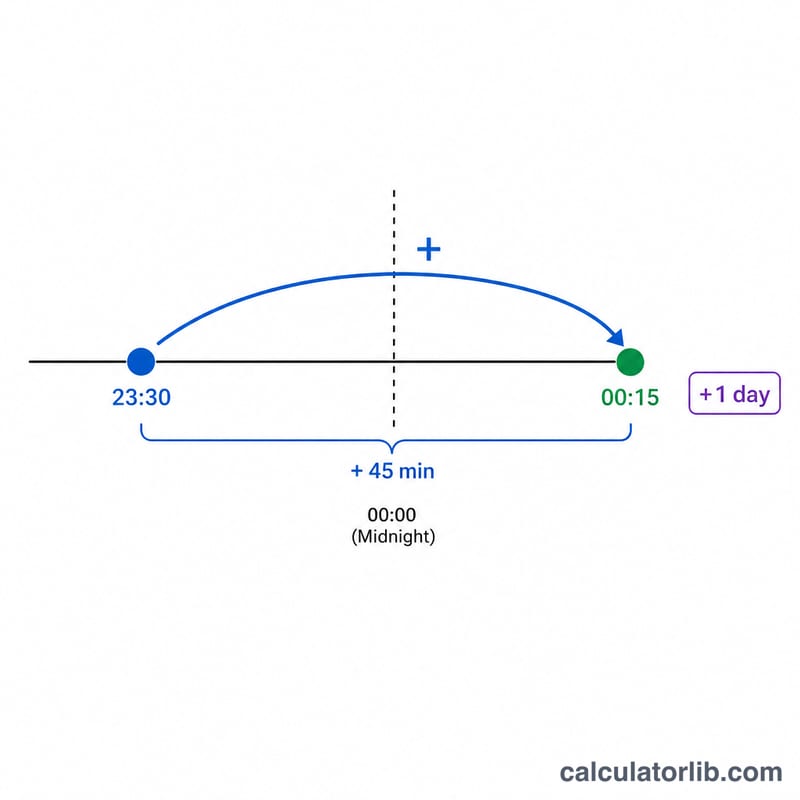
The Add Minutes to a Time Calculator takes a starting clock time and a number of minutes, then tells you the resulting time on a 24-hour clock. It correctly wraps around midnight, so adding 90 minutes to 23:30 gives 01:00 the next day, and it also accepts negative values to subtract minutes.
How to use it
Enter the start hour (0–23) and start minute (0–59), then type how many minutes you want to add. Use a negative number to go backwards in time. The result shows the new time in HH:MM format, the total minutes since midnight, and a day offset (+1 means the next day, −1 means the previous day).
The formula explained
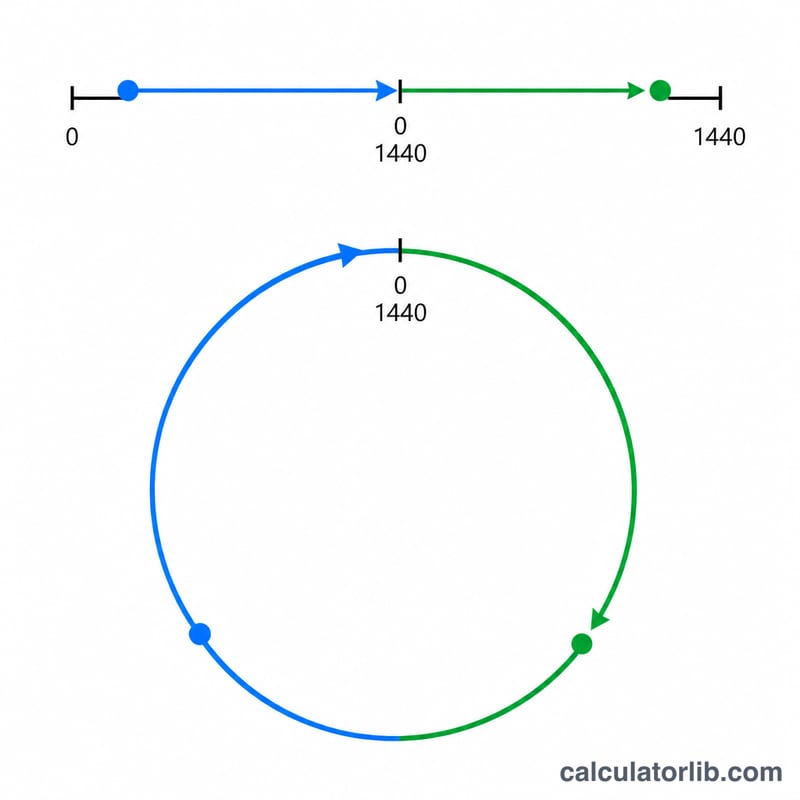
First the start time is converted to minutes since midnight: \(\text{startMinutes} = \text{hour} \times 60 + \text{minute}\). The minutes to add are summed, then the modulo operation by 1440 (the number of minutes in a day) wraps the value into a single day. A double-modulo, \(((\text{total} \bmod 1440) + 1440) \bmod 1440\), keeps the answer positive even when subtracting. Finally the wrapped total is split back into hours and minutes.
$$\text{newTime} = (\text{startMinutes} + \text{addMinutes}) \bmod 1440$$$$\text{newTotal} = ((\text{startMinutes} + \text{addMinutes}) \bmod 1440 + 1440) \bmod 1440$$$$\text{hour} = \left\lfloor \tfrac{\text{newTotal}}{60} \right\rfloor,\quad \text{min} = \text{newTotal} \bmod 60$$
Worked example
Start at 09:30 and add 90 minutes. Start minutes = \(9 \times 60 + 30 = 570\). Total = \(570 + 90 = 660\). \(660 \bmod 1440 = 660\). Hour = \(660 \div 60 = 11\), minute = \(660 \bmod 60 = 0\), so the new time is 11:00 on the same day.
More Worked Examples
Each example follows the same formula, \( T = (((60\,h + m + a) \bmod 1440) + 1440) \bmod 1440 \), then splits \(T\) into a new hour \(\lfloor T/60 \rfloor\) and new minute \(T \bmod 60\). There are 1440 minutes in a day.
Example 1 — Midnight rollover: 23:30 + 90 minutes
Convert the start time to minutes since midnight and add:
$$60 \times 23 + 30 + 90 = 1380 + 30 + 90 = 1500$$Reduce modulo 1440 to wrap past midnight:
$$T = ((1500 \bmod 1440) + 1440) \bmod 1440 = 60$$Split into hours and minutes:
$$\text{Hour} = \left\lfloor \tfrac{60}{60} \right\rfloor = 1, \qquad \text{Minute} = 60 \bmod 60 = 0$$Result: 01:00, the next day (+1 day).
Example 2 — Subtraction crossing midnight: 00:15 − 30 minutes
Here the added value is negative (\(a = -30\)):
$$60 \times 0 + 15 + (-30) = -15$$The double-modulo handles the negative value, keeping the result in the range 0–1439:
$$T = ((-15 \bmod 1440) + 1440) \bmod 1440 = (-15 + 1440) \bmod 1440 = 1425$$Split into hours and minutes:
$$\text{Hour} = \left\lfloor \tfrac{1425}{60} \right\rfloor = 23, \qquad \text{Minute} = 1425 \bmod 60 = 45$$Result: 23:45, the previous day (−1 day).
Example 3 — More than a full day: 12:00 + 1500 minutes
1500 minutes is 25 hours, so the clock should advance one full day and then one extra hour:
$$60 \times 12 + 0 + 1500 = 720 + 1500 = 2220$$Reduce modulo 1440 (subtracting one whole day of 1440 minutes):
$$T = ((2220 \bmod 1440) + 1440) \bmod 1440 = 780$$Split into hours and minutes:
$$\text{Hour} = \left\lfloor \tfrac{780}{60} \right\rfloor = 13, \qquad \text{Minute} = 780 \bmod 60 = 0$$Result: 13:00, the next day (+1 day).
FAQ
Can I add more than 24 hours? Yes. The day offset tells you how many full days forward the result lands.
Does it work for subtracting minutes? Yes — enter a negative number in the minutes field and the time rolls back, showing a negative day offset if it crosses midnight.
Is this 12-hour or 24-hour? Input and output use the 24-hour clock; 13:00 equals 1:00 PM.