
What is the Add Minutes Calculator?
The Add Minutes Calculator lets you add (or subtract) any number of minutes to a starting clock time and instantly returns the resulting time on a 24-hour clock. It automatically carries minutes into hours and rolls hours over midnight, reporting how many days forward or backward the result lands.
How to use it
Enter the start hour (0–23) and start minute (0–59), then type the number of minutes you want to add. Use a negative number to subtract minutes. The calculator shows the new time in HH:MM format, the day offset, and the total minutes counted from midnight.
The formula explained
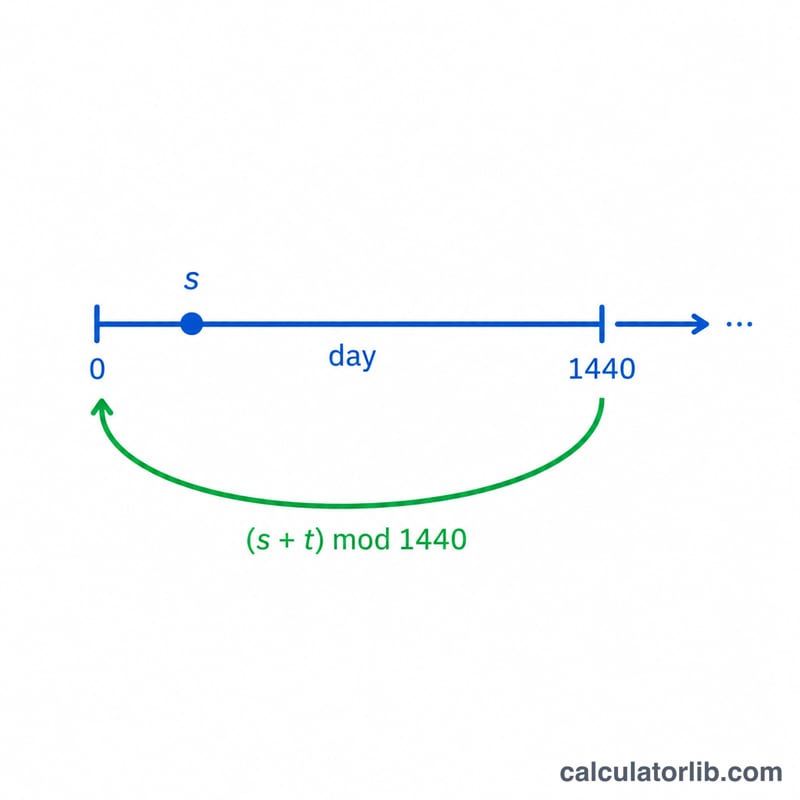
First the start time is converted to total minutes from midnight: $$T = H \times 60 + M + N$$ To display this on a clock the value is reduced modulo 1440 (the number of minutes in a day). The resulting hour is the integer part of that remainder divided by 60, and the minute is the remainder modulo 60. The day offset is the number of full days crossed, found by flooring \(T \div 1440\).
Worked example
Start at 09:30 and add 90 minutes. $$T = 9 \times 60 + 30 + 90 = 630 \text{ minutes}$$ \(630 \bmod 1440 = 630\), which is 10 hours and 30 minutes, so the result is 11:00 with a day offset of 0. Adding 1000 minutes to 23:00 (\(1380 + 1000 = 2380\)) gives \(2380 \bmod 1440 = 940\) → 15:40 with a day offset of 1.
Minutes to Hours and Minutes
Because the calculator works internally in total minutes, it helps to know how common minute amounts break down into hours, minutes, and days. To convert any minute count, divide by 60 for whole hours and take the remainder as leftover minutes; divide by 1440 for whole days.
| Minutes | Hours & minutes | Decimal hours | Days |
|---|---|---|---|
| 15 | 0 h 15 min | 0.25 h | — |
| 30 | 0 h 30 min | 0.5 h | — |
| 45 | 0 h 45 min | 0.75 h | — |
| 60 | 1 h 0 min | 1 h | — |
| 90 | 1 h 30 min | 1.5 h | — |
| 120 | 2 h 0 min | 2 h | — |
| 480 | 8 h 0 min | 8 h | ⅓ day |
| 720 | 12 h 0 min | 12 h | ½ day |
| 1440 | 24 h 0 min | 24 h | 1 day |
Worked example: 90 minutes is \(90 \div 60 = 1\) hour with a remainder of \(90 - 60 = 30\) minutes, i.e. 1 h 30 min. A full 1440 minutes equals \(1440 \div 60 = 24\) hours, which is exactly one calendar day — adding it returns you to the same clock time on the next day.
FAQ
Can I subtract minutes? Yes — enter a negative value in the "Minutes to Add" field and the result wraps backward correctly.
What does day offset mean? It is how many midnight boundaries the new time crosses: +1 means the next day, −1 the previous day.
Does it use 12 or 24 hour time? The output is on a 24-hour clock (00:00–23:59).