Backwards Tax Calculator
A Backwards Tax Calculator (or Reverse Sales Tax Calculator) is a tool that helps you determine the pre-tax amount when you know the total amount after tax has been applied. This is particularly useful when you need to find the original price of an item based on its final price.
When to Use a Backwards Tax Calculator
You might need to use a backwards tax calculator in the following situations:
- When you know the total cost (including tax) and need to determine the original price
- When calculating business expenses where you need to separate the tax amount from total payments
- When budgeting for purchases and you need to know how much of your spending goes to tax versus the actual items
How to Calculate Sales Tax Backwards
There are two common scenarios when calculating tax backwards:
1. When the amount includes tax (gross amount):
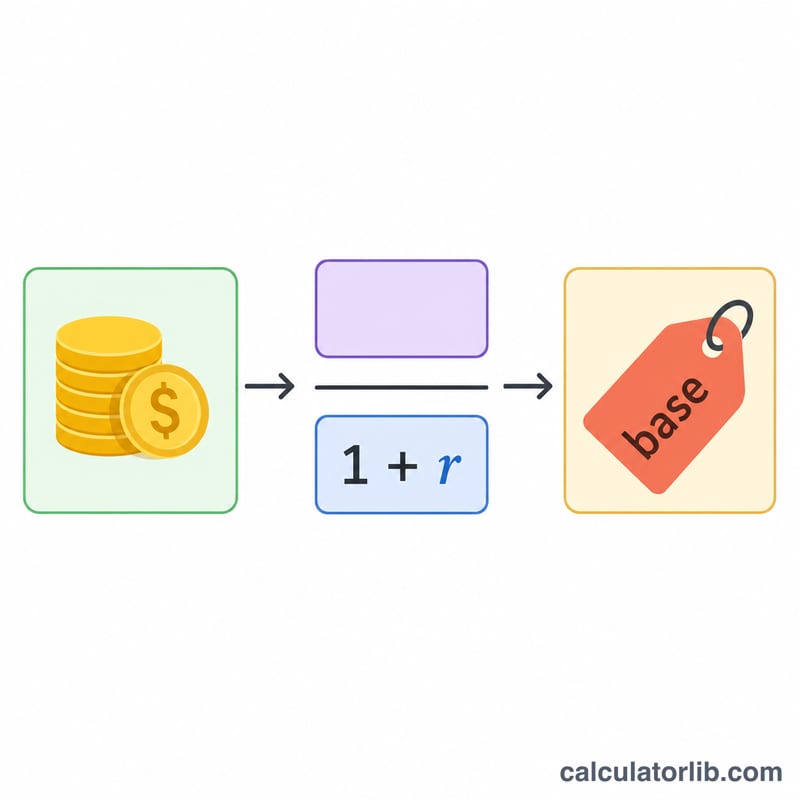
Before Tax Amount = After Tax Amount / (1 + (Tax Rate / 100))
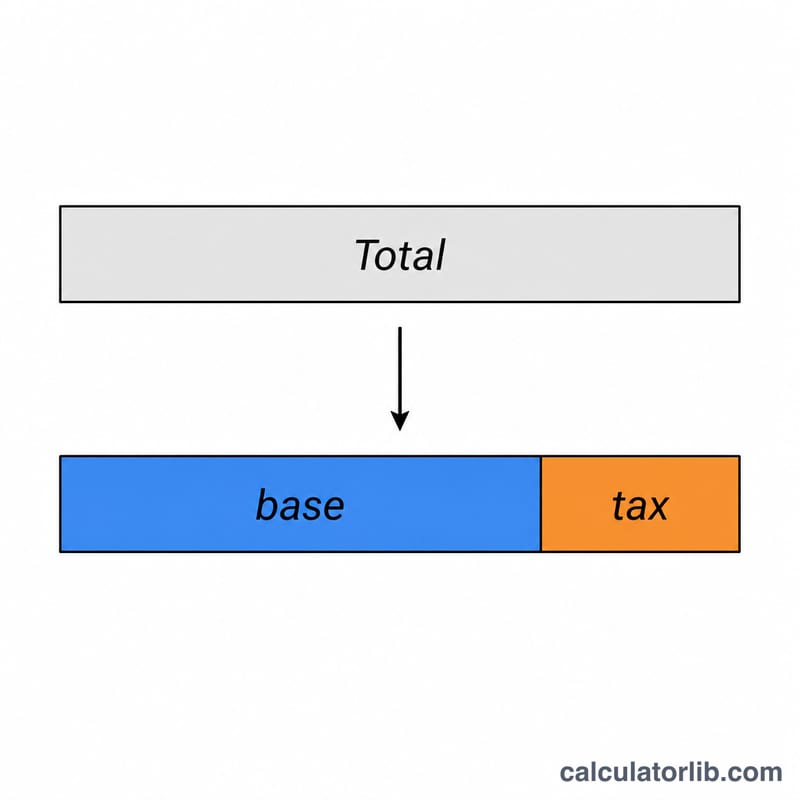
Tax Amount = After Tax Amount - Before Tax Amount
2. When the amount doesn't include tax (net amount):
Tax Amount = After Tax Amount × (Tax Rate / 100)
Before Tax Amount = After Tax Amount
After Tax Amount (including tax) = Before Tax Amount + Tax Amount
The effective tax rate (the actual percentage of tax paid relative to the pre-tax amount) can be calculated as:
Effective Tax Rate = (Tax Amount / Before Tax Amount) × 100%
Examples of Calculating Sales Tax Backwards
Example 1: Finding Original Price from a Total Including Tax
If you purchased an item for $108.90 and the sales tax rate is 8.9%, what was the pre-tax price?
| Information | Value |
|---|---|
| Total Amount (Including Tax) | $108.90 |
| Tax Rate | 8.9% |
| Pre-Tax Amount | $100.00 |
| Tax Amount | $8.90 |
Calculation: $108.90 / (1 + (8.9/100)) = $108.90 / 1.089 = $100.00
Example 2: Finding Tax Amount When Starting with Net Price
If an item costs $75 before tax and the tax rate is 6%, what will be the total cost after tax?
| Information | Value |
|---|---|
| Pre-Tax Amount | $75.00 |
| Tax Rate | 6% |
| Tax Amount | $4.50 |
| Total Amount (Including Tax) | $79.50 |
Calculation: Tax Amount = $75 × (6/100) = $4.50
Total = $75 + $4.50 = $79.50
Example 3: Calculating Business Expense with Different Tax Rate
Your business made a purchase of $1,230 including tax. If the tax rate is 23%, how much was the pre-tax amount for your accounting records?
| Information | Value |
|---|---|
| Total Amount (Including Tax) | $1,230.00 |
| Tax Rate | 23% |
| Pre-Tax Amount | $1,000.00 |
| Tax Amount | $230.00 |
Calculation: $1,230 / (1 + (23/100)) = $1,230 / 1.23 = $1,000
Related Tax Calculations
Understanding how to calculate taxes backwards can be helpful for various financial planning situations. You might also find these related calculators useful:
- Sales Tax Calculator - Calculate sales tax on purchases
- Discount Calculator - Calculate discount prices
- VAT Calculator - Calculate Value Added Tax
- Profit Margin Calculator - Calculate profit margins on sales
- Percent Off Calculator - Calculate savings from percentage discounts
Tips for Using the Backwards Tax Calculator
Keep the following tips in mind when using a backwards tax calculator:
- Always ensure you know whether your starting amount includes tax (gross) or excludes tax (net)
- Use the correct tax rate for your location as sales tax varies by state, county, and even city
- For business accounting, always keep records of both the pre-tax and post-tax amounts
- Remember that some items may be tax-exempt or have different tax rates based on local regulations
Key Terms and Definitions
A backwards (reverse) tax calculation starts from a total that already contains tax and works back to the amount the tax was charged on. The terms below describe each part of that calculation.
- Gross amount (tax-inclusive total) — the amount actually paid or invoiced, tax included. This is the figure you enter as After-Tax Amount. In VAT and GST countries it is usually the price shown on the shelf label; in the United States it is normally the receipt total after sales tax is added at the register.
- Net amount (pre-tax, tax-exclusive) — the price of the goods or services before tax. This is the calculator's main output and, in most bookkeeping systems, the figure posted to an expense or revenue account.
- Tax amount — the difference between gross and net: \(\text{Tax} = \text{Gross} - \text{Net}\). Equivalently, \(\text{Tax} = \text{Net} \times r\), where \(r\) is the rate written as a decimal.
- Nominal tax rate — the statutory percentage applied to the net amount (for example 20% VAT, or a 8.25% combined sales tax). It is the rate you enter in the Tax Rate (%) field.
- Effective tax rate — tax expressed as a share of a chosen base. Against the net amount it equals the nominal rate; against the gross total it is \(\dfrac{r}{1+r}\), which is always smaller. Always state which base an "effective rate" refers to.
- Divisor \((1 + r/100)\) — the single number that converts gross to net. At 7% the divisor is 1.07; at 20% it is 1.20. Reverse tax is simply division by this figure: $$\text{Net} = \frac{\text{Gross}}{1 + \dfrac{r}{100}}$$
- VAT / GST vs. sales tax — Value Added Tax (Europe, UK and many other countries) and Goods and Services Tax (Canada, Australia, New Zealand, India and others) are typically quoted inclusive in consumer prices and are collected at each stage of the supply chain, with registered businesses reclaiming input tax. United States sales tax is a single-stage retail tax that is normally quoted exclusive and added at checkout. The reverse-tax arithmetic is identical; only the convention about which price is displayed differs.
- Combined rate — in the United States, the total rate charged at a location is the sum of the state rate plus any county, city and special-district rates (for example a state rate plus a county rate plus a transit-district rate). Enter the combined rate, not the state rate alone. Canada's HST provinces work similarly, combining the federal and provincial components into one rate.
Common Tax Rates and Their Reverse-Tax Divisors
To remove tax from a tax-inclusive total, divide by the divisor \(1 + r\) — or, equivalently, multiply by the pre-tax factor \(\dfrac{1}{1+r}\). The last column shows what fraction of the gross total the tax itself represents, \(\dfrac{r}{1+r}\); note that it is always lower than the nominal rate.
| Nominal rate | Divisor (1 + r) | Pre-tax factor 1/(1 + r) | Tax share of gross r/(1 + r) |
|---|---|---|---|
| 5% | 1.05 | 0.95238 | 4.762% |
| 6% | 1.06 | 0.94340 | 5.660% |
| 6.25% | 1.0625 | 0.94118 | 5.882% |
| 7% | 1.07 | 0.93458 | 6.542% |
| 7.5% | 1.075 | 0.93023 | 6.977% |
| 8% | 1.08 | 0.92593 | 7.407% |
| 8.25% | 1.0825 | 0.92379 | 7.621% |
| 8.9% | 1.089 | 0.91827 | 8.173% |
| 10% | 1.10 | 0.90909 | 9.091% |
| 13% | 1.13 | 0.88496 | 11.504% |
| 15% | 1.15 | 0.86957 | 13.043% |
| 20% | 1.20 | 0.83333 | 16.667% |
| 21% | 1.21 | 0.82645 | 17.355% |
| 23% | 1.23 | 0.81301 | 18.699% |
The rates above are listed because they are common round figures, not because any one of them applies to you. In the United States, the rate charged at a given address is a combined state + county + city + special-district rate that changes by jurisdiction and over time — verify it with the state department of revenue or the local tax authority (many publish an address-level rate lookup) rather than assuming a nearby city's rate. Outside the US, standard VAT/GST rates and reduced rates are set nationally and also change; check the current rate published by the relevant national tax authority before relying on a figure for filing or invoicing.
Worked check at 6.25%: a $53.13 inclusive total gives \(53.13 \div 1.0625 = 50.005 \approx 50.00\) net and $3.13 tax, and \(3.13 \div 53.13 = 5.89\%\) of the gross — close to the 5.882% shown in the table, with the small gap coming from cent rounding.
Understanding Your Results
The calculator returns three linked figures: the pre-tax (net) amount, the tax amount, and the effective rate. Here is what each one means in practice.
- The pre-tax amount is the taxable base. It is the figure that belongs in an expense record, a revenue line, or a reimbursement claim in most accounting systems, because tax is usually tracked in a separate account (recoverable input VAT/GST, or sales tax payable). For a $216.75 receipt at a combined 8.25% rate, the net amount is 200.23, from $$\frac{216.75}{1 + \dfrac{8.25}{100}} = \frac{216.75}{1.0825} = 200.23$$ leaving $16.52 of tax. A €1,000.00 invoice total at a 20% VAT rate breaks down the same way: $$\frac{1000.00}{1.20} = 833.33$$ giving 833.33 net and 166.67 of tax.
- Tax as a share of the gross is always lower than the nominal rate. In the first example the tax is 8.25% of the net amount but only \(16.52 \div 216.75 = 7.62\%\) of the total paid — matching \(\dfrac{r}{1+r}\) from the reference table. This is why multiplying a tax-inclusive total by the rate overstates the tax: at 8.25%, \(216.75 \times 0.0825 = 17.88\), about $1.36 too much. Division by \(1+r\) is the correct operation.
- Why the effective rate equals the rate you entered. For a single-rate calculation the tool derives the net amount from the rate and then reports tax ÷ net, which reconstructs the same percentage — so an effective rate matching your input is a consistency check that the split is arithmetically sound, not new information. The effective rate only diverges from the nominal rate when the base changes: when tax is measured against the gross, when several rates are blended across a receipt, or when part of the purchase is exempt.
- Expect cent-level differences from the printed receipt. Point-of-sale and invoicing systems round tax per line item, per tax group, or on the invoice total, and the rules differ by system and jurisdiction. A reverse calculation from the rounded grand total can therefore land one or two cents away from the tax line on the paper receipt. For a single-item purchase the two normally agree; for a long till receipt, a difference of a cent or two is normal and is not an error in either figure. If an exact figure is required — for a VAT/GST return or an audit trail — use the tax amount printed on the document.
- One rate at a time. The result reflects only the single rate you entered applied to the whole amount. Real receipts often mix rates: groceries or books at a reduced or zero rate alongside general merchandise at the standard rate, prescription items that are exempt, or fees such as bottle deposits, tips and certain surcharges that are not taxed at all. Splitting a mixed receipt with one blended rate produces a wrong net figure for every line. Group the lines by tax treatment, run the calculation once per group, then add the groups back together.
Rules on what is taxable, which rate applies at a given address, and how rounding must be performed are set nationally (and, in the United States, locally). This page and the calculator are informational tools for checking arithmetic — they are general information, not tax advice, and they do not determine your tax liability. For filing, invoicing or any decision with money at stake, confirm the applicable rate and treatment with the relevant tax authority or a qualified tax professional in your jurisdiction.