
What is the Byte Converter?
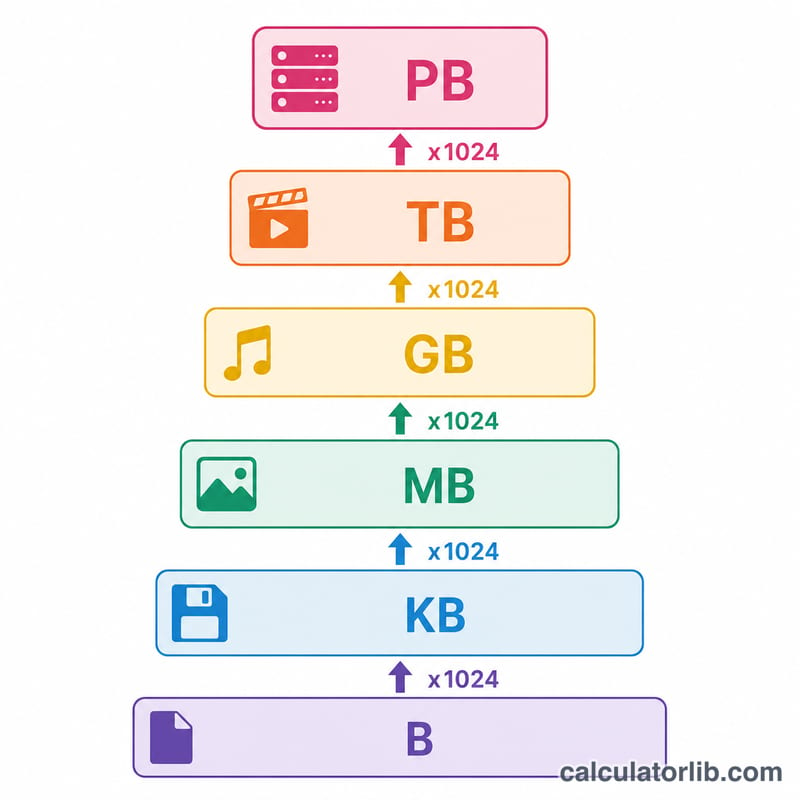
The Byte Converter turns a digital storage quantity from one unit into another — bytes, kilobytes (KB), megabytes (MB), gigabytes (GB), terabytes (TB) and petabytes (PB). It uses the binary base of 1024, the convention used by most operating systems and storage tools, where each step up multiplies by 1024 rather than 1000.
How to use it
Enter a numeric value, choose the unit you are converting from, then choose the unit you want to convert to. The result shows the equivalent value in the target unit along with the total number of bytes. It works for whole numbers and decimals alike.
The formula explained
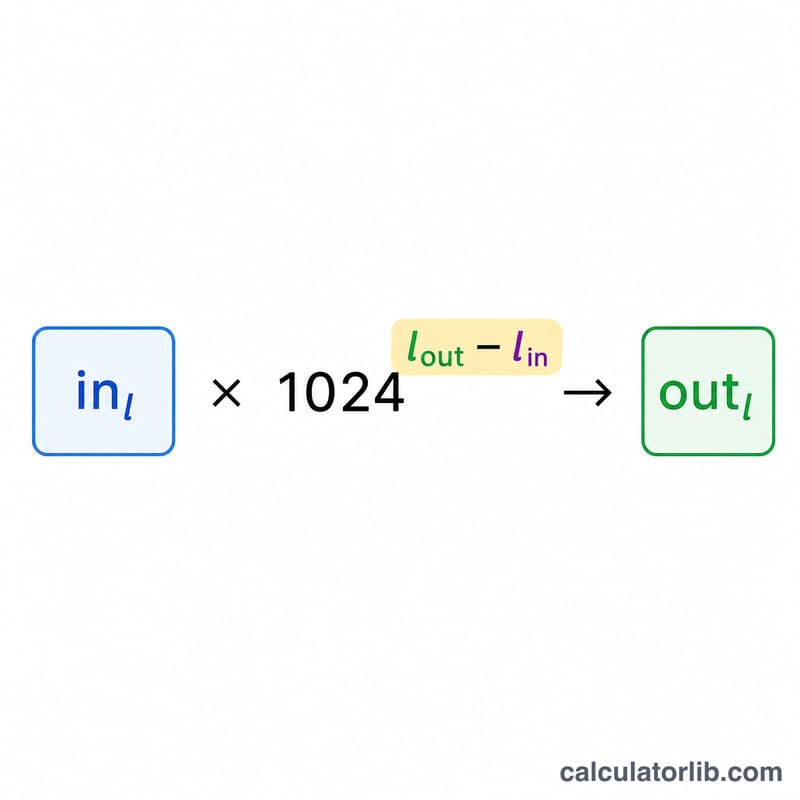
Each unit is assigned a level: B=0, KB=1, MB=2, GB=3, TB=4, PB=5. The conversion is value_out = value_in × 1024^(level_in − level_out). If you convert up the scale (e.g. MB to GB) the exponent is negative, so you divide; converting down the scale (e.g. GB to MB) the exponent is positive, so you multiply. This single formula handles every pair of units in both directions.
Worked example
Convert 1 GB to MB. GB has level 3 and MB has level 2, so the exponent is 3 − 2 = 1: 1 × 1024^1 = 1024 MB. To go the other way, 1024 MB to GB gives 1024 × 1024^(2−3) = 1024 × (1/1024) = 1 GB.
Byte Conversion Table
This converter uses the binary base, where each step up multiplies by 1024. The general relationship is:
$$1\text{ unit} = 1024^{n}\text{ bytes}$$where \(n = 0\) for the byte, \(1\) for KB, \(2\) for MB, and so on. The table below lists each unit, its exponent \(n\), its value in bytes, and its equivalent in the unit one step below.
| Unit | Exponent (\(n\)) | Value in bytes (\(1024^{n}\)) | Equivalent |
|---|---|---|---|
| Byte (B) | 0 | 1 | 1 B (smallest unit here) |
| Kilobyte (KB) | 1 | 1,024 | 1 KB = 1,024 B |
| Megabyte (MB) | 2 | 1,048,576 | 1 MB = 1,024 KB = 1,048,576 B |
| Gigabyte (GB) | 3 | 1,073,741,824 | 1 GB = 1,024 MB = 1,073,741,824 B |
| Terabyte (TB) | 4 | 1,099,511,627,776 | 1 TB = 1,024 GB |
| Petabyte (PB) | 5 | 1,125,899,906,842,624 | 1 PB = 1,024 TB |
Worked example: to convert 4 GB to MB, the exponent difference is \(3 - 2 = 1\), so \(\text{Result} = 4 \times 1024^{(3-2)} = 4 \times 1024 = \)4,096 MB.
Definitions & Glossary
- Byte (B)
- The basic unit of digital storage, equal to 8 bits. A single byte can represent one character of text (e.g., the letter "A") in common encodings such as ASCII.
- Kilobyte (KB)
- In the binary convention used by this tool, 1 KB = 1,024 bytes (\(2^{10}\)). Roughly the size of a short plain-text note or a small icon.
- Megabyte (MB)
- 1 MB = 1,024 KB = 1,048,576 bytes (\(2^{20}\)). Comparable to a high-quality photo or about a minute of compressed audio.
- Gigabyte (GB)
- 1 GB = 1,024 MB = 1,073,741,824 bytes (\(2^{30}\)). Typical scale for movies, large apps, and system memory modules.
- Terabyte (TB)
- 1 TB = 1,024 GB = 1,099,511,627,776 bytes (\(2^{40}\)). A common capacity for modern hard drives and SSDs.
- Petabyte (PB)
- 1 PB = 1,024 TB = 1,125,899,906,842,624 bytes (\(2^{50}\)). Used at the scale of large data centers and enterprise storage arrays.
- Binary base (1024)
- The convention where each successive unit is 1,024 (\(2^{10}\)) times the previous one. It reflects how computer memory is addressed in powers of two, and is the base used by this converter.
- IEC binary units (KiB, MiB, GiB)
- To avoid ambiguity, the International Electrotechnical Commission defines explicit binary prefixes: 1 kibibyte (KiB) = 1,024 B, 1 mebibyte (MiB) = 1,024 KiB = 1,048,576 B, 1 gibibyte (GiB) = 1,024 MiB. These names mean exactly the same quantities this tool calls KB, MB, and GB.
- Decimal SI base (1000)
- The International System of Units defines prefixes in powers of 1,000: 1 KB = 1,000 B, 1 MB = 1,000,000 B, 1 GB = 1,000,000,000 B. Storage drive manufacturers typically advertise capacity using this decimal base, which is why a "1 TB" drive (1,000,000,000,000 bytes) shows as roughly 0.91 TiB (about 931 GiB) in an operating system that counts in binary.
FAQ
Does this use 1000 or 1024? It uses 1024, the binary (IEC-style) base most software reports. Drive manufacturers often use 1000, which is why a "1 TB" disk shows as roughly 931 GiB in your OS.
Can I convert decimals? Yes — values such as 1.5 GB or 0.25 TB are fully supported.
What's the largest unit? This tool goes up to petabytes (PB), which is 1024 TB or 1024^5 bytes.