
What This Calculator Does
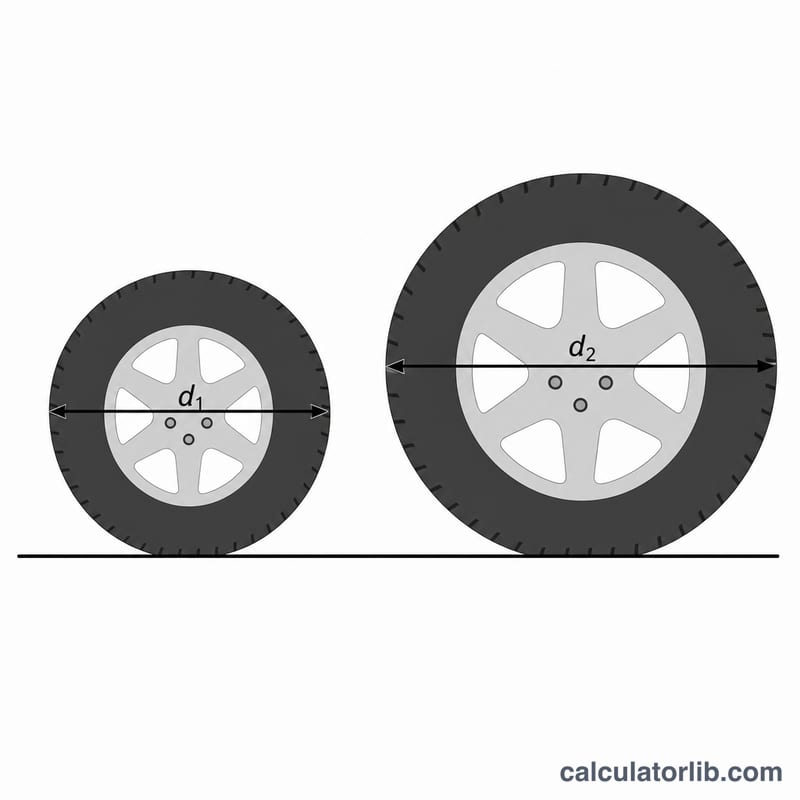
When you fit tires of a different size than your vehicle came with, your speedometer no longer reads correctly. The speedometer is calibrated for a specific tire diameter, so a larger tire makes you travel farther per wheel revolution — meaning your true speed is higher than the dial shows. This tool calculates your actual speed and the resulting speedometer error from any tire-size change.
How to Use It
Enter the speed your speedometer currently displays, the original (factory) tire diameter, and the new tire diameter. Both diameters must use the same unit (inches, millimetres, or whatever you prefer) — the ratio is what matters. The result shows your corrected actual speed in the same unit as the speed you entered, plus how far off the speedometer is in absolute and percentage terms.
The Formula Explained
Actual speed equals the indicated speed multiplied by the ratio of new diameter to old diameter: $$\text{Actual} = \text{Indicated} \times (\text{New} \div \text{Old})$$. A bigger new tire (ratio > 1) means you are actually going faster than indicated; a smaller tire means you are going slower. The speedometer error is simply the percentage difference between actual and indicated speed.
Worked Example
Suppose your speedometer reads 60 mph, your original tires were 26.3 inches in diameter, and your new tires are 27.5 inches. Actual speed = $$60 \times (27.5 \div 26.3) = 60 \times 1.04563 \approx 62.74 \text{ mph}.$$ So when the dial shows 60, you are really doing about 62.7 mph — an error of roughly +4.6%.
FAQ
Do bigger tires make my speedometer read low or high? Bigger tires make the speedometer read low — you are actually traveling faster than it shows.
What counts as tire diameter? The overall outside diameter of the mounted tire, not the wheel/rim diameter. You can compute it from a tire size code or measure it directly.
Does the unit matter? Use any unit for diameter as long as both values match. The speed output stays in whatever unit you entered the indicated speed in.