
What is the BigQuery Cost Calculator?
This calculator estimates your monthly Google Cloud BigQuery bill under the on-demand pricing model, where you pay for the amount of data your queries scan plus the data you keep in storage. It helps you forecast costs before running heavy analytics workloads and spot the impact of scanning large tables repeatedly. Pricing is region-dependent and is set in USD by Google Cloud — enter the rates that apply to your project's region.
How to use it
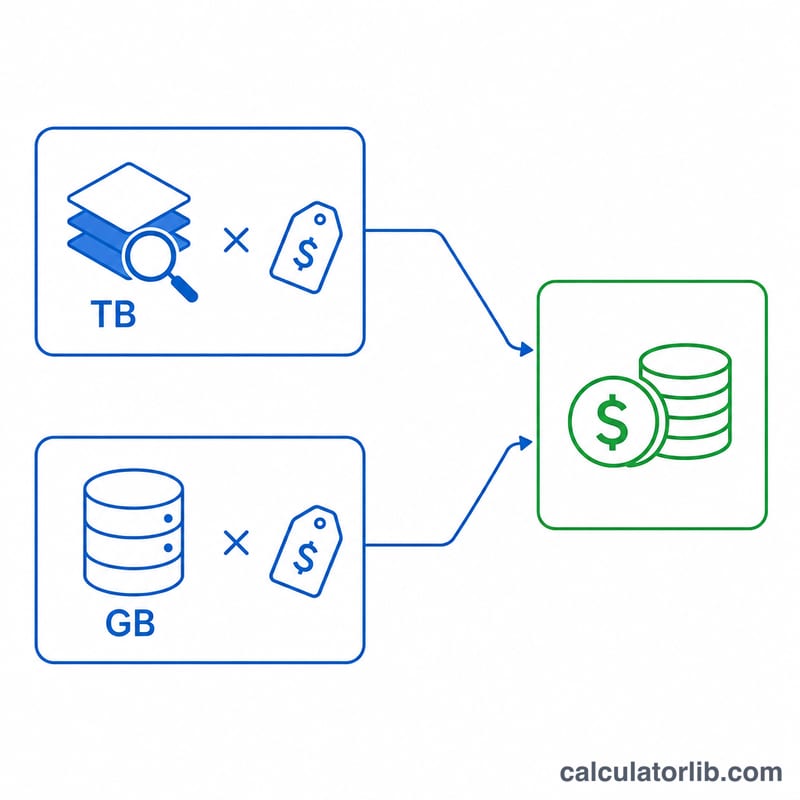
Enter the average data scanned per query in terabytes, how many queries you run per month, and your on-demand query price per TB (Google's default is around $6.25/TB in many regions). Add your free query tier (the first 1 TB per month is typically free), then your active storage in GB and the storage price per GB/month (roughly $0.02 for active storage). The tool multiplies billable data by the query price and adds storage cost.
The formula explained
Total scanned = data per query × number of queries. Billable scanned = total scanned − free tier (never below 0). Query cost = billable scanned × price per TB. Storage cost = storage GB × price per GB. The monthly estimate is query cost + storage cost.
$$\text{Total Cost} = \max\!\left(Q \cdot D - F,\; 0\right) \cdot P_q \;+\; S \cdot P_s$$
$$\text{where}\quad \left\{ \begin{aligned} D &= \text{Data Scanned (TB)} \\ Q &= \text{Queries / Month} \\ F &= \text{Free Tier (TB)} \\ P_q &= \text{Query Price (\$/TB)} \\ S &= \text{Storage (GB)} \\ P_s &= \text{Storage Price (\$/GB)} \end{aligned} \right.$$
Worked example
Suppose each query scans 1 TB, you run 1,000 queries a month, the price is $6.25/TB, and the free tier is 1 TB. Total scanned = 1,000 TB; billable = 999 TB; query cost = \(999 \times \$6.25 = \$6{,}243.75\). With 1,000 GB of storage at $0.02/GB = $20. Total = $6,263.75 per month.
$$\text{Total Cost} = \max\!\left(1000 \cdot 1 - 1,\; 0\right) \cdot 6.25 \;+\; 1000 \cdot 0.02 = \$6{,}263.75$$
BigQuery On-Demand Pricing Reference
Google BigQuery's on-demand model charges for the volume of data each query scans, plus a separate monthly charge for stored data. The rates below are the widely documented list prices for the US multi-region, quoted in USD. Pricing varies by region (for example, some regions charge more per TB), so always confirm against the current Google Cloud pricing page and your billing region.
| Component | Documented Rate (US) | Notes |
|---|---|---|
| On-demand query pricing | ~$6.25 / TB scanned | Billed on bytes processed, rounded up; minimum 10 MB per query |
| Active storage | ~$0.02 / GB / month | Tables or partitions modified within the last 90 days |
| Long-term storage | ~$0.01 / GB / month | Data not modified for 90 consecutive days (~50% discount) |
| Free query tier | 1 TB / month | First 1 TB of query data processed is free each month |
| Free storage tier | 10 GB / month | First 10 GB of storage is free each month |
In the cost formula, the query rate maps to \(P_q\) ($/TB), the storage rate to \(P_s\) ($/GB), the free query allowance to \(F\) (TB), and your stored volume to \(S\) (GB). Loading, copying, and exporting data are generally free, but streaming inserts and some other operations carry their own charges not modeled here.
Cost Across Common Workload Scenarios
The table below applies the formula \(\text{Total} = \max(Q\cdot D - F,\,0)\cdot P_q + S\cdot P_s\) using a query price of $6.25/TB, a 1 TB free tier, storage fixed at 500 GB, and storage priced at $0.02/GB/month (a $10.00 storage charge in every row). Total monthly data scanned is \(Q\cdot D\).
| Scenario | Data / Query | Queries / Month | Total Scanned | Billable (after 1 TB free) | Query Cost | Storage Cost | Total / Month |
|---|---|---|---|---|---|---|---|
| Light | 0.1 TB | 200 | 20 TB | 19 TB | $118.75 | $10.00 | $128.75 |
| Medium | 1 TB | 1,000 | 1,000 TB | 999 TB | $6,243.75 | $10.00 | $6,253.75 |
| Heavy | 5 TB | 2,000 | 10,000 TB | 9,999 TB | $62,493.75 | $10.00 | $62,503.75 |
The light scenario's query cost is computed as \((200 \times 0.1 - 1) \times 6.25 = 19 \times 6.25 = \$118.75\), plus \(500 \times 0.02 = \$10.00\) storage. These numbers make it clear that for high-volume workloads, query (scan) cost dwarfs storage — controlling bytes scanned is where the savings are.
Key Terms Explained
- Data scanned / processed bytes (\(D\))
- The volume of table data a query reads, measured in bytes and billed per TB. BigQuery bills on bytes processed regardless of how many rows are returned; selecting fewer columns reads fewer bytes.
- Queries per month (\(Q\))
- How many such queries you run monthly. Total scanned volume is \(Q \cdot D\), which the free tier \(F\) is subtracted from before applying the query price \(P_q\).
- On-demand vs. capacity (slots)
- On-demand bills per TB scanned (the model in this calculator). Capacity pricing instead reserves compute units called slots for a flat hourly or committed rate, decoupling cost from bytes scanned — better for steady, heavy usage.
- Active vs. long-term storage
- A table or partition is active storage while modified within the last 90 days (~$0.02/GB). If untouched for 90 consecutive days it becomes long-term storage at roughly half the rate (~$0.01/GB), with no change in performance.
- Free tier (\(F\))
- Each month BigQuery provides 1 TB of query processing and 10 GB of storage at no cost. In the formula \(F\) is the free query allowance subtracted from total scanned volume, floored at zero.
- Partitioning & clustering
- Techniques that organize a table so queries read only relevant segments. Effective partitioning (e.g., by date) and clustering reduce \(D\) — the bytes scanned — directly lowering on-demand cost.
- Region
- The geographic location of your dataset. Per-TB query rates and per-GB storage rates differ by region; \(P_q\) and \(P_s\) in this tool should match the region where your data lives.
FAQ
Is this exact for my bill? No — it's an estimate. Actual BigQuery costs depend on your region, edition (on-demand vs. capacity/slots), long-term vs. active storage discounts, and rounding to the nearest MB.
How do I reduce query cost? Select only needed columns, partition and cluster tables, preview with LIMIT carefully (LIMIT does not reduce scanned bytes), and use the query validator to see bytes scanned before running.
Does the free tier reset? The on-demand free analysis tier (commonly 1 TB) resets monthly. Set it to 0 if it no longer applies to your account.