
What is the Binary Multiplication Calculator?
This tool multiplies two binary (base-2) numbers and returns the product as a binary string, along with the decimal equivalents of both inputs and the result. It is a universal math tool — binary arithmetic works the same everywhere, so no country or jurisdiction applies.
How to use it
Type a binary number (only the digits 0 and 1) into each field. Any other characters are ignored, so spacing or stray symbols won't break the result. Press calculate to see the product in both binary and decimal.
The formula explained
Binary multiplication can be done bit-by-bit with shift-and-add, but the cleanest way to compute it is to convert each operand to decimal, multiply, and convert the answer back to binary. Formally:
$$P_2 = \text{bin}\!\left(\text{dec}(A_2) \times \text{dec}(B_2)\right)$$For example, the binary value 1010 equals decimal 10 because \(1\cdot 8 + 0\cdot 4 + 1\cdot 2 + 0\cdot 1 = 10\).
Worked example
Multiply 1010 × 11. First convert: \(1010_2 = 10\) and \(11_2 = 3\). Multiply in decimal:
$$10 \times 3 = 30$$Convert 30 back to binary: \(30 = 16 + 8 + 4 + 2 = 11110_2\). So \(1010 \times 11 = \)11110 in binary.
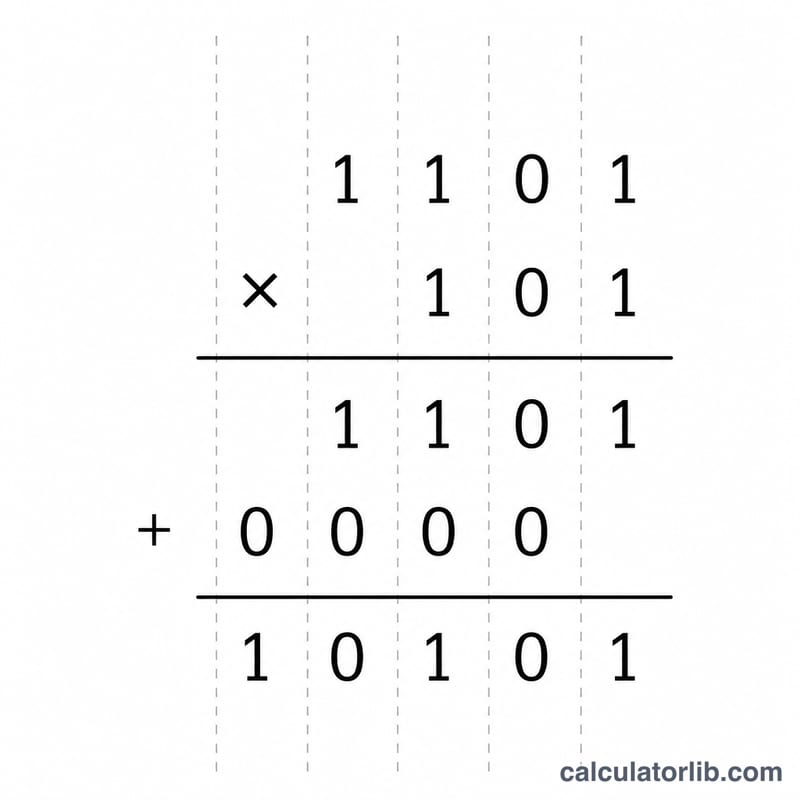
How to Multiply Binary Numbers by Hand
Binary multiplication uses the same shift-and-add long-multiplication procedure as decimal, but it is far simpler because each digit of the multiplier is either 0 or 1. Multiplying by 1 copies the multiplicand; multiplying by 0 gives a row of zeros. The only real work is shifting each partial product left by its bit position and then adding the rows together with binary carry rules.
Worked walkthrough for \((1010)_2 \times (11)_2\):
- Set up the operands. Multiplicand \(A = 1010_2 = 10\), multiplier \(B = 11_2 = 3\). The expected product is \(10 \times 3 = 30\).
- Multiply by the rightmost multiplier bit (bit 0 = 1). Since the bit is 1, copy the multiplicand: partial product \(= 1010\), shifted left 0 places.
- Multiply by the next multiplier bit (bit 1 = 1). The bit is 1, so copy the multiplicand again and shift it left by 1 position (append one trailing zero): partial product \(= 10100\).
- Drop any zero rows. If a multiplier bit had been 0, its entire row would be zeros and could be skipped. Here both rows are kept.
- Add the partial products with binary addition. Align by place value and add, carrying whenever two 1s meet (\(1+1 = 10\), write 0 carry 1):
\(\;\;\;01010\)
\(+\,10100\)
\(=\,11110\) - Read the result. The binary product is \((11110)_2\), which equals 30 in decimal — confirming \(10 \times 3 = 30\). You can verify the addition step itself as 11110.
In short: generate one shifted row per multiplier bit (zero rows for 0 bits), then sum every row using binary addition. The full product of an \(m\)-bit number and an \(n\)-bit number never exceeds \(m+n\) bits.
More Worked Examples
Each example shows the decimal conversion of both inputs, the shift-and-add partial products, and the final binary product.
Example 1 — \(111_2 \times 101_2\) (7 × 5 = 35)
- Convert: \(111_2 = 7\), \(101_2 = 5\).
- Multiplier bits (right to left) are 1, 0, 1:
- bit 0 = 1 \(\Rightarrow 111\) (shift 0)
- bit 1 = 0 \(\Rightarrow\) zero row, skipped
- bit 2 = 1 \(\Rightarrow 11100\) (shift 2)
- Add: \(00111 + 11100 = 100011\).
- Result: \((100011)_2 = \) 35, matching \(7 \times 5 = 35\).
Example 2 — \(1100_2 \times 1010_2\) (12 × 10 = 120)
- Convert: \(1100_2 = 12\), \(1010_2 = 10\).
- Multiplier \(1010_2\) bits (right to left) are 0, 1, 0, 1:
- bit 0 = 0 \(\Rightarrow\) skip
- bit 1 = 1 \(\Rightarrow 11000\) (shift 1)
- bit 2 = 0 \(\Rightarrow\) skip
- bit 3 = 1 \(\Rightarrow 1100000\) (shift 3)
- Add: \(0011000 + 1100000 = 1111000\).
- Result: \((1111000)_2 = \) 120, matching \(12 \times 10 = 120\).
Example 3 — \(1_2 \times 1101_2\) (single-bit multiplier, 1 × 13 = 13)
- Convert: \(1_2 = 1\), \(1101_2 = 13\).
- The multiplier \(1\) has a single bit equal to 1, so there is exactly one partial product with no shift: \(1101\).
- With only one row there is nothing to add.
- Result: \((1101)_2 = 13\). Multiplying any binary number by \(1\) leaves it unchanged, just as in decimal.
FAQ
What if I enter a non-binary digit? Digits other than 0 and 1 are stripped out before calculating, so only valid binary digits are used.
Does it handle large numbers? Yes — inputs are processed as 64-bit integers, so very long binary strings stay accurate up to that limit.
Why show the decimal values? Seeing the decimal form helps you verify the conversion and understand exactly what is being multiplied.