
What this calculator does
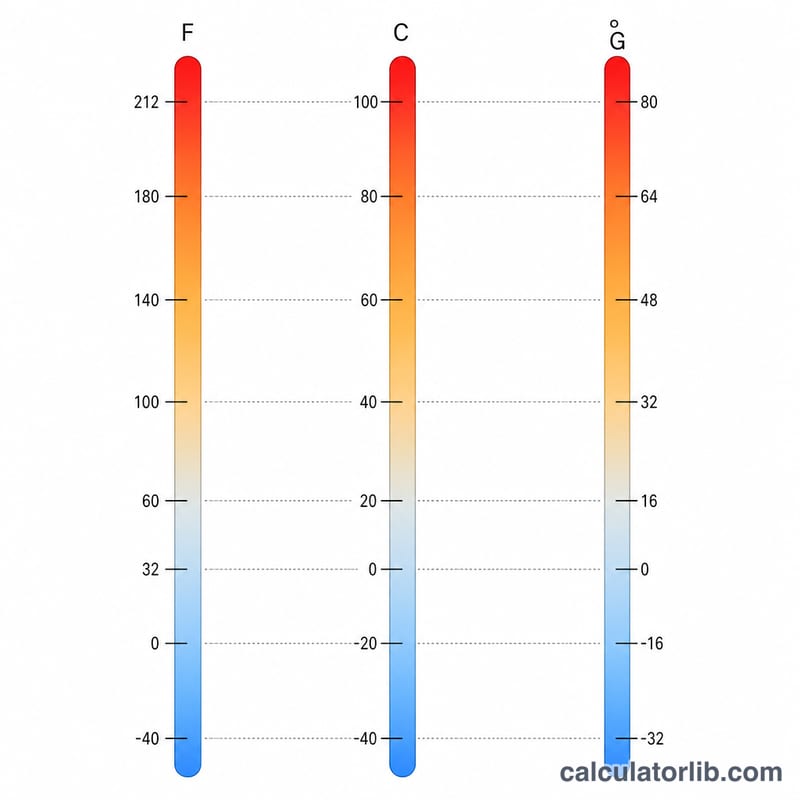
The Oven Temperature Conversion Calculator translates baking temperatures between the three scales cooks meet most often: Fahrenheit (°F, common in the US), Celsius (°C, used across most of the world) and the UK Gas Mark scale found on gas ovens. Enter a single value, pick its unit, and instantly see all three equivalents so a recipe written for one oven works perfectly on yours.
How to use it
Type the temperature your recipe specifies, choose whether that number is in Fahrenheit, Celsius or Gas Mark, and read the converted results. The hero box shows the Fahrenheit value while the table lists the Celsius and Gas Mark equivalents.
The formula explained
Fahrenheit and Celsius are linked by $$\degree C = (\degree F - 32)\times\tfrac{5}{9}$$ The Gas Mark scale is approximately linear above Gas Mark 1: each whole mark represents a 25°F step, with Gas Mark 0 lining up to about 250°F, giving $$\text{Gas Mark} = \dfrac{\degree F - 250}{25}$$ To go the other way, $$\degree F = \text{Gas Mark}\times 25 + 250$$ The calculator first converts your input to Fahrenheit, then derives the other two scales from it.
Worked example
A recipe calls for a 350°F oven. $$\degree C = (350 - 32)\times\tfrac{5}{9} = 318 \times 0.5556 \approx 176.7\degree C$$ $$\text{Gas Mark} = \dfrac{350 - 250}{25} = \dfrac{100}{25} = 4$$ So 350°F is about 177°C, or Gas Mark 4 — a classic moderate baking temperature.
FAQ
Is the Gas Mark scale exact? No — it is an approximation. The \((\degree F - 250)/25\) rule matches common oven charts well from Gas Mark 1 upward; very low settings vary by manufacturer.
Why does Celsius show decimals? The math rarely lands on whole numbers. For baking you can safely round to the nearest 5°C.
Can I convert from Celsius or Gas Mark too? Yes. Just select that unit as your input and the calculator handles the conversion in reverse.