
What Is Ascending Order?
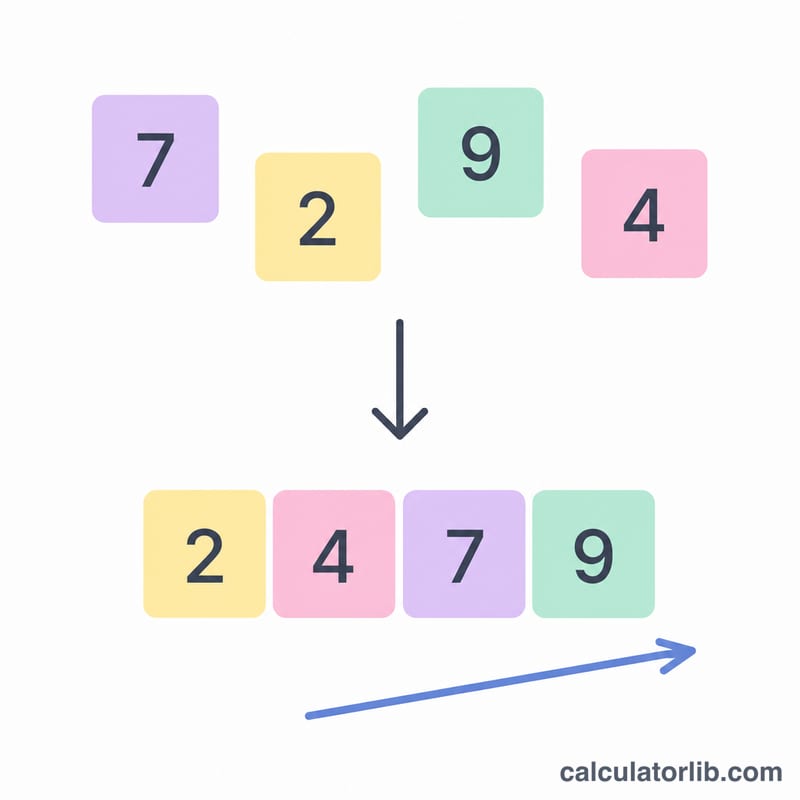
Ascending order means arranging numbers from the smallest value to the largest. A list of values is in ascending order when every term is less than or equal to the one that follows it, written formally as \(a_1 \le a_2 \le \cdots \le a_n\). This calculator takes any list you type and instantly re-orders it from low to high, while also reporting the count, minimum, maximum, and sum.
How to Use the Calculator
Type or paste your numbers into the input box. You can separate them with commas, spaces, or both — for example 5, 2, 9, 1, 7 or 5 2 9 1 7. Decimals and negative numbers are supported. Press calculate and the tool returns the sorted sequence plus a summary table.
The Formula Explained
Sorting in ascending order is the process of producing a permutation of the original list such that each element satisfies \(a_i \le a_{i+1}\). The smallest value becomes the first term and the largest becomes the last. The relationship is non-strict (\(\le\)), so duplicate values are kept and placed next to each other.
$$\text{Sorted} = \operatorname{sort}_{\uparrow}\left(\text{Numbers}\right) \;\Rightarrow\; a_1 \le a_2 \le \cdots \le a_n$$Worked Example
Suppose your numbers are 5, 2, 9, 1, 7. Comparing them, the smallest is 1 and the largest is 9. Re-ordering gives 1, 2, 5, 7, 9. The count is 5, the minimum is 1, the maximum is 9, and the sum is $$1 + 2 + 5 + 7 + 9 = 24.$$

How to Sort in Ascending Order by Hand
Ascending order means arranging numbers from the smallest value to the largest value, so that every number is less than or equal to the one after it: \(a_1 \le a_2 \le \cdots \le a_n\). The selection-sort procedure below mirrors exactly what the calculator does, and you can follow it with pencil and paper for any short list.
- Write out the full list. Copy every value down, keeping each one even if it repeats. For example: 6, 2, 6, 2, 9.
- Scan for the smallest value. Compare the numbers one at a time and remember the lowest you have seen so far. When comparing, treat negatives as smaller than positives (e.g. \(-3 < 0 < 4\)), and compare decimals by lining up the decimal point (e.g. \(2.05 < 2.5\) because the tenths digit 0 is less than 5).
- Place that smallest value first in your new, sorted list and cross it off the original list.
- Repeat with what remains. Scan the leftover numbers for the new smallest value, append it to the sorted list, and cross it off.
- Keep duplicates. If two values are equal, both belong in the result — write them next to each other (their order does not matter since they are tied under \(\le\)).
- Stop when the original list is empty. The numbers you copied across, in the order you copied them, are now in ascending order.
- Check your work. Read the sorted list left to right and confirm each value is \(\le\) the next. The first entry should equal the minimum and the last should equal the maximum; the count must match the original list.
Tip for mixed signs: a number with a larger magnitude but a negative sign is still smaller, so \(-10 < -2\). For decimals shorter than others, you may pad with trailing zeros (2.5 → 2.50) to compare digit by digit.
Key Terms
- Ascending order
- An arrangement of values from smallest to largest, where each value is less than or equal to the next: \(a_1 \le a_2 \le \cdots \le a_n\).
- Descending order
- The reverse arrangement — from largest to smallest, \(a_1 \ge a_2 \ge \cdots \ge a_n\).
- Non-strict inequality (\(\le\))
- The "less than or equal to" relation. It is used instead of strict "less than" (\(<\)) so that equal (duplicate) values are allowed to sit next to each other in sorted order.
- Permutation
- A rearrangement of the same set of values into a different order. A sorted list is one specific permutation of the original list — same numbers, reordered.
- Minimum
- The smallest value in the list. After ascending sorting it is always the first element, \(a_1\).
- Maximum
- The largest value in the list. After ascending sorting it is always the last element, \(a_n\).
- Count
- The number of values in the list, \(n\). Sorting does not change the count; the result has exactly as many entries as the input.
- Sum
- The total obtained by adding every value together, \(a_1 + a_2 + \cdots + a_n\). Like the count, it is unchanged by reordering.
- Duplicate values
- Two or more entries that are equal. They are all retained when sorting; equal values are considered tied and may appear in either relative order.
FAQ
What is the difference between ascending and descending order? Ascending goes smallest to largest; descending goes largest to smallest.
Can I sort negative numbers and decimals? Yes. Negatives come first (e.g. -3 before 0), and decimals are placed by their true numeric value.
Are duplicate values removed? No. Every value you enter is kept, so repeated numbers appear next to each other in the result.