What is the Milliseconds to HH:MM:SS Calculator?
This calculator converts a duration given in milliseconds into a familiar clock-style time format of hours, minutes and seconds (HH:MM:SS), plus any leftover milliseconds. Milliseconds are widely used in programming, logging, performance benchmarking and stopwatch/timer applications, where elapsed time is often stored as a single large integer. Turning that number into a human-readable time makes it far easier to interpret.
How to use it
Enter the total number of milliseconds you want to convert and the calculator instantly returns the equivalent time as HH:MM:SS along with a breakdown of hours, minutes, seconds and the remaining milliseconds. For example, a stopwatch reading of 3,661,500 ms becomes 01:01:01 with 500 ms remaining.
The formula explained
The conversion uses integer division and the modulo (remainder) operation. There are 3,600,000 ms in an hour, 60,000 ms in a minute and 1,000 ms in a second. Hours are the total divided by 3,600,000 (floored). The remainder after removing whole hours is divided by 60,000 to get minutes. The remaining part divided by 1,000 gives seconds, and the final remainder is the leftover milliseconds.
$$\begin{gathered} \text{HH:MM:SS} \\[1.5em] \text{where}\quad \left\{ \begin{aligned} \text{HH} &= \left\lfloor \frac{\text{Milliseconds}}{3600000} \right\rfloor \\ \text{MM} &= \left\lfloor \frac{\text{Milliseconds} \bmod 3600000}{60000} \right\rfloor \\ \text{SS} &= \left\lfloor \frac{\text{Milliseconds} \bmod 60000}{1000} \right\rfloor \end{aligned} \right. \end{gathered}$$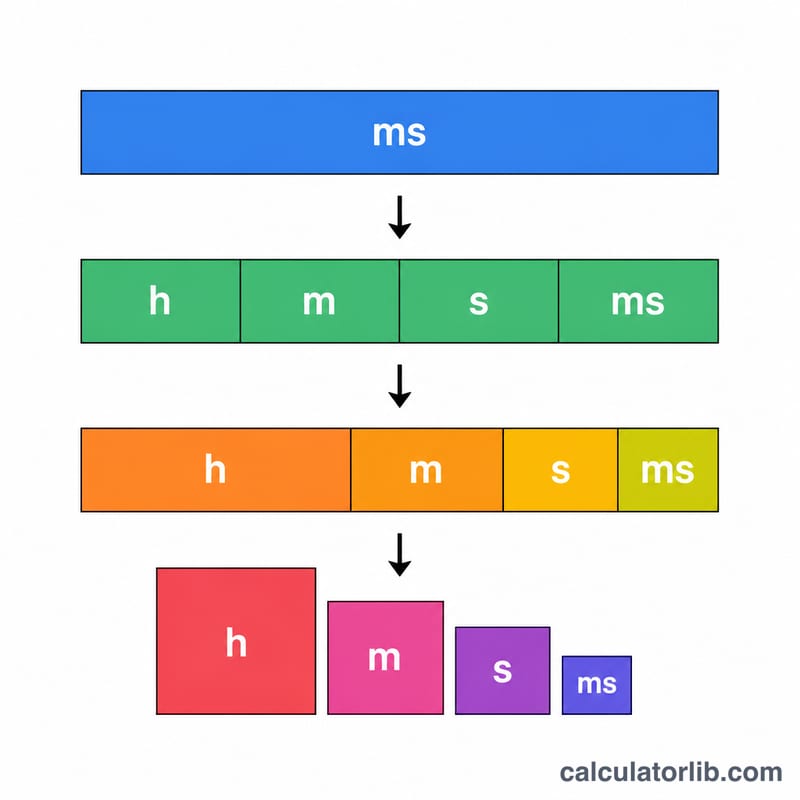
Worked example
Take 3,661,500 ms. Hours = \(\left\lfloor 3{,}661{,}500 / 3{,}600{,}000 \right\rfloor = 1\). Remainder = 61,500 ms. Minutes = \(\left\lfloor 61{,}500 / 60{,}000 \right\rfloor = 1\). Remainder = 1,500 ms. Seconds = \(\left\lfloor 1{,}500 / 1{,}000 \right\rfloor = 1\). Remaining ms = \(1{,}500 \bmod 1{,}000 = 500\). Result: 01:01:01 and 500 ms.
Common Millisecond to Time Conversions
One second is 1,000 ms, one minute is 60,000 ms and one hour is 3,600,000 ms. The table shows common values in HH:MM:SS format. Values below 1,000 ms are shown with a fractional-second part (HH:MM:SS.mmm), because they round down to 00:00:00 in whole seconds.
| Milliseconds | HH:MM:SS | Meaning |
|---|---|---|
| 1 ms | 00:00:00.001 | One thousandth of a second |
| 100 ms | 00:00:00.100 | 0.1 second |
| 500 ms | 00:00:00.500 | Half a second |
| 1,000 ms | 00:00:01 | 1 second |
| 60,000 ms | 00:01:00 | 1 minute |
| 300,000 ms | 00:05:00 | 5 minutes |
| 3,600,000 ms | 01:00:00 | 1 hour |
| 43,200,000 ms | 12:00:00 | 12 hours |
| 86,400,000 ms | 24:00:00 | 1 day |
| 604,800,000 ms | 168:00:00 | 7 days (168 hours) |
Hours are not wrapped at 24, so durations longer than a day appear as totals such as 168:00:00 rather than days plus hours.
Developer Use Case Examples
Millisecond values are common in logs, timeouts and media metadata. Each row shows the whole-second HH:MM:SS result and the leftover milliseconds (the remainder after dividing by 1,000) that do not fill a complete second.
| Scenario | Input (ms) | HH:MM:SS | Leftover ms |
|---|---|---|---|
| API latency | 250 | 00:00:00 | 250 ms |
| Request timeout | 30,000 | 00:00:30 | 0 ms |
| Session timeout | 1,800,000 | 00:30:00 | 0 ms |
| Video length | 5,400,000 | 01:30:00 | 0 ms |
| Batch job runtime | 90,000,000 | 25:00:00 | 0 ms |
Worked check for the job runtime: 90,000,000 ÷ 3,600,000 = 25 hours exactly, so the minutes and seconds are both 00 and the remainder is 0 ms. For the video: 5,400,000 ÷ 3,600,000 = 1 hour with 1,800,000 ms left, and 1,800,000 ÷ 60,000 = 30 minutes, giving 01:30:00.
FAQ
What if my value is over 24 hours? The hours field simply keeps counting up (e.g. 90,000,000 ms = 25:00:00); it is a duration, not a clock time, so it does not wrap at 24 hours.
Are decimal milliseconds supported? The calculator floors the input to whole milliseconds before converting, so sub-millisecond fractions are dropped.
How many milliseconds are in a minute? There are 60,000 milliseconds in one minute and 3,600,000 in one hour.