

What Is a Car Refinance Calculator?
A car refinance calculator estimates your new monthly auto-loan payment after refinancing at a different interest rate or term, then compares it to your current payment to show how much you could save. It works for any currency, though dollar labels are shown here.
How to Use It
Enter your current loan balance (the remaining principal you still owe), your current monthly payment, the new annual interest rate you've been offered, and the new loan term in months. The calculator returns your new monthly payment, the monthly savings, and the total savings over the life of the new loan.
The Formula
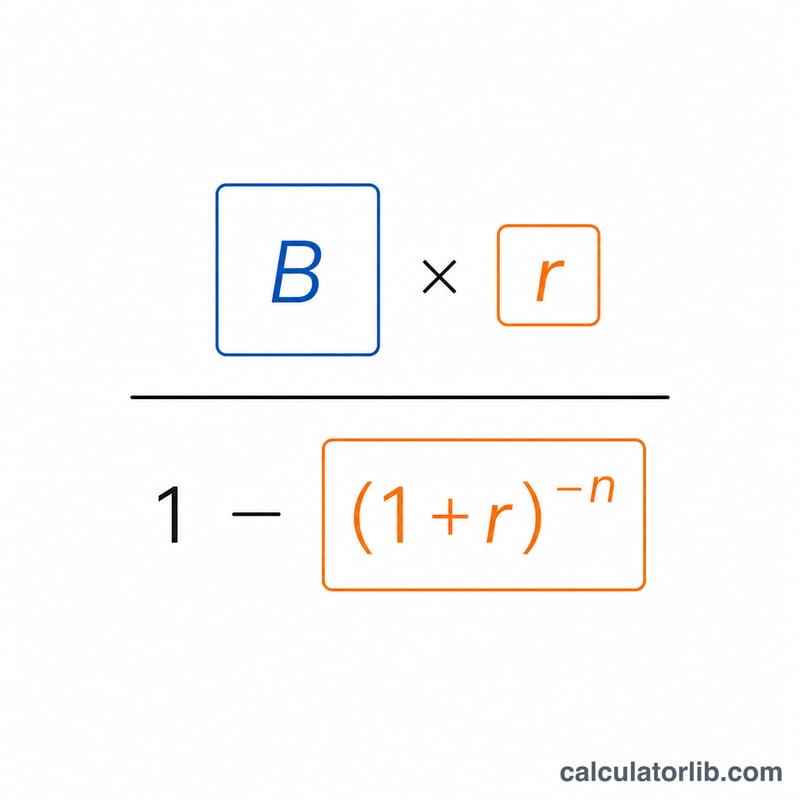
The new payment uses the standard amortization formula:
$$M = B \cdot \frac{r}{1-(1+r)^{-n}}$$
where \(r\) is the monthly interest rate (annual rate \(\div 12 \div 100\)) and \(n\) is the number of months. Monthly savings is simply your old payment minus the new payment, and total savings is that figure multiplied by the term.
Worked Example
Suppose you owe $20,000, currently pay $450/month, and refinance at 5% over 48 months. The monthly rate \(r = 0.05 \div 12 = 0.0041667\). The new payment is \(20000 \times 0.0041667 \div (1 - 1.0041667^{-48}) \approx \$460.59\). Monthly savings \(= 450 - 460.59 = -\$10.59\) (the payment actually rose), and total over 48 months \(\approx -\$508.12\) — meaning this refinance costs more, not less.
FAQ
Why might savings be negative? A lower rate doesn't always mean lower cost — a longer or different term can raise the payment or total interest. Negative savings means the new loan costs more.
Does this include fees? No. Refinancing may carry origination or title fees; subtract those separately to find true net savings.
What balance should I enter? Use your current payoff/principal balance, not the original loan amount.