
What the Percentage Increase Calculator Does
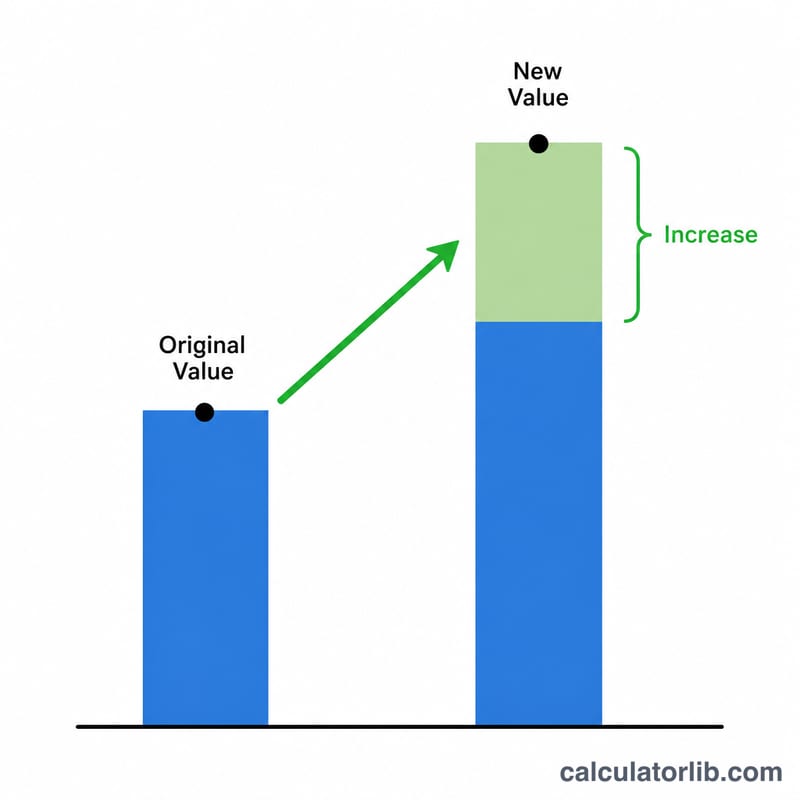
This calculator measures how much a number has grown from a starting point to a new figure, expressed as a percentage. Enter your Original Value (where you started) and your New Value (where you ended up), and the tool instantly returns the percentage increase, the raw difference between the two numbers, and a multiplier showing how many times larger the new value is compared to the original.
It works for any pair of numbers — prices, salaries, website traffic, weight, populations, exam scores and more. If the new value is smaller than the original, the result will be negative, indicating a decrease rather than an increase.
How to Use It
- Original Value — type the figure you are starting from (the "before" number).
- New Value — type the figure you are comparing to (the "after" number).
The calculator then displays the percentage increase, the difference (New − Original), and the multiplier (New ÷ Original).
The Formula Explained
The core formula is:
$$\text{Percentage Increase} = \frac{\text{New Value} - \text{Original Value}}{\left|\text{Original Value}\right|} \times 100$$First it subtracts the original from the new value to get the difference. It then divides that difference by the absolute value of the original (so a negative starting number doesn't flip the sign unexpectedly) and multiplies by 100 to turn it into a percentage. It also calculates a multiplier as \(\text{New} \div \text{Original}\).
Worked Example
Suppose a product's price rose from an Original Value of 80 to a New Value of 100:
- Difference = \(100 - 80 = \mathbf{20}\)
- Percentage Increase = \(\left(20 \div 80\right) \times 100 = \mathbf{25\%}\)
- Multiplier = \(100 \div 80 = \mathbf{1.25\times}\)
So the price increased by 25%, meaning the new price is 1.25 times the old one.
How to Calculate Percentage Increase by Hand
Percentage increase measures how much a value has grown relative to its starting point, expressed as a percent. You can compute it in four short steps:
- Find the difference. Subtract the original value from the new value: \(\text{Difference} = \text{New} - \text{Original}\). This tells you how many units the quantity changed.
- Divide by the absolute value of the original. Take \(\dfrac{\text{Difference}}{\left|\text{Original}\right|}\). Using the absolute value of the original keeps the formula valid even when the starting number is negative.
- Multiply by 100. Convert the decimal ratio into a percentage by multiplying by 100.
- Interpret the sign. A positive result means the value increased; a negative result means it actually decreased (in which case the magnitude is the percentage decrease).
Putting it together gives the formula:
$$\text{Increase \%} = \frac{\text{New} - \text{Original}}{\left|\text{Original}\right|} \times 100$$Worked run-through: Suppose a price rises from an original value of 80 to a new value of 100.
- Difference: \(100 - 80 = 20\).
- Divide: \(\dfrac{20}{\left|80\right|} = 0.25\).
- Multiply: \(0.25 \times 100 = 25\).
- Interpret: the result is positive, so this is a 25% increase.
So going from 80 to 100 is a 25% increase.
Frequently Asked Questions
What if the new value is lower than the original? The result will be a negative percentage, which represents a percentage decrease. For example, going from 100 to 80 gives −20%.
What does the multiplier mean? The multiplier shows the ratio between the two numbers. A multiplier of 2 means the new value is double the original; 1.5 means it is 50% larger.
Is percentage increase the same as percentage difference? No. Percentage increase always divides by the original value, so the order of the numbers matters. Swapping them produces a different result.
Related percentage calculators
- Percent Change Calculator — increase or decrease from an old value to a new one.
- Percentage Decrease Calculator — how much a value went down, in percent.
- Percentage Difference Calculator — compare two numbers with no before/after.
- Percent Error Calculator — measured value vs. a known true value.