
What the Reverse BMI for Height Calculator Does
Most BMI tools ask for your height and weight, then return a number. This calculator flips the process around. You provide your weight in kilograms and a target BMI, and it tells you the height that would produce that exact BMI at your current weight. It's a handy way to visualise where your weight sits relative to standard health categories, or to understand the height-weight combinations behind a goal BMI.
The Inputs You Provide
- Weight (kg) — your body weight in kilograms.
- Target BMI — the Body Mass Index value you want to map a height to (for example 22, which sits in the healthy range).
The result shows the corresponding height in centimetres, the same height converted to feet and inches, and the BMI category your chosen target falls into.
The Formula Explained
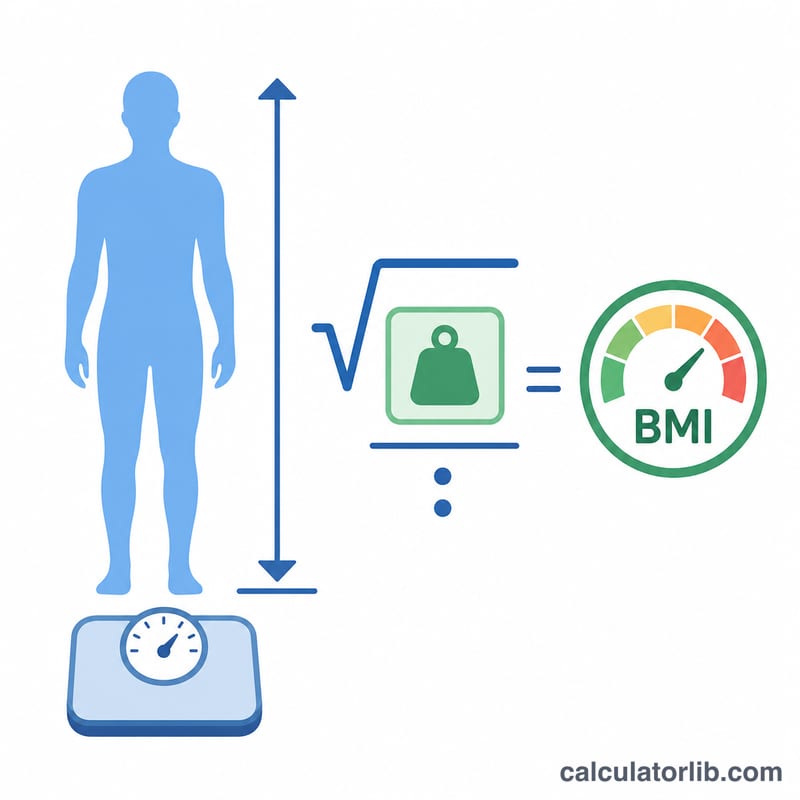
Standard BMI is weight (kg) divided by height (m) squared. Rearranging that equation to solve for height gives the formula this tool uses:
$$\text{Height (cm)} = 100 \times \sqrt{\frac{\text{Weight}}{\text{BMI}}}$$
The square root of weight-over-BMI gives height in metres, and multiplying by 100 converts it to centimetres. The tool then divides by 30.48 to get total feet, and takes the fractional part times 12 for the remaining inches.
Worked Example
Suppose you weigh 70 kg and want a target BMI of 22 (Normal weight):
- \(70 \div 22 = 3.1818\)
- \(\sqrt{3.1818} = 1.7838\) metres
- \(\times 100 =\) 178.4 cm, which is about 5 ft 10 in
This means a person weighing 70 kg would have a BMI of 22 if they were roughly 178 cm tall. Enter a different BMI to see how the matching height shifts.
BMI Categories
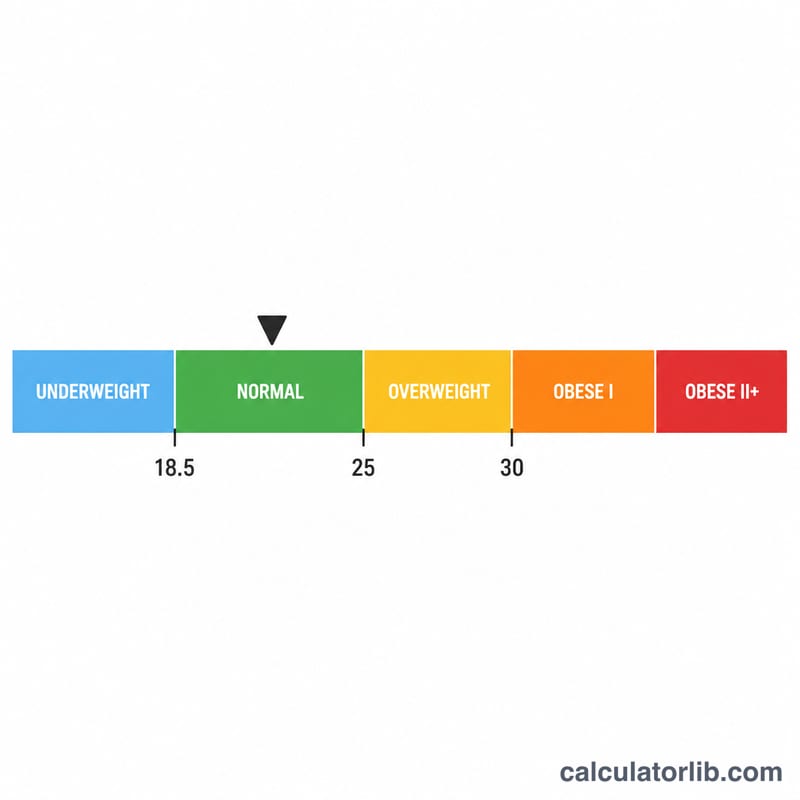
- Under 18.5 — Underweight
- 18.5 to 24.9 — Normal weight
- 25 to 29.9 — Overweight
- 30 and above — Obese
Frequently Asked Questions
How do you find height from BMI and weight?
Because BMI equals weight in kilograms divided by height in metres squared, you rearrange the formula to solve for height. Take your weight divided by the target BMI, then take the square root of the result. That gives height in metres, which the calculator converts to centimetres and feet and inches.
What is the formula used by the reverse BMI calculator?
The standard BMI formula is BMI = weight (kg) / height (m)squared. To reverse it for height, the calculator uses height (m) = the square root of (weight in kg / target BMI). Enter your weight and a desired BMI value, and it returns the matching height instantly.
Is this a substitute for measuring my actual height?
No. Your real height is fixed and cannot be changed. This tool shows the hypothetical height that would yield a chosen BMI at your current weight. It is mainly educational, useful for understanding BMI and for setting realistic weight or fitness goals, not for replacing a physical measurement.
What units does the calculator use?
Enter your weight in kilograms and the calculator returns height in centimetres, with a feet-and-inches conversion shown alongside. BMI itself is unitless, so the target BMI value has no units. If you only have pounds, convert to kilograms first by dividing by 2.205.
Does BMI work accurately for everyone?
Not always. BMI doesn't account for muscle mass, bone density, fat distribution, age, sex or ethnicity, so very athletic, pregnant or older individuals may get misleading results. A muscular person can register as overweight despite low body fat. Treat the figure as a rough screening guide, not a medical diagnosis.
What are the standard BMI categories?
For adults, a BMI under 18.5 is underweight, 18.5 to 24.9 is the healthy or normal range, 25 to 29.9 is overweight, and 30 or above is classed as obese. When you pick a target BMI in the calculator, choosing a value between 18.5 and 24.9 reflects the healthy range.
Related calculators
- Reverse BMI Calculator — weight from a target BMI.
- BMI Calculator — body mass index from height & weight.
- Healthy Weight Calculator — healthy weight range.
- Ideal Body Weight Calculator — ideal body weight.