What is a print bleed calculator?
A print bleed calculator works out how big your artwork file must be so that colour and images run all the way to the edge of the finished piece. Commercial printing cuts many sheets at once, and the blade can drift by a fraction of a millimetre. To avoid thin white slivers along the trimmed edge, designers extend the background past the final cut line. That extra strip is called the bleed, and this tool adds it to your trim size automatically.
How to use it
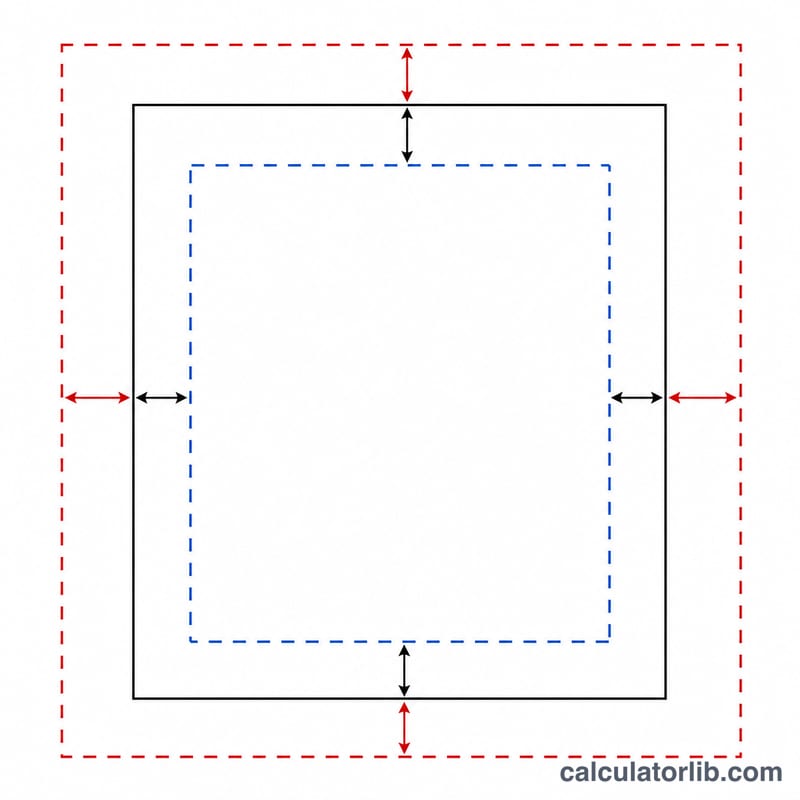
Enter the finished trim width and height of your product, the bleed you want on each side (3 mm is the common default; 0.125 in ≈ 3.175 mm in the US), and the safety margin that keeps important content away from the cut. The calculator returns the full artboard size to build your document at, plus the safe zone where text and logos should stay.
The formula explained
Because bleed is added to every edge, each dimension gains twice the bleed value \(B\):
$$\text{W}_{bleed} = \text{W}_{trim} + 2B, \qquad \text{H}_{bleed} = \text{H}_{trim} + 2B$$The safe zone shrinks inward by twice the margin \(M\), where \(\text{W}_{trim}\) and \(\text{H}_{trim}\) are the trim dimensions:
$$\text{W}_{safe} = \text{W}_{trim} - 2M, \qquad \text{H}_{safe} = \text{H}_{trim} - 2M$$Worked example
For an A4 flyer (210 \(\times\) 297 mm) with 3 mm bleed and a 5 mm safety margin:
$$\text{W}_{bleed} = 210 + 2\times 3 = 216\,\text{mm}$$$$\text{H}_{bleed} = 297 + 2\times 3 = 303\,\text{mm}$$$$\text{W}_{safe} = 210 - 2\times 5 = 200\,\text{mm}$$So you build the file at 216 \(\times\) 303 mm and keep key content inside a 200 \(\times\) 287 mm safe area.
Standard Trim Sizes & Bleed Values
The table below lists trim sizes for widely used print products, with the bleed most commonly applied on each side and a typical safety (safe zone) margin. The A-series sizes (A4, A5, A6, DL) are defined by the international standard ISO 216; US Letter and the 3.5 × 2 in business card are North American conventions, while the 85 × 55 mm business card is common in Europe. A bleed of 3 mm and the imperial 0.125 in (\(\approx 3.175\text{ mm}\)) are the usual defaults, but they are conventions, not universal rules. Always confirm the exact bleed and safe margin with your specific print provider before building the file.
| Product | Trim size | Bleed per side | Safe margin |
|---|---|---|---|
| A4 (ISO 216) | 210 × 297 mm | 3 mm | 3–5 mm |
| A5 (ISO 216) | 148 × 210 mm | 3 mm | 3–5 mm |
| A6 (ISO 216) | 105 × 148 mm | 3 mm | 3–5 mm |
| DL (ISO 216, ⅓ A4) | 99 × 210 mm | 3 mm | 3–5 mm |
| US Letter (North America) | 8.5 × 11 in (215.9 × 279.4 mm) | 0.125 in (3.175 mm) | 0.125–0.25 in |
| US business card (North America) | 3.5 × 2 in (88.9 × 50.8 mm) | 0.125 in (3.175 mm) | 0.125 in (≈3 mm) |
| EU business card | 85 × 55 mm | 3 mm | 3–5 mm |
To turn any trim size into the full document size, add the bleed to both edges of each dimension: for A4 with 3 mm bleed the document becomes \((210 + 2 \times 3) \times (297 + 2 \times 3) = 216 \times 303\text{ mm}\). The safe zone shrinks by the margin on both edges instead, e.g. with a 5 mm safe margin: \((210 - 2 \times 5) \times (297 - 2 \times 5) = 200 \times 287\text{ mm}\).
Millimetres, Inches & Points Conversion
Print bleed setup mixes three units: millimetres (metric artwork and ISO paper sizes), inches (North American sizes) and PostScript points (used inside PDF and page-layout software). They are linked by exact base factors:
$$1\text{ in} = 25.4\text{ mm} = 72\text{ pt} \qquad 1\text{ mm} = \frac{72}{25.4}\text{ pt} \approx 2.835\text{ pt}$$
The point here is the modern PostScript / DTP point, defined as exactly \(\tfrac{1}{72}\) inch (the standard used by PDF, InDesign, Illustrator and similar tools). The table converts the values you meet most often when setting bleed and safe margins; inch and point figures are rounded, so treat them as approximate.
| Value | Millimetres (mm) | Inches (in) | Points (pt) |
|---|---|---|---|
| Common metric bleed | 3 mm | ≈ 0.118 in | ≈ 8.5 pt |
| Common imperial bleed | 3.175 mm | 0.125 in | 9 pt |
| Larger safe margin | 5 mm | ≈ 0.197 in | ≈ 14.17 pt |
| Base: one inch | 25.4 mm | 1 in | 72 pt |
| Base: one millimetre | 1 mm | ≈ 0.0394 in | ≈ 2.835 pt |
Worked conversions, shown with full substitution:
- 3 mm to inches: \(3 \div 25.4 = 0.1181\ldots \approx 0.118\text{ in}\)
- 3 mm to points: \(3 \times 2.835 = 8.50\text{ pt}\)
- 0.125 in to millimetres: \(0.125 \times 25.4 = 3.175\text{ mm}\)
- 0.125 in to points: \(0.125 \times 72 = 9\text{ pt}\)
- 5 mm to inches: \(5 \div 25.4 = 0.1968\ldots \approx 0.197\text{ in}\)
FAQ
How much bleed do I need? Most printers ask for 3 mm (or 0.125 in) per side, but always confirm with your print provider.
What is the difference between bleed and safe margin? Bleed extends artwork beyond the cut; the safe margin keeps important elements a safe distance inside the cut so nothing gets clipped.
Do I export the file at trim or bleed size? Export at the full bleed size shown above, with crop marks if your printer requests them.