
What the Cosecant Calculator Does
This calculator finds the cosecant (csc) of an angle that you enter in degrees. Cosecant is one of the six core trigonometric functions and is simply the reciprocal of the sine of an angle. Instead of looking up tables or chaining several keystrokes on a scientific calculator, you type a single angle and the tool returns the csc value instantly. It is handy for trigonometry homework, physics problems, surveying, and any task where reciprocal trig functions come up.
The Input You Provide
- Angle (in degrees): the only field. Enter any angle, such as 30, 45, 90, or a decimal like 22.5. Negative values are accepted too.
The Formula
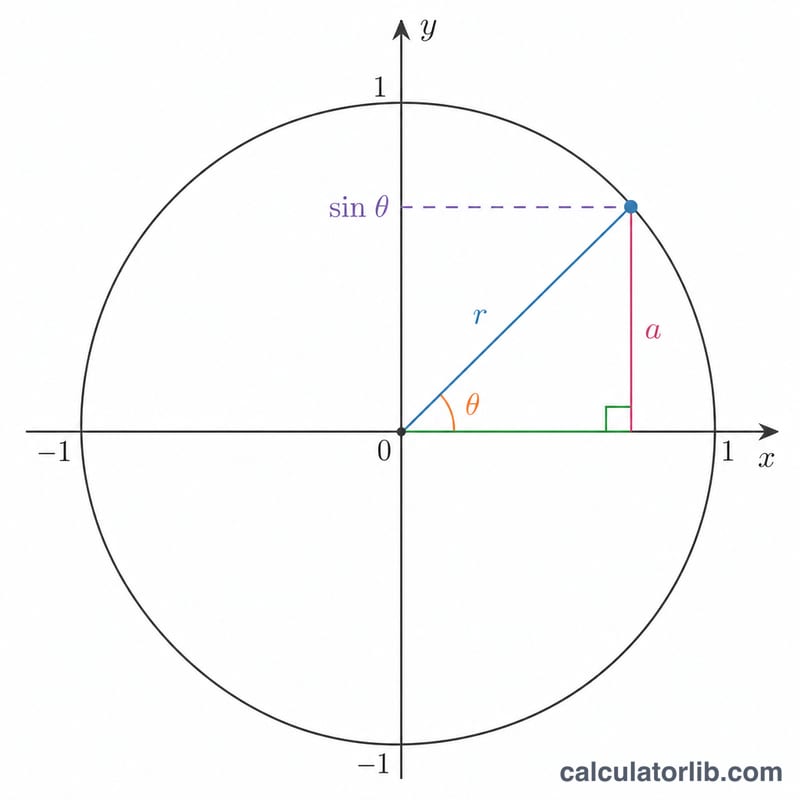
The cosecant is defined as:
$$\csc(x) = \frac{1}{\sin(x)}$$Because most math libraries work in radians, the calculator first converts your degree value to radians using \(\text{radians} = \text{degrees} \times \frac{\pi}{180}\). It then computes the sine of that radian value and takes its reciprocal. In effect the tool runs 1 / Math.sin(Math.toRadians(angle)), which mirrors the formula exactly.
Worked Example
Suppose you enter an angle of 30 degrees:
- Convert to radians: \(30 \times \frac{\pi}{180} \approx 0.5236\) radians.
- Take the sine: \(\sin(0.5236) = 0.5\).
- Take the reciprocal: \(\frac{1}{0.5} = \mathbf{2}\).
So \(\csc(30^{\circ}) = 2\). Likewise, \(\csc(90^{\circ}) = \frac{1}{\sin(90^{\circ})} = \frac{1}{1} = 1\), and \(\csc(45^{\circ}) = \frac{1}{0.7071} \approx 1.4142\).
Frequently Asked Questions
Why do I get an error or a huge number at 0° or 180°? The sine of 0° and 180° is exactly 0, and dividing by zero is undefined. Cosecant has vertical asymptotes at these angles, so the result is infinite (undefined). Choose an angle where the sine is not zero.
Can I enter angles greater than 360° or negative angles? Yes. Trigonometric functions are periodic, so 390° behaves like 30°, and negative angles are handled correctly because cosecant is an odd function: \(\csc(-30^{\circ}) = -2\).
Do I need to enter radians instead of degrees? No. This calculator expects degrees and converts them to radians internally, so just type the degree value as you would read it from a problem.