
What the Pixel Density Calculator Does
This calculator works out the pixel density of any display in PPI (pixels per inch) — the universal measure of how sharp a screen looks. PPI is independent of country or measurement standard, but it relies on a diagonal screen size given in inches, which is how monitors, phones and TVs are typically marketed worldwide. Alongside PPI, the tool also reports the screen's total pixel count and its simplified aspect ratio.
The Three Inputs
- Screen Size (inches): the diagonal measurement of the display, between 0 and 1000.
- Horizontal Resolution (pixels): the number of pixels across the width (e.g. 1920), up to 100,000.
- Vertical Resolution (pixels): the number of pixels down the height (e.g. 1080), up to 100,000.
If any value falls outside these ranges, the calculator returns an error instead of a result.
The Formula Explained
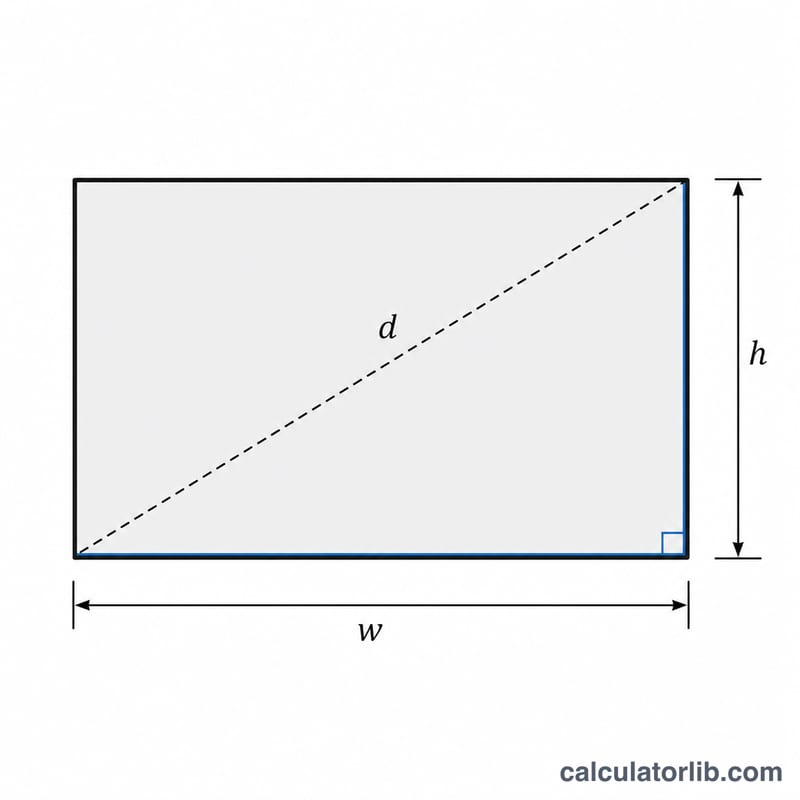
PPI is found by dividing the diagonal resolution by the diagonal screen size. The diagonal resolution is calculated with the Pythagorean theorem:
$$\text{PPI} = \frac{\sqrt{\text{H Res}^{2} + \text{V Res}^{2}}}{\text{Screen Size (in)}}$$- Diagonal resolution = \(\sqrt{\text{horizontal}^{2} + \text{vertical}^{2}}\)
- PPI = diagonal resolution \(\div\) screen size (inches)
- Total pixels = horizontal \(\times\) vertical
- Aspect ratio = both resolutions divided by their greatest common divisor (GCD)
Worked Example
Take a 24-inch monitor running at 1920 × 1080:
- Diagonal resolution $$= \sqrt{1920^{2} + 1080^{2}} = \sqrt{3{,}686{,}400 + 1{,}166{,}400} = \sqrt{4{,}852{,}800} \approx 2202.9 \text{ pixels}$$
- PPI $$= 2202.9 \div 24 \approx \textbf{91.8 PPI}$$
- Total pixels $$= 1920 \times 1080 = 2{,}073{,}600$$
- GCD of 1920 and 1080 = 120, so the aspect ratio simplifies to 16:9
That 92 PPI is typical of a desktop monitor; a modern smartphone often exceeds 400 PPI for the same reason — more pixels packed into far fewer inches.
Frequently Asked Questions
What is a good PPI? For phones held close to the eye, 300+ PPI looks crisp. Desktop monitors viewed further away look sharp around 90–110 PPI, while 4K displays reach 140–160 PPI.
Why use the diagonal instead of width? Screen size is always quoted as a diagonal, so the diagonal resolution must be used to keep the units consistent.
Does higher resolution always mean higher PPI? No. PPI also depends on screen size. A large 4K TV can have lower PPI than a small Full HD phone because its pixels are spread over more inches.