
What the Matrix Transpose Calculator does
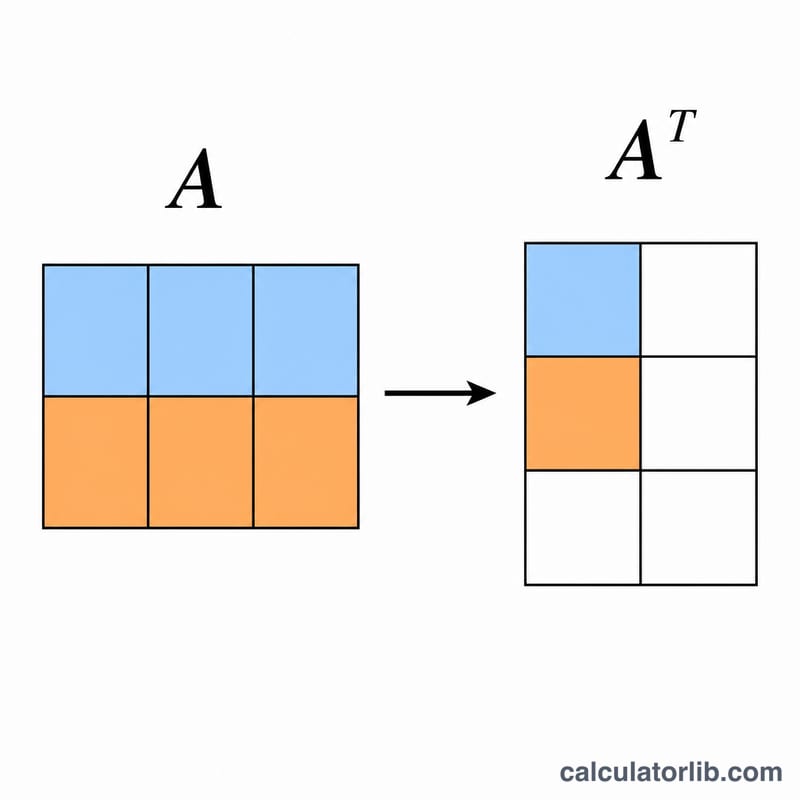
This tool computes the transpose (written \(A^{\mathsf{T}}\)) of any matrix you enter. Transposing a matrix flips it over its main diagonal: every row becomes a column and every column becomes a row. The calculator parses your input, builds the original matrix, and returns \(A^{\mathsf{T}}\) along with the dimensions of both matrices so you can quickly check your work.
How to enter your matrix
There is a single input field: Enter Matrix. The format is simple:
- Separate the values in a row with commas.
- Use a vertical bar
|to start a new row. - Values may be integers or decimals (they are read with exact decimal precision).
For example, 1, 2, 3 | 4, 5, 6 describes a 2\(\times\)3 matrix with rows [1, 2, 3] and [4, 5, 6]. Extra spaces around numbers are trimmed automatically, so neat formatting is fine.
The formula explained
The transpose is defined element by element as:
$$\left(A^{\mathsf{T}}\right)_{ij} = A_{ji}$$
In plain words, the entry in row i, column j of the transposed matrix equals the entry in row j, column i of the original. If the original \(A\) is an \(m\times n\) matrix (\(m\) rows, \(n\) columns), then \(A^{\mathsf{T}}\) is \(n\times m\). The calculator confirms this by reporting the original rows/columns and the transposed rows/columns.
Worked example
Enter: 1, 2, 3 | 4, 5, 6
This is a 2\(\times\)3 matrix:
- Row 1: 1, 2, 3
- Row 2: 4, 5, 6
Applying \(\left(A^{\mathsf{T}}\right)_{ij} = A_{ji}\), each original row becomes a column. The result is a 3\(\times\)2 matrix:
- Row 1: 1, 4
- Row 2: 2, 5
- Row 3: 3, 6
Notice the dimensions swapped from 2\(\times\)3 to 3\(\times\)2, exactly as the formula predicts.
Frequently asked questions
Do all rows need the same number of values? Yes. The calculator uses the length of the first row to determine the column count, so each row should contain the same number of comma-separated values to get a correct, rectangular result.
Can I transpose a single row or column (a vector)? Absolutely. Entering 1, 2, 3 (one row) gives a 3\(\times\)1 column, and entering 1 | 2 | 3 gives a 1\(\times\)3 row. Transposing converts between row and column vectors.
What happens if I transpose \(A^{\mathsf{T}}\) again? You get back the original matrix, because \(\left(A^{\mathsf{T}}\right)^{\mathsf{T}} = A\). This is a quick way to verify your input was read correctly.